








Download Serato Hex FX for macOS
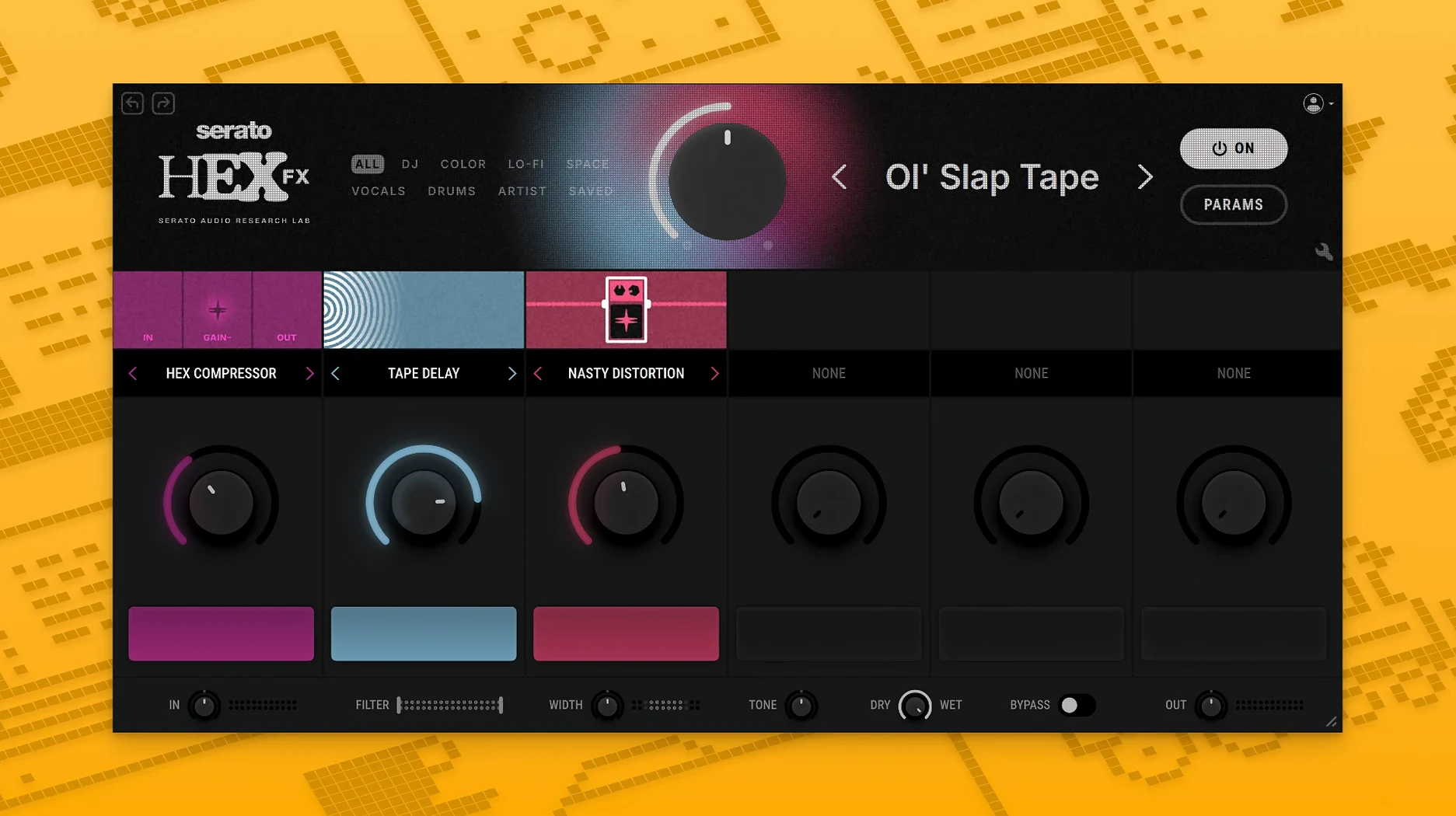
Beatmakers in Serato Studio and producers who hop between Ableton Live, Logic, and FL Studio have been reaching for Hex FX to add movement without stacking a dozen separate plugins. The 1.2.0 update now pulls Pro Tools users into the same workflow.
| Detail | Info |
|---|---|
| Developer | Serato |
| Format | VST, AU, AAX Native |
| macOS | 10.15 or later |
| Architecture | Apple Silicon / Intel |
| Content | 50 chainable FX, 200+ presets |
The real draw is how the effects chain. Hex FX treats processing as one big modular strip, so a distortion can feed a filter that feeds a reverb without ever leaving the window. The included EQ section covers low-shelf, mid-bell, and high-shelf bands, which keeps tonal shaping inside the plugin rather than sending you back to your channel strip. Presets from Guy Lawrence, DECAP, Jake One, and Lord Finesse give the factory library a hands-on feel that leans more toward finished color than blank starting points.
Your first couple of sessions with Hex FX can feel like standing in front of a packed pedalboard with no setlist. A few habits early on make the difference between aimless knob-twisting and actually finishing ideas.
Start by loading one of the artist presets and immediately pulling back the wet/dry mix to about 30%. This lets you hear what the chain is actually doing before committing. The DECAP presets, in particular, run hot — they're designed to smack, and on a dense mix they can overwhelm the transients you spent an hour dialing in. Backing off the mix reveals the character without bulldozing the arrangement.
Next, reorder the effect chain on purpose, not just to experiment. A common trap is putting reverb before distortion, which sounds cool for about eight bars and then turns into mud in a full arrangement. Hex FX lets you drag modules into any order, so try distortion → filter → modulation → time-based as a starting chain. The EQ bands sit at the end by default; leave them there for surgical cleanup after the creative processing.
Save your own presets religiously. The factory library is strong, but your tweaked version of a Guy Lawrence chain with the mid-bell EQ cutting 2 dB at 400 Hz is yours, and you'll want it back next week without rebuilding it from memory. Name presets after what they do to the sound — "snare widen crunch" is more useful than "cool effect 3."
If the plugin ever crashes on first launch, the fix is quick. Open Terminal and paste the two commands the installer notes mention, one after the other. That clears a code-signing hiccup that occasionally trips up the AU validation in Logic. After a reboot, Hex FX shows up reliably in every host.
How Hex FX sits among similar multi-effects
Multi-FX plugins for Mac fall roughly into two camps: the all-in-one channel strips that prioritize mixing utility, and the creative processors built for sound design. Hex FX leans hard into the second lane. Compared to something like Soundtoys Effect Rack, Hex FX offers fewer individual effect modules — Soundtoys packs deeper analog-modeled saturation and a wider modulation section — but Hex FX counters with faster chain reordering and a preset library that feels curated for contemporary beat-driven genres rather than vintage studio homage.
Against iZotope's Trash (the resurrected version), Hex FX is less aggressive in its distortion algorithms. Trash excels at multiband mangling and convolution-based destruction; Hex FX keeps things more musical and mix-ready out of the box. Where Trash rewards deep parameter diving, Hex FX rewards speed — you land on a usable sound in half the clicks. The tradeoff is that Trash goes further into outright sound destruction if that's what you need.
Kilohearts Snap Heap occupies the same modular territory, letting you stack and reorder effects freely. Snap Heap's ecosystem is expandable through individual effect purchases, so it can grow far beyond 50 modules. Hex FX counters with a tighter, opinionated set of processors that all speak the same sonic language. No expansion packs, no modular storefront — what's in the box is the instrument. For producers who want boundaries that guide decisions rather than endless options, Hex FX feels more like an instrument and less like a construction kit.
What 1.2.0 quietly improved
The headline of version 1.2.0 is AAX Native support, and for Pro Tools users that's genuinely a door-opener. Before this update, using Hex FX inside a Pro Tools session meant routing through a wrapper or bouncing stems out to another host. Now the installer includes a dedicated AAX option, and the plugin appears directly in the AudioSuite and insert menus. In everyday use, this means a Pro Tools user can pull up a Jake One preset on a drum bus without leaving the mixing window, which keeps momentum during recall-heavy sessions.
The bug fixes in 1.2.0 are less flashy but address a real annoyance: the plugin previously lost its wet/dry setting when you duplicated a track in Logic. That's now resolved, along with a graphics glitch on certain Intel Macs running macOS Monterey where the EQ curve display would freeze during playback. Neither fix changes what the plugin sounds like, but both remove friction that added up over long sessions. The macOS 26 Tahoe support also future-proofs the plugin for anyone already running beta builds on a test machine.
A specific task: thickening a thin drum loop
Here's a concrete workflow for turning a flat, sample-pack drum loop into something with weight and movement, start to finish inside Hex FX.
Drop the loop onto an audio track in your DAW and insert Hex FX as the first plugin on the channel. Open the factory preset called Drum Bus Crunch — it loads a chain of light saturation, a mid-bell EQ boost around 2 kHz, and a short room reverb. The loop immediately sounds fuller, but it's still a bit polite. Dial the saturation drive up from 20% to about 45% until the snare starts to bite. Pull the reverb's decay down to 0.6 seconds so it doesn't blur the kick pattern.
Now reorder the chain. Drag the EQ module before the saturation. The 2 kHz boost now pushes the snare's attack into the saturator harder, adding a crack that wasn't there before. Back the mid-bell gain off to +2 dB so it doesn't get harsh. Insert the Halftime Performance FX at the very end of the chain and leave it bypassed for now — this is your drop moment later in the arrangement. Save the whole thing as "drum bus punch + halftime trigger."
In your project, automate Halftime's bypass across the last two bars of a buildup. When it kicks in, the loop drops to half-speed with all the processing intact, and the transition into the next section hits harder than a filter sweep alone ever would. That's the kind of chainable thinking Hex FX encourages — build once, tweak per track, trigger with intent.
Producers hunting for a serato hex fx crack or a serato hex torrent will find the 1.2.0 build runs beautifully on Apple Silicon Macs once they get it set up. A serato hex fx free download search can absolutely lead you to this version with working AAX support if you know where to look. The 010 hex editor download crowd might not realize Hex FX's preset files are readable XML, but that's a tangent for another afternoon.
Version 1.2.0 focuses on Pro Tools compatibility:
- AAX Native support added, bringing Hex FX to Pro Tools sessions.
- The installer now includes an AAX format option.
- Bug fixes throughout the plugin.
- macOS 10.15 or later
- Apple Silicon or Intel Mac
- Host with VST, AU, or AAX Native support
Questions people ask
Which hosts officially support Serato Hex FX?
Serato Studio, Ableton Live, FL Studio, Logic Pro, and Maschine are officially supported, with AAX Native support covering Pro Tools.
Does Hex FX work on Apple Silicon Macs?
Yes, it runs natively on both Apple Silicon and Intel Macs with macOS 10.15 or later.
How many effects and presets are included?
Hex FX includes 50 chainable FX and over 200 presets from artists like DECAP, Guy Lawrence, and Amber Navran.
Also on readers' docks
Sign in or create an account to leave a comment.
No comments yet. Tell me how it got on with your other devices.
More in VST Plugins
See all Serato Sample
2.2.0 VST Plugins
612 MB
Serato Sample
2.2.0 VST Plugins
612 MB
 Updated Serum
2.1.5 VST Plugins
1.2 GB
Updated Serum
2.1.5 VST Plugins
1.2 GB
 Scaler 3
3.3.2 VST Plugins
1.4 GB
Scaler 3
3.3.2 VST Plugins
1.4 GB
 Sauceware Audio Scorch 2
1.0.4 VST Plugins
2 GB
Sauceware Audio Scorch 2
1.0.4 VST Plugins
2 GB
 ShaperBox
3.6.1 VST Plugins
111 MB
ShaperBox
3.6.1 VST Plugins
111 MB
 Safari Pedals Everything Bundle
2026.05 VST Plugins
628 MB
Safari Pedals Everything Bundle
2026.05 VST Plugins
628 MB
 Roland ZENOLOGY Pro
2.0.7 VST Plugins
1.8 GB
Roland ZENOLOGY Pro
2.0.7 VST Plugins
1.8 GB
 Roland Cloud Legendary Series
2025.06.29 VST Plugins
1.3 GB
Roland Cloud Legendary Series
2025.06.29 VST Plugins
1.3 GB