









Download Scaler 3 for macOS
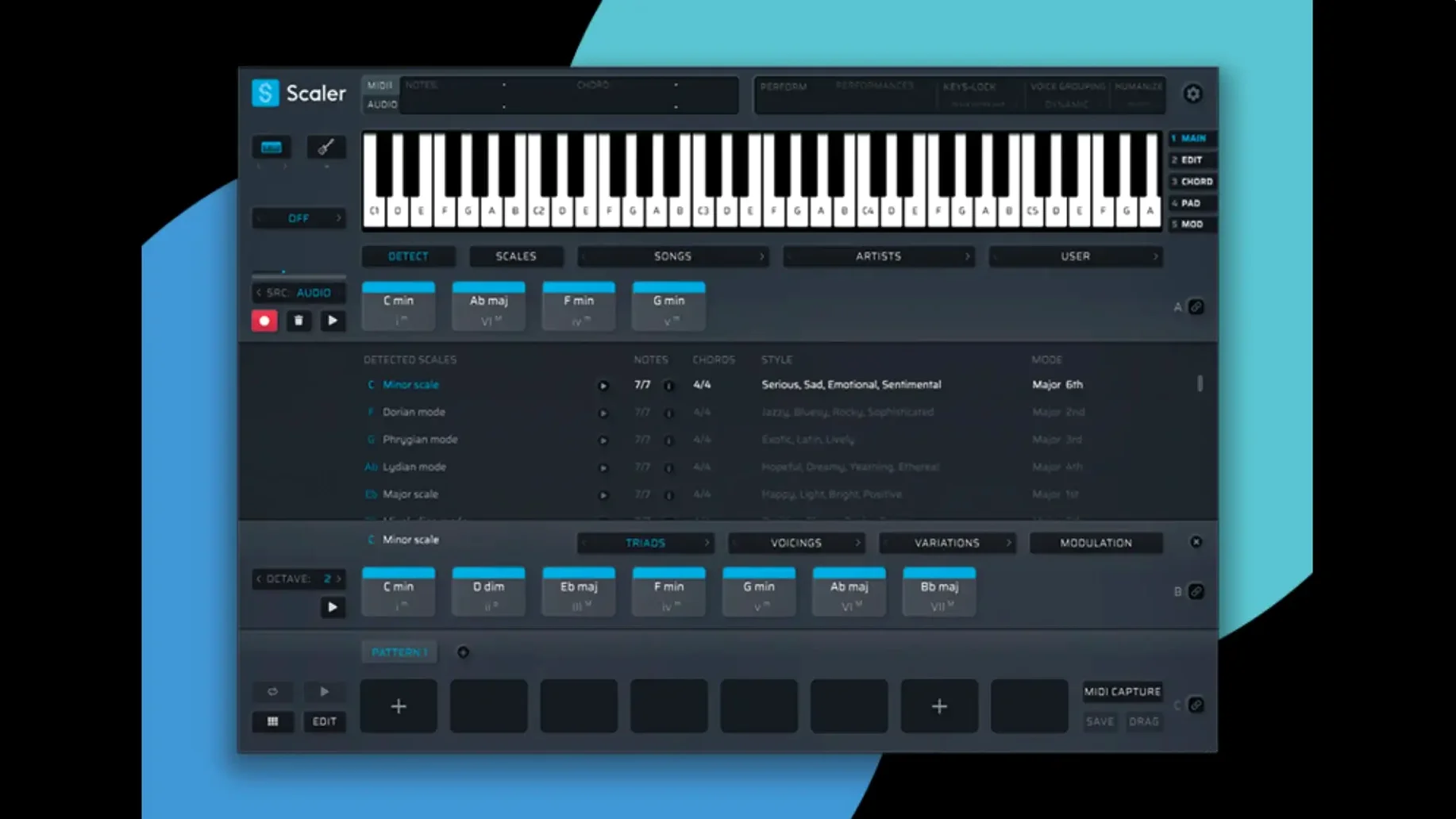
Staring at an empty piano roll, unsure where the next chord lives, can stop a session cold. Scaler 3 steps in as a dedicated music theory workstation that helps you find progressions, build melodies, and get MIDI moving again without the guesswork.
Find a Progression
Browse chord suggestions pulled from presets grouped by artists and genres, then drag them into your session. The library acts like a map, showing you harmonic choices that fit your key right away.
Build the Arrangement
Generate melodies, bass lines, and arpeggios that lock into your chosen progression. The standalone mode lets you sketch ideas before you even open your DAW, keeping the focus on writing.
Link and Edit MIDI
Use Multi-Bind to send chord changes across multiple tracks at once, and lean on the MIDI editor for cleanup—version 3.3.2 fixes note display issues and crops blank space from exports automatically.
Load as AU or VST3 Inside Your Host DAW
Scaler 3 doesn't try to replace your DAW or your go-to synth — it sits upstream, where the writing actually happens. The AU and VST3 versions load right into Logic Pro, Ableton Live, Bitwig, or whatever host you call home. Fire it up on a MIDI track, let it feed notes to any instrument downstream, and use the built-in plugin hosting when you want to audition chords through Serum, Diva, or a dusty Kontakt library without leaving the interface.
On the macOS side, it respects the conventions you already know. MIDI drag-and-drop works directly onto tracks in Logic and Live. If you use Keyboard Maestro or BetterTouchTool, a quick shortcut to open the standalone app gives you a scratchpad that's outside any session. I keep it pinned in the Dock next to my DAW — open it, sketch a four-bar idea, drag the MIDI into a project, done.
Integration with the Finder isn't flashy, but it's there: exported MIDI files land wherever you tell them, and versions 3.3.2 automatically crops the blank bars that used to pad the start of files. That means less trimming once the MIDI hits your timeline. If you use iCloud Drive, dropping files into a shared folder lets you bounce ideas between a MacBook and an iMac without re-saving anything.
Audio Unit hosting bridges the gap between theory and sound. Load a piano plug-in on the chord track, a bass plug-in on the bass track, and suddenly the Multi-Lane Timeline isn't just a MIDI editor — it's a miniature arrangement view with real instruments singing back at you. The Multi-Bind feature ties it together: shift one chord and every bound lane follows. That plays nicely with hardware synths too, as long as your MIDI routing is set up in your DAW.
Change the Default Launch Key from C Major
The defaults get you composing, but a few tweaks make Scaler 3 feel less like a demo and more like your own workspace.
Set your default key and scale behavior. The app guesses C major on first launch, which might not match the dark G minor track you're building. Head to the scale lock and pin your key so chord suggestions don't wander when you click around. If you toggle relative modes, the interface stays in your lane instead of resetting every time you audition a preset.
Adjust the MIDI export resolution. Scaler exports at a default 16th-note grid, which can feel rigid for loose, human-feeling parts. Bumping the export resolution to 32nd notes or adding a slight humanize percentage gives dragged-in phrases a breath that quantized blocks lack.
Reassign the Multi-Bind toggle. Out of the box, Multi-Bind activates with a click in the timeline header, but if you're flipping between lanes constantly, set a MIDI note or CC trigger instead. A spare pad on your controller or a footswitch assigned to the bind command lets you edit linked tracks without touching the mouse.
Dark mode matching. Scaler follows the macOS system appearance setting, but if your DAW uses a custom theme and the mismatch bugs you, the preferences let you force light or dark. It's a small thing that stopped annoying me after a single late-night session.
Plugin hosting buffer. When you load a third-party instrument inside Scaler, the standalone app sets a modest audio buffer. If you hear clicks on an M1 machine at 32 samples, bump it to 128 in the audio preferences — the latency hit is negligible for chord work, and the CPU breathes easier.
Fix Blank Exports When Dragging MIDI Clips
Every power tool comes with a few speed bumps.
Blank exports that shouldn't be blank. Before 3.3.2, dragging MIDI into a DAW sometimes pulled in silent bars at the top of the clip. The fix now baked in means you shouldn't see it, but if you're on a project started in an earlier version, re-export the clip. The cropping algorithm trims empty space only on fresh exports.
Chord display going haywire. The 3.3.2 update also patched a MIDI Editor bug where notes would vanish or chords looked like they'd been scrambled. If you still see garbled blocks, toggle the editor view between piano roll and notation and back — it forces a redraw that clears the cache. Closing and reopening the plugin window usually sorts any lingering ghost notes.
Plugin hosting fails silently. Scaler can load AU and VST instruments, but plug-in validation hiccups happen, especially after a macOS update. If you drop Serum into a chord lane and hear nothing, open the plug-in hosting tab, remove the instrument, and re-add it. On Apple Silicon machines, double-check that the hosted plug-in actually runs natively — Rosetta-wrapped plug-ins occasionally time out during the scan.
Multi-Bind won't disengage. Occasionally a bound group sticks even after you toggle it off. The quickest route: clear the bindings from the lane header rather than relying on the global toggle. Select each lane, right-click the Multi-Bind icon, and choose "Remove binding." It's a two-second fix that beats restarting the plug-in.
Dragged MIDI lands on the wrong track. If you drag a phrase from Scaler into a DAW and it drops onto the track below the one you intended, it's usually a focus issue. Click the destination track header in your DAW before dragging from Scaler, not after. Some hosts grab focus only on a track header click, not on the arrange area.
Build a Bridge in E-Flat Without Theory Freeze
Imagine a songwriter who plays enough keys to get by but freezes when asked to build a bridge that isn't four chords of G major. She opens the standalone Scaler 3 on a MacBook Air, sets the key to E-flat minor, and scrolls through the artist presets until she finds a progression labeled with a mood that fits the second verse. Three clicks later, the chords sit in the timeline.
She adds a melody lane, tweaks the generated phrase by dragging a few notes in the MIDI editor, then layers a bass line from the arpeggio generator. The Multi-Bind link keeps bass and chords locked while she experiments with inversions. When the skeleton feels right, she drags the whole arrangement into Logic as separate MIDI tracks, routes them to Retro Synth and a sampled upright piano, and records vocals over the top. What started as a blank afternoon turns into a finished demo before dinner — not because she suddenly learned advanced theory, but because Scaler 3 gave her the harmonic roadmap and stayed out of the way.
A tidy MIDI Editor update and cleaner exports make this one worth grabbing:
- Fixed MIDI Editor display glitches that led to missing notes, wrong chord representations, and awkward blank space before chords.
- Exported MIDI now automatically crops any empty space at the start of the sequence.
- macOS 10.15 or newer
- Apple Silicon and Intel (64-bit only)
- VST, VST3, AU, and AAX formats
Questions people ask
Can I use Scaler 3 without a DAW?
Yes, it includes a standalone mode that works on macOS 10.15 and later, so you can compose directly without launching a host.
Also on readers' docks
Sign in or create an account to leave a comment.
No comments yet. Tell me how it got on with your other devices.
More in VST Plugins
See all Sauceware Audio Scorch 2
1.0.4 VST Plugins
2 GB
Sauceware Audio Scorch 2
1.0.4 VST Plugins
2 GB
 Safari Pedals Everything Bundle
2026.05 VST Plugins
628 MB
Safari Pedals Everything Bundle
2026.05 VST Plugins
628 MB
 Roland ZENOLOGY Pro
2.0.7 VST Plugins
1.8 GB
Roland ZENOLOGY Pro
2.0.7 VST Plugins
1.8 GB
 Serato Hex FX
1.2.0 VST Plugins
105 MB
Serato Hex FX
1.2.0 VST Plugins
105 MB
 Roland Cloud Legendary Series
2025.06.29 VST Plugins
1.3 GB
Roland Cloud Legendary Series
2025.06.29 VST Plugins
1.3 GB
 Serato Sample
2.2.0 VST Plugins
612 MB
Serato Sample
2.2.0 VST Plugins
612 MB
 RipX DAW Pro
8.0.3 VST Plugins
1.6 GB
RipX DAW Pro
8.0.3 VST Plugins
1.6 GB
 Updated Serum
2.1.5 VST Plugins
1.2 GB
Updated Serum
2.1.5 VST Plugins
1.2 GB