









Download Roland ZENOLOGY Pro for macOS
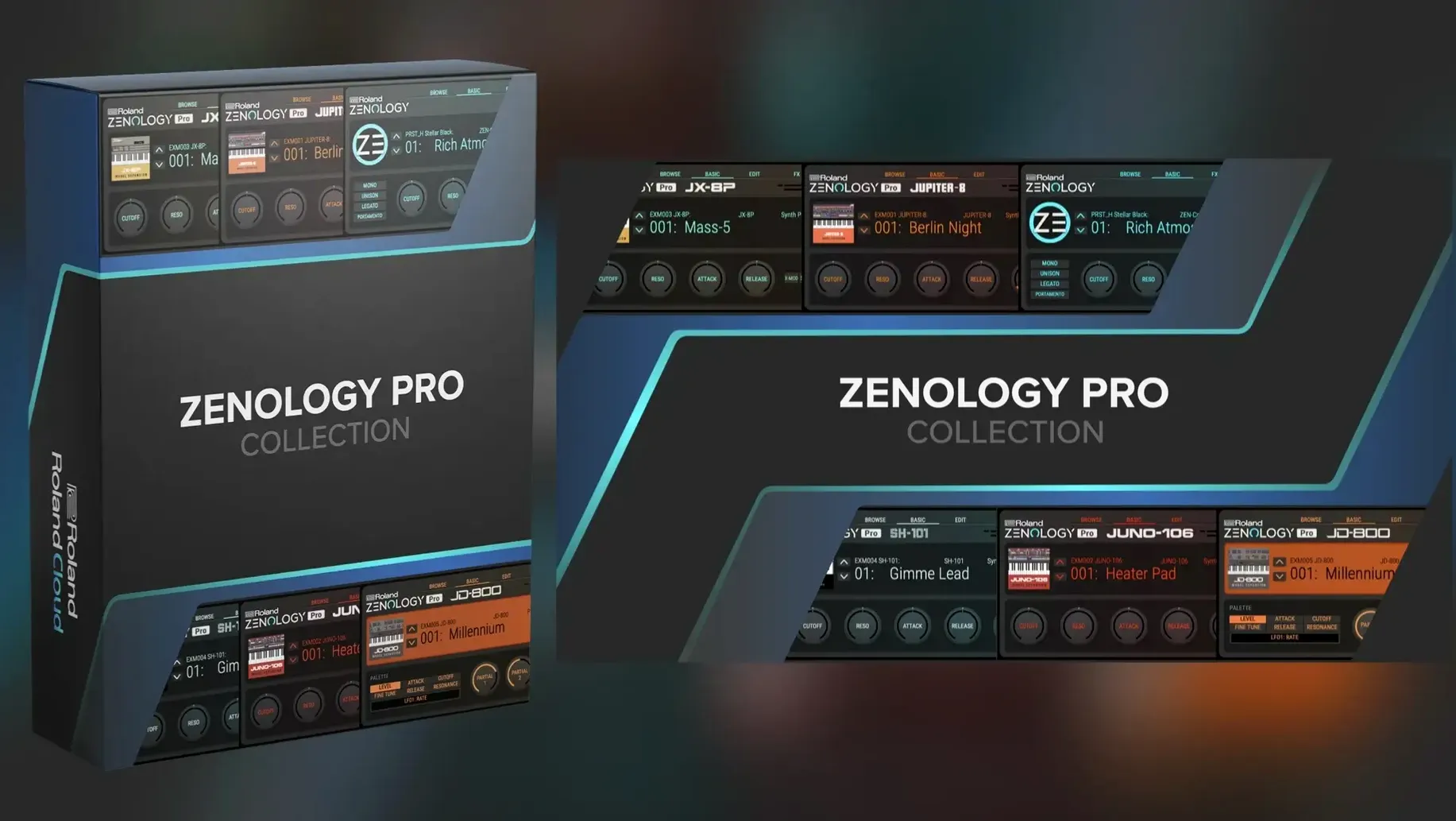
SuperSAW detune catches your ear first, spreading across the stereo field. Roland ZENOLOGY Pro — the ZEN-Core Synthesis System opened up as a DAW plug-in. The same engine that powers hardware like JUPITER-X and FANTOM, now living on your Mac track stack.
Lead track — virtual analog oscillators with that classic Roland snap, run through a JUPITER-modeled filter. Pad bus — PCM SYNC oscillators pulling from 1,840 waveforms, washed in one of the 90+ onboard effects. Bass duties — a sub oscillator paired with the noise generator for texture, tight and present.
Ten filter types cover a lot of ground. JUPITER models for vintage squelch, modern digital modes for precision. The resizable interface keeps the focus on sound design, not squinting. macOS 11 and later, runs native on Apple Silicon and Intel. Version 2.0.7. All in English.
A typical session with ZENOLOGY Pro usually starts before you hear a note. I open Logic Pro, load an empty instrument track, and drop the plug-in onto the channel strip. The default tone that greets me is usually something polite — a warm pad or a clean electric piano — and I let it play for a moment while I decide what I actually need. Then I hit the browser.
The Tone Browser is not flashy, but it works fast. I type "bass" in the search field, scroll past a few dozen results, and pick something with a sharp attack. The 4,000-plus factory tones can feel overwhelming if you just scroll randomly, so I almost always filter by category first — Bass, Lead, Pad, or Drums — then narrow down by character. A couple of clicks and I'm auditioning a punchy FM bass that cuts through the demo loop I have running. I favorite it with a single click so I can find it again next week.
From there, the real work begins. I open the editor view and see four parts stacked vertically — each one an independent oscillator, filter, amp, dual LFOs, and EQ. I rarely need all four parts for a simple bass patch, but the moment I want a layered lead or a complex pad, the architecture makes sense. Part one handles the fundamental, part two adds an octave-up harmonic, part three introduces a slow-attack PCM texture, and part four might stay muted until I need a noise layer for breath. Each part has its own pan, tuning, and level. There is no fighting the interface to get them working together.
The oscillators are where ZENOLOGY Pro shows its dual nature. I switch between virtual analog and PCM waveforms often within the same session. Virtual analog gives me the classic saw and square shapes I expect from a Roland synth, plus the Supersaw detune that fills out a chorus without any effects yet. PCM SYNCO opens the waveform library — 1,840 samples that range from orchestral stabs to vocal phrases to synth textures I have never heard used on a record. On a recent track, I used a PCM bell tone as the attack transient for an analog pad, and the result was something I could not have planned on paper.
After the oscillators, I gravitate toward the filter section. Ten types is a lot to choose from, but I keep returning to three: the JUPITER-8 low-pass for anything that needs warmth and movement, the JUPITER-X multimode for more aggressive sweeping, and a clean digital high-pass when I need to carve space for a vocal. The resonance behaves differently on each model — the JUPITER-8 filter can self-oscillate at high settings, which I use occasionally as a sine-wave source in its own right. Dialing in filter envelope depth while the sequence loops is where I lose track of time.
Modulation is the quiet backbone of the session. Two LFOs per part, 11 shapes each, and no shortage of destinations. I route LFO1 to pitch for a gentle vibrato on a lead, then use LFO2 on filter cutoff with a random shape for an evolving pad that never repeats exactly. The step-shape LFO is underrated — I have used it to create rhythmic gating effects without touching an external plugin. By the time I close the project, I have three instances of ZENOLOGY Pro running: one bass, one pad, one lead, and my CPU meter has barely flinched on the M1 Pro machine. That is not something I take for granted with a four-part synth that loads PCM waveforms.
Unlocking the Hidden Four-Part Engine
The biggest mistake I see beginners make is treating ZENOLOGY Pro like a preset player. They load a tone, it sounds good, they move on. But underneath that single tone is a four-part engine, and many of the factory presets only use one or two parts. Beginners rarely click into the part view to see what is actually happening — which oscillator type is loaded, which filter is active, how the LFOs are routed. Learning to deconstruct a preset teaches more about ZEN-Core synthesis than any manual.
Another common stumble is ignoring the PCM oscillator's potential. People gravitate toward virtual analog because it is familiar, but the PCM waveforms cover an enormous range — strings, choirs, percussion, noise textures, synthetic waveforms from Roland's archive. A beginner might build an entire track using only virtual analog and then wonder why their sound palette feels limited. Toggling over to PCM and browsing the waveform list takes seconds and opens up a completely different sonic territory.
Gain staging across the four parts catches people too. Each part has its own level control, and it is easy to stack three or four parts and hit the output so hard that everything distorts in an unpleasant way. The solution is not to lower the master volume — it is to balance the parts at their individual outputs first, then use the overall level. Some of the best patches I have made run parts at surprisingly low levels, letting the filter and effects do the heavy lifting in the mix.
The effects section is deep — over 90 algorithms — and beginners often load a reverb or delay on every part instead of using the master effects bus. That eats CPU and muddies the sound. Learning to place time-based effects on the master and use part-level effects only for character — like a phaser on a single oscillator — cleans up a patch dramatically. I have seen people abandon perfectly good tones because they did not realize they had three reverbs fighting each other across four parts.
Right-Click for Instant MIDI Control
Right-clicking almost any knob or slider pops up a menu for MIDI learn, modulation assignment, and value reset. I did not discover this for weeks after I started using the plugin, and it changed how I set up controller mappings. Assigning a hardware fader to filter cutoff takes two clicks, and the mapping persists across sessions.
The browser has a favorites system that goes deeper than the star icon. You can create custom banks, drag tones between them, and organize by project, genre, or mood. I keep a bank called "Starting Points" — raw tones with no effects, just good oscillator and filter combinations that I can build on quickly. Building that bank took an afternoon and has saved me countless hours since.
Keyboard shortcuts in the editor are minimal but useful. The arrow keys navigate between parameters, and holding Shift while dragging a knob gives you fine control. The interface is resizable from a small corner handle, and I keep mine at about 130% — large enough to read clearly on a 14-inch screen, small enough that I can still see my DAW's mixer behind it.
The effects routing deserves more attention than it gets. You can place effects in series or parallel, and the order matters enormously. A delay before a distortion sounds completely different from a distortion before a delay. I stumbled onto a patch where a pitch shifter fed into a long reverb, and the resulting cloud of detuned reflections became the hook of a track I finished that same night.
How a sound designer might use it
A friend who does sound design for indie games uses ZENOLOGY Pro differently from how I use it in music production. She works in short, focused sessions — two or three hours at a stretch — building batches of related sounds for a single project. For a recent sci-fi title, she needed a set of UI sounds: confirmation chimes, error buzzes, menu navigation clicks. She opened ZENOLOGY Pro, initialized a blank tone, and started with a single PCM oscillator — a short metallic hit from the waveform library. She shaped the amplitude envelope so the sound lasted barely 200 milliseconds, then applied a band-pass filter with a quick envelope sweep to give it a rising character. The result was clean, synthetic, and exactly what the developer had described in the brief.
For the error sounds, she used two parts: a low analog square wave for a buzzy fundamental and a noise oscillator with a fast decay for a burst of static. She routed both through a bit-crusher effect from the onboard library, then added a short slapback delay to make the sound feel like it was bouncing off a metal wall. The entire patch took under ten minutes, and she exported it directly to the game engine's audio folder without leaving her DAW. What she appreciates most is the consistency — every sound she builds in ZENOLOGY Pro shares the same sonic fingerprint because the engine, the filters, and the effects all come from the same ecosystem. When the developer asked for eight more UI sounds two weeks later, she loaded the original session and the tools were exactly where she left them.
macOS 11 Minimum and Apple Silicon Support
Does ZENOLOGY Pro work on my Mac if I am still running an older system? The plugin requires macOS 11 or later, so if you are on Big Sur or anything newer, you are covered. Both Apple Silicon and Intel 64-bit Macs are supported natively — there is no Rosetta-only workaround to worry about. If your DAW recognizes AU or VST3 plugins on a compatible macOS version, ZENOLOGY Pro will show up in your instrument list without extra configuration.
How heavy is the plugin on CPU, especially with multiple parts and effects? It scales well. A single instance with one or two parts and a couple of effects is light enough to run on older Intel Macs without issues. When you start stacking four parts with PCM oscillators and separate insert effects on each, the CPU load increases — that is just physics — but I have run eight instances on an M1 Pro Mac with headroom to spare. The resizable interface does not add any measurable overhead, and the plugin does not phone home or run background processes that drag on system resources.
Can I use patches I create in the DAW on a hardware ZEN-Core instrument later? Yes, and this is one of the quiet strengths of the ecosystem. Patches saved in ZENOLOGY Pro can be exported and loaded into compatible Roland hardware like a JUPITER-X or FANTOM. The file format is shared, so you can design a sound on your laptop during a flight, then transfer it to a keyboard for rehearsal that evening. The reverse works too — hardware patches can come into the DAW for further editing or layering.
What is the difference between ZENOLOGY and ZENOLOGY Pro, and do I need both? ZENOLOGY is the streamlined version — same core sounds, simpler interface, fewer editing options. ZENOLOGY Pro unlocks the full editor with all four parts exposed, the complete effects library, and access to the PCM waveform archive. If you only need to browse presets and tweak a macro control here and there, the standard version might suit you. If you plan to build sounds from scratch or edit deeply, ZENOLOGY Pro is the one that gives you the actual synthesizer, not just the player.
Will I need additional downloads to get the full sound library, and how big is the installation? The base installation includes over 4,000 tones and 200 drum kits, which covers a lot of ground immediately. Expanding to the full 10,000-plus variations requires Sound Packs and Wave Expansions — separate downloads that add specific
- macOS 11 or later
- Apple Silicon or Intel Mac
Questions people ask
Does ZENOLOGY Pro include the sounds from Roland's JUPITER and FANTOM hardware?
It uses the same ZEN-Core synthesis engine found in JUPITER-X and FANTOM instruments, giving you the four oscillator types, filter models, and PCM waveforms.
Also on readers' docks
Sign in or create an account to leave a comment.
No comments yet. Tell me how it got on with your other devices.
More in VST Plugins
See all Roland Cloud Legendary Series
2025.06.29 VST Plugins
1.3 GB
Roland Cloud Legendary Series
2025.06.29 VST Plugins
1.3 GB
 Safari Pedals Everything Bundle
2026.05 VST Plugins
628 MB
Safari Pedals Everything Bundle
2026.05 VST Plugins
628 MB
 RipX DAW Pro
8.0.3 VST Plugins
1.6 GB
RipX DAW Pro
8.0.3 VST Plugins
1.6 GB
 Sauceware Audio Scorch 2
1.0.4 VST Plugins
2 GB
Sauceware Audio Scorch 2
1.0.4 VST Plugins
2 GB
 Scaler 3
3.3.2 VST Plugins
1.4 GB
Scaler 3
3.3.2 VST Plugins
1.4 GB
 Revoice Pro
5.1.30 VST Plugins
39 MB
Revoice Pro
5.1.30 VST Plugins
39 MB
 reFX Nexus
5.5.21 VST Plugins
72 MB
reFX Nexus
5.5.21 VST Plugins
72 MB
 RC-20 Retro Color
1.5.1 VST Plugins
170 MB
RC-20 Retro Color
1.5.1 VST Plugins
170 MB