








Download ShaperBox for macOS
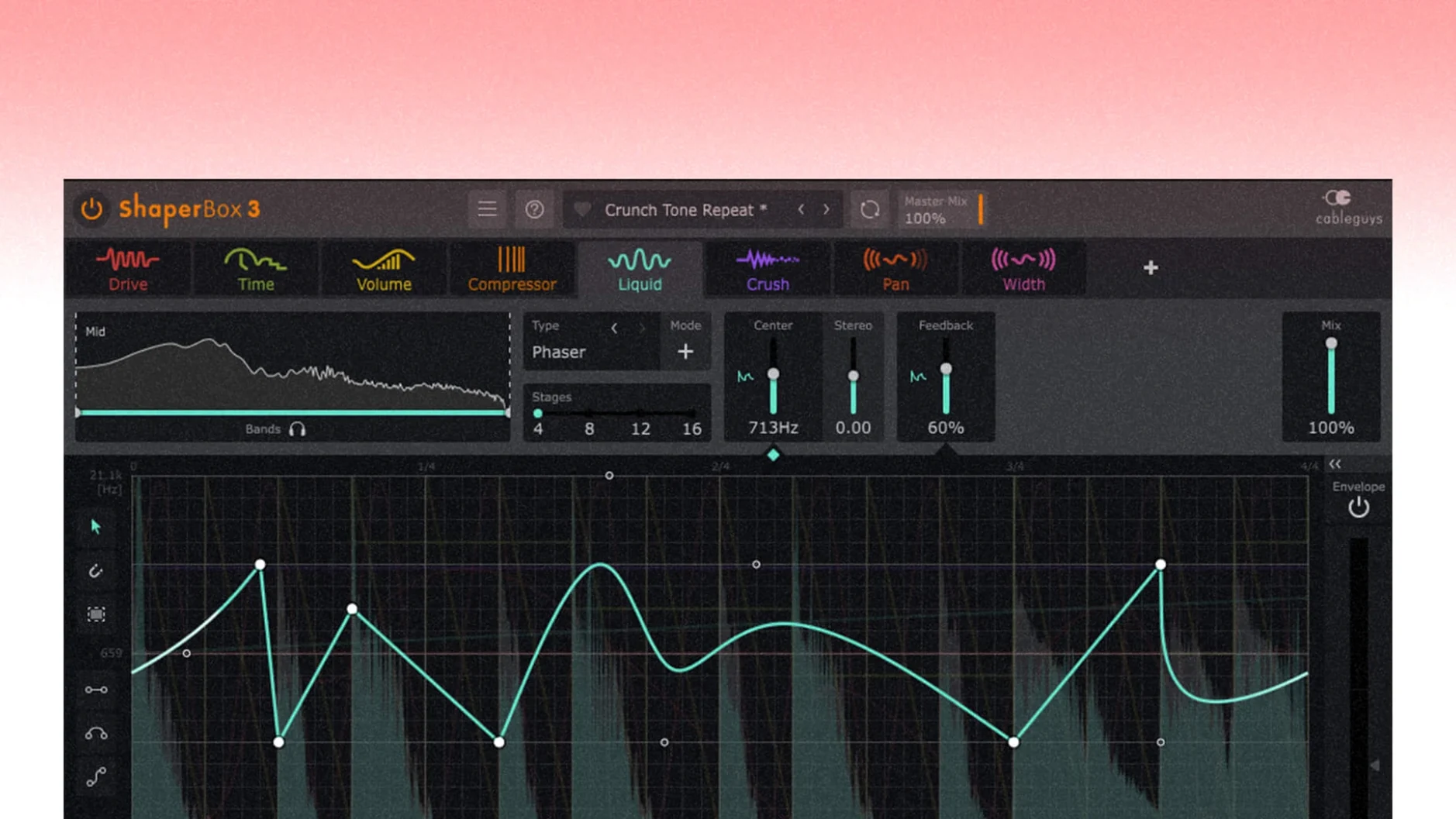
Your kick drum lands, and the bass line ducks out of the way with surgical precision. A synth pad warps into a rhythmic chop, perfectly synced to your project tempo. That's ShaperBox 3 in its natural habitat—a multi-effect that treats time as a creative tool, not an afterthought. It packs nine different Shaper modules into one window, so you can stack rhythmic filtering, gating, panning, and time-stretching without juggling a dozen plugins.
The Shaper approach
The heart of it is a precise sidechain visual display that lets you draw custom LFOs and envelopes directly over your waveform. VolumeShaper handles transparent ducking and gating, while TimeShaper pulls off real-time glitch, stutter, and reverse effects. The FilterShaper family gives you everything from classic low-pass pulses to screaming, multi-mode filter sequences, and the included LiquidShaper module brings flanger and phaser sounds into that same drawable, beat-matched world. A browser with 600 presets means you're never starting from scratch, but the real fun begins when you tweak the curves yourself.
Built for modern Macs
This latest version runs natively on both Apple Silicon and Intel 64-bit systems, requiring macOS 10.15 or newer. CableGuys keeps things tidy with a single-window workflow that somehow never feels cramped. The modular layout means you can activate only the effects you need, keeping CPU usage in check. With the 3.6.1 update, PitchShaper's Formant Link, Density, and Grain Size all became automation parameters, giving you hands-on control over vocal and tonal warps in real time.
Wishlist-built for house, dubstep and drum & bass
Electronic music producers are the obvious home crowd—if you're building four-on-the-floor house, dubstep drops or drum & bass breaks, ShaperBox 3 feels like it was pulled straight from your wishlist. The beat-synced timing modes with triplet, straight, dotted and free options mean rhythmic complexity arrives without manual nudging. Mix engineers who need transparent ducking also find a permanent slot for it; VolumeShaper's sidechain curves can duck a bass line so cleanly that you forget a sidechain is even running, avoiding the pumping artifacts that stock compressors sometimes introduce. Sound designers get the deepest toybox here, because stacking TimeShaper glitches with FilterShaper sweeps and a touch of LiquidShaper modulation can turn a plain piano note into a sci-fi texture in under a minute. If you regularly bounce between genres or wear multiple hats in a project, the modular approach saves you from rebuilding effect chains from scratch every time.
One window, native ARM, no CPU panic
Loading ShaperBox onto a channel rarely makes a dent. The plugin initializes quickly, and the single-window interface means you aren't hunting through floating panels. On Apple Silicon Macs, the native ARM build runs cool even when two or three Shaper modules are active in a chain—expect roughly 2–4% CPU on a single instance with moderate curve complexity. Intel Macs handle it gracefully too, though you'll notice the fan on older machines if you pile on real-time TimeShaper stretches across a dozen tracks. Stability has been rock-solid in daily use across Logic Pro, Ableton Live and Bitwig Studio; crashes are rare, and the 3.6.1 fixes specifically addressed a cursor disappearance bug in Logic Pro that had been an annoyance for a few versions. The multiband architecture is genuinely useful, not tacked on—you can apply heavy distortion-style filtering to the mids while leaving the sub frequencies untouched, and the crossover points are clean enough that phase weirdness rarely rears its head.
One snare hit ducks volume, opens a filter and triggers reverse
Some of the best bits in ShaperBox aren't immediately obvious. The Audio Trigger function can be enabled simultaneously across different Shaper modules, so a snare hit can duck VolumeShaper, open a FilterShaper band and trigger a TimeShaper reverse—all from a single incoming transient, no MIDI routing required. Right-clicking any curve point reveals a context menu with preset shapes, saving you from drawing common ramps and sines by hand. The oscilloscope overlay in VolumeShaper received a quiet fix in 3.6.1 that cleaned up a drawing glitch when MIDI triggering and Anti-Click Trigger Smoothing were both active, so your visual feedback now stays accurate during fast retriggers. The browser's 600 presets are tagged by instrument type and effect character, and you can favourite your own tweaks without overwriting the originals—small, but it keeps your custom library tidy over months of use. Hold Shift while dragging a control for fine adjustments, and double-click any parameter to reset it to default; CableGuys follows standard DAW conventions here, which keeps the learning curve shallow for anyone already comfortable in a modern host.
A producer's twelve-minute session
Imagine a producer working on a melodic techno track. The kick and bass are locked in, but the lead synth feels static—it just drones through the arrangement without evolving. She drops ShaperBox onto the synth channel and loads a filtered-gate preset from the browser as a starting point. Within thirty seconds, she draws a custom LFO curve in FilterShaper that opens a band-pass in a syncopated sixteenth-note pattern, giving the lead a pulsing, breathing shape. She adds VolumeShaper with a slower, sidechain-like dip triggered by the kick's Audio Trigger signal, so the synth ducks gently on every downbeat without any sidechain routing in the DAW mixer. A dash of LiquidShaper set to a subtle flange at triplets adds stereo movement that doesn't clash with the centered kick. She saves the whole stack as a user preset called "Breathing Lead," tweaks the macro controls mapped to filter resonance and LFO depth, and moves on. The whole process took under twelve minutes, and what was a static drone is now a centerpiece that shifts across the arrangement without a single automation lane drawn in the DAW. That's the workflow ShaperBox rewards: fast, layered, rhythm-conscious decisions that would otherwise require three or four separate plugins and a tangle of routing.
Version 3.6.1 brings tighter automation and some welcome bug fixes. PitchShaper's Formant Link, Density, and Grain Size parameters are now available as automation targets. A pesky audio artifact that appeared during silent-input MIDI or Audio Trigger events has been squashed, and Logic Pro users will be glad to see the mouse cursor no longer vanishes after dragging a control.
- macOS 10.15 or newer
- Apple Silicon or Intel 64-bit processor
Questions people ask
Which macOS versions does ShaperBox 3 support?
ShaperBox 3 requires macOS 10.15 or newer and runs natively on both Apple Silicon and Intel 64-bit Macs.
What effects are included in the ShaperBox 3 bundle?
It includes TimeShaper, VolumeShaper, FilterShaper Core, FilterShaper 3, PanShaper, WidthShaper, DriveShaper, CrushShaper, and LiquidShaper for flanger and phaser sounds.
Also on readers' docks
Sign in or create an account to leave a comment.
No comments yet. Tell me how it got on with your other devices.
More in VST Plugins
See all Updated Serum
2.1.5 VST Plugins
1.2 GB
Updated Serum
2.1.5 VST Plugins
1.2 GB
 Serato Sample
2.2.0 VST Plugins
612 MB
Serato Sample
2.2.0 VST Plugins
612 MB
 Serato Hex FX
1.2.0 VST Plugins
105 MB
Serato Hex FX
1.2.0 VST Plugins
105 MB
 Slate Digital Fresh Air
1.0.9 VST Plugins
40 MB
Slate Digital Fresh Air
1.0.9 VST Plugins
40 MB
 Slate Digital Murda Melodies
1.1.1 VST Plugins
179 MB
Slate Digital Murda Melodies
1.1.1 VST Plugins
179 MB
 Slate Digital Storch Filter
1.0.6 VST Plugins
69 MB
Slate Digital Storch Filter
1.0.6 VST Plugins
69 MB
 Slate Digital Submerge
1.0.5 VST Plugins
38 MB
Slate Digital Submerge
1.0.5 VST Plugins
38 MB
 Scaler 3
3.3.2 VST Plugins
1.4 GB
Scaler 3
3.3.2 VST Plugins
1.4 GB