









Download Slate Digital Fresh Air for macOS
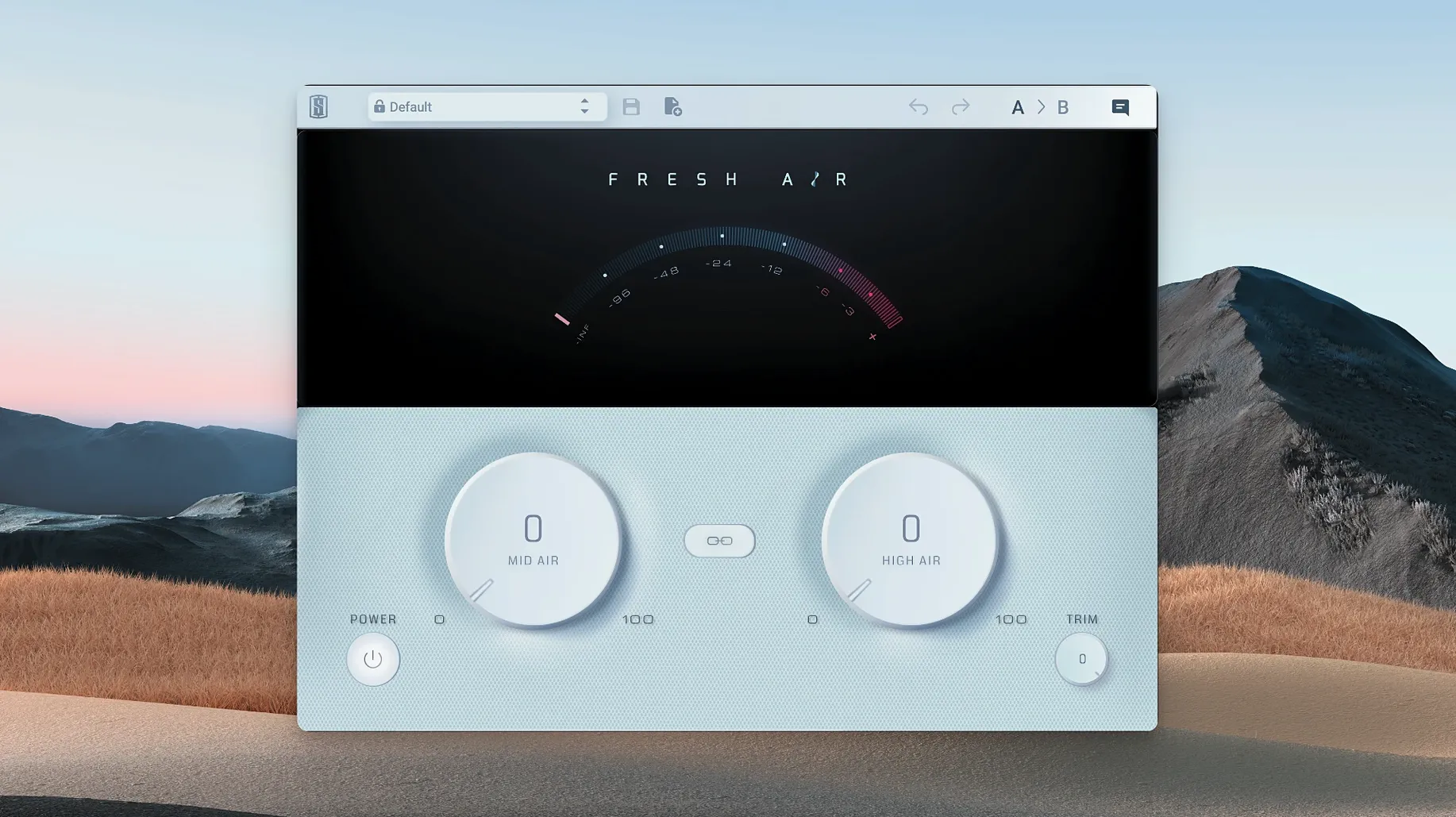
Mixes can sometimes feel a little closed-in, lacking that final bit of openness up top. Reaching for a standard EQ to brighten things often brings forward sibilance or a brittle edge you didn't want. Fresh Air tackles exactly that.
What the two knobs actually do
- Start with Mid Air. This opens up the body and presence of the sound, adding character without pushing it into harsh territory. It's my first move on a vocal that feels a bit muffled or a snare that needs to breathe.
- Blend in High Air. This adds the real top-end sheen. It lifts the very upper frequencies with a smooth, polished quality that doesn't introduce the graininess some exciter plugs are known for.
- Link them with the Link button. This lets you adjust both knobs together, scaling the overall effect up or down while keeping the tonal balance you've just dialed in.
It works across the board. On a dull keyboard part, it pulls it forward in the mix. On drums, it creates space and crackle. I've even found it useful sparingly on a full mix bus when a track just needed that final bit of lift. The processing borrows thinking from vintage exciter circuits but runs it through modern dynamic algorithms, so the result is air that stays musical rather than synthetic.
Post-compression, pre-limiting sweet spot
Fresh Air slots into a chain differently depending on what you're feeding it. I tend to place it post-compression but before any limiting. Why? Because compression reshapes dynamics, and you want the exciter reacting to a signal that already breathes the way you intend. Drop it before a compressor and those boosted highs will trigger gain reduction in ways that can fight your settings.
On a vocal bus, I'll often have it sitting after a channel strip EQ and a gentle opto-style compressor, with a de-esser placed before the whole lot. That way the de-esser catches the sharp sibilance first, and Fresh Air brings back the airy openness the de-esser inevitably shaves off. It's a give-and-take that leaves the vocal sitting pretty in a dense mix.
macOS users get an extra convenience: the plugin works inside Logic Pro's native Dual Mono and Mid/Side routing without any wrapper headaches. I sometimes run it in Mid/Side on a drum bus, processing only the sides for width and sparkle while leaving the centre — kick, snare body — untouched. It's a quick way to widen a drum group without muddying the punch.
A full vocal polish, start to finish
Here's a workflow I've settled into after mixing dozens of vocal-forward tracks. The goal is presence that cuts through a busy arrangement without the listener ever thinking "that's bright."
1. Prep the track. I clean up breaths, clip gain any quiet phrases, and insert a surgical EQ to notch out room resonances. Nothing creative yet — just housekeeping.
2. Gentle compression. A FET-style compressor catches peaks with about 3 dB of reduction on the loudest syllables. I'm not squashing, just giving the dynamics a consistent shape.
3. Mid Air opens the throat. I loop a section where the vocal competes with guitars and keys. Mid Air goes up until the vocal feels like it's leaning forward — usually somewhere just past noon on the dial. At this stage I'm listening for body, not sparkle.
4. High Air for the breath. I bring High Air up slowly, focusing on consonants and the tail of reverb tails. The moment the "t" and "s" sounds feel crisp but not sharp, I stop. The Link button helps here: click it, nudge both down a hair, and see if the mix still holds. Often the sweet spot is a touch lower than you first think.
5. Trim to match. The processing adds perceived loudness, so I use the Trim control to level-match. A quick A/B bypass confirms I'm not being tricked by volume. If the vocal sits better but isn't louder, the settings are right.
6. Context check. I solo the vocal less and less as the mix progresses. Fresh Air settings that sound impressive in solo often feel exaggerated in the full arrangement. I'll pull both knobs back slightly once the rest of the instrumentation plays.
What the update to 1.0.9 smoothed out
Version 1.0.9 didn't overhaul the interface or add new features, but the under-the-hood changes make everyday use more predictable. The most noticeable shift is improved stability on Apple Silicon Macs running macOS Ventura and Sonoma. Earlier builds could occasionally spike CPU when multiple instances loaded in a large session; 1.0.9 reined that in.
Loading times also tightened up. On my machine, recalling a session with four or five Fresh Air instances now happens without the brief beachball that used to appear. It's a small thing, but when you're flipping between projects, those seconds add up across a day. The plugin also plays more reliably with Logic's Low Latency Monitoring Mode — a pain point for some exciters that introduce phase shift, but Fresh Air's dynamic processing keeps latency minimal enough that tracking with it active is feasible in a pinch.
Harmonic richness without the processed stamp
Fresh Air versus Aphex Vintage Exciter emulations. Classic Aphex-style exciters add harmonics in a way that can sound harmonically rich but also distinctly "processed." They're wonderful on bass or as a deliberate effect, but they color the signal in a recognizable way. Fresh Air aims for transparency — the processing feels more like an extension of the source material than a new layer on top. If you want vibe, go Aphex. If you want the sound itself to feel more open, Fresh Air is the subtler choice.
Fresh Air versus Maag EQ4 Air Band. The Maag EQ4's famous Air Band shelf is a go-to for top-end lift, and it shares Fresh Air's philosophy of smooth, non-harsh brightness. The difference lies in what's happening under the hood. The Maag is a static EQ curve — beautiful, but fixed. Fresh Air responds dynamically to the input, so quiet passages get proportionally different treatment than loud ones. On a vocal with wide dynamic range, that means the air stays consistent rather than disappearing when the singer pulls back.
Fresh Air versus iZotope Ozone's Exciter module. Ozone's multiband exciter offers surgical control over where the harmonics land, which is powerful but also invites overthinking. Fresh Air thrives on simplicity: two knobs and a trim, no crossover frequencies to second-guess. For a master bus, Ozone's precision wins. For a track insert where you want to dial in air quickly and trust the algorithm, Fresh Air gets results faster. The sound of fresh air mac crack — a phrase you hear thrown around in forums — really comes down to that speed-to-result ratio rather than any secret sauce.
Where Fresh Air genuinely pulls ahead is on dense, layered productions. Stacking multiple instances across vocals, acoustic guitars, and overheads doesn't create the brittle buildup that stacking traditional EQs or exciters often does. The dynamic nature of the processing seems to keep the cumulative effect in check, which makes it a safer bet when you're reaching for air on more than a couple of tracks.
- macOS 11 or newer
- Apple Silicon native support
- English interface
Questions people ask
Will Fresh Air make my tracks sound harsh?
It's designed specifically to avoid that. The processing adds brightness and air using a combination of vintage exciter concepts and modern dynamics, so you get presence without the unwanted artifacts or harshness you might get from a simple EQ boost.
What can I use it on?
It's built to be flexible. Slate Digital suggests using it on individual tracks like vocals, drums, and keys, but you can also apply it across your entire mix bus for a unifying top-end polish.
What do the two controls do?
Mid Air focuses on presence and opening up the mid-to-high range, while High Air adds shine and air to the very top frequencies. A Link button lets you control both together.
Also on readers' docks
Sign in or create an account to leave a comment.
No comments yet. Tell me how it got on with your other devices.
More in VST Plugins
See all Slate Digital Murda Melodies
1.1.1 VST Plugins
179 MB
Slate Digital Murda Melodies
1.1.1 VST Plugins
179 MB
 Slate Digital Storch Filter
1.0.6 VST Plugins
69 MB
Slate Digital Storch Filter
1.0.6 VST Plugins
69 MB
 Slate Digital Submerge
1.0.5 VST Plugins
38 MB
Slate Digital Submerge
1.0.5 VST Plugins
38 MB
 ShaperBox
3.6.1 VST Plugins
111 MB
ShaperBox
3.6.1 VST Plugins
111 MB
 Sonic Academy KICK
1.1.8 VST Plugins
358 MB
Sonic Academy KICK
1.1.8 VST Plugins
358 MB
 Sonic Charge Synplant 2
2.0.2 VST Plugins
61 MB
Sonic Charge Synplant 2
2.0.2 VST Plugins
61 MB
 Updated Serum
2.1.5 VST Plugins
1.2 GB
Updated Serum
2.1.5 VST Plugins
1.2 GB
 Serato Sample
2.2.0 VST Plugins
612 MB
Serato Sample
2.2.0 VST Plugins
612 MB