Download Timing for macOS
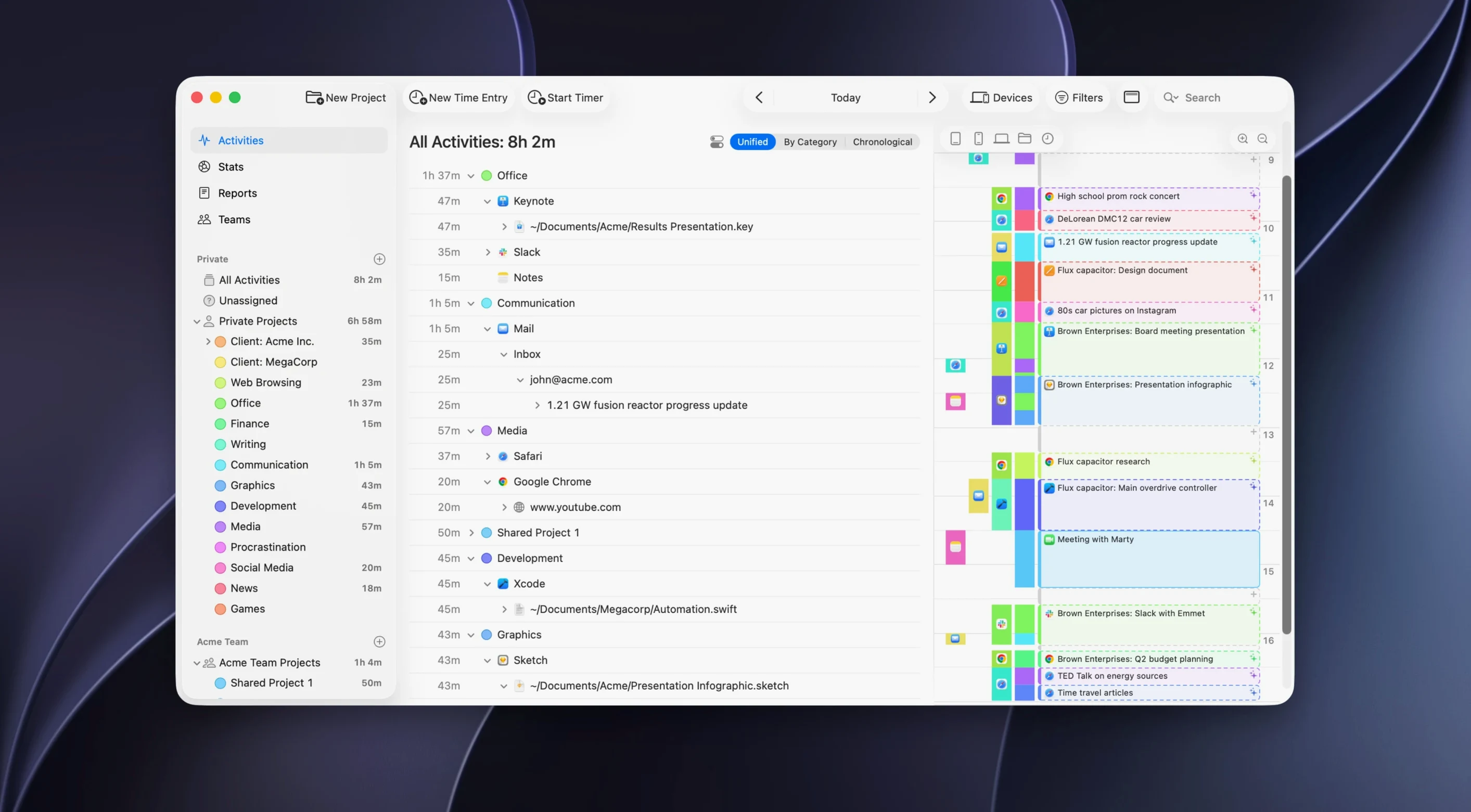
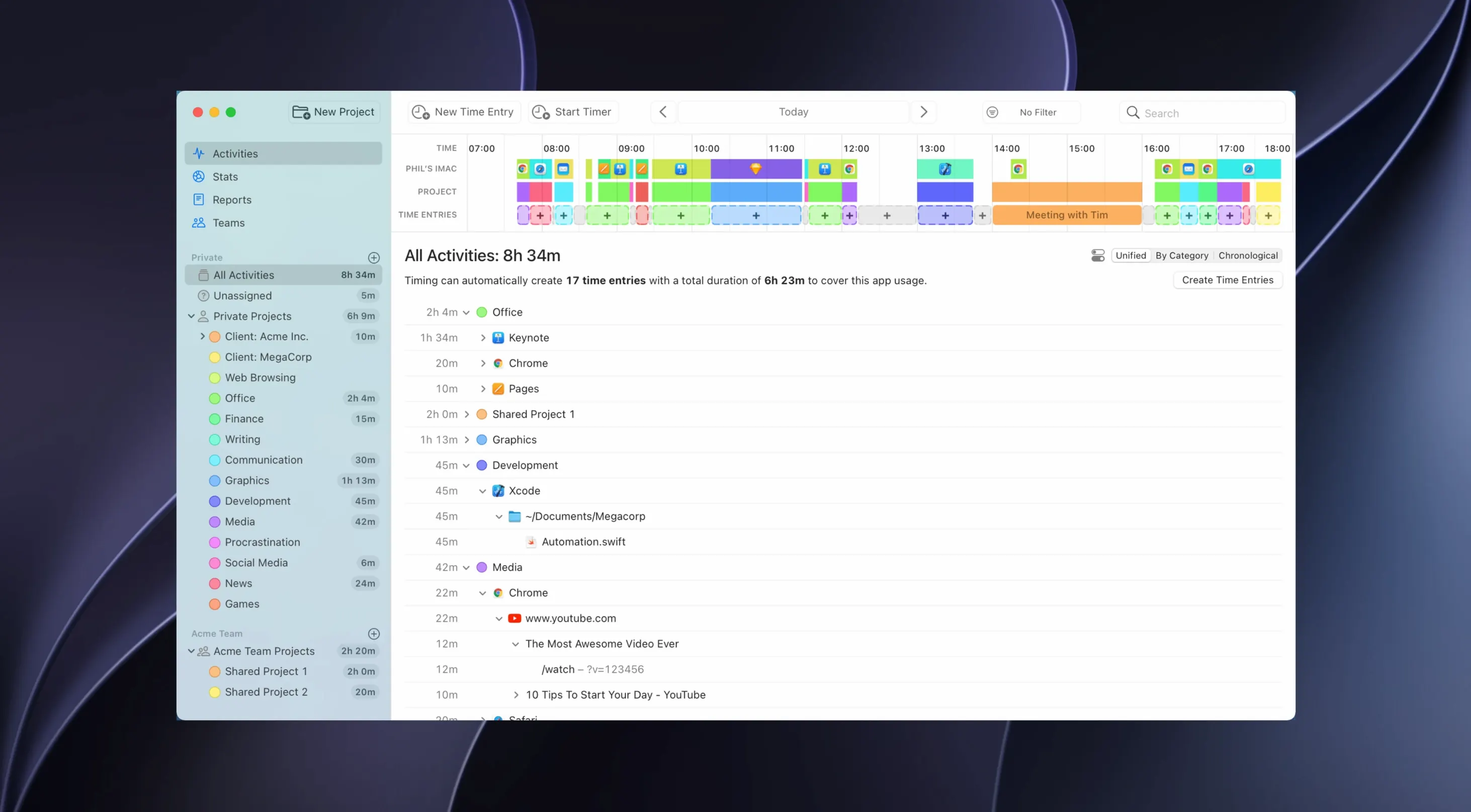
The Call Tracking feature is where you first realize Timing thinks differently. Instead of asking you to remember to click a button, it watches which apps, documents, and websites you use — then quietly builds a timeline you can review later. It’s automatic time tracking that respects your boundaries: private browser tabs are ignored entirely, and you can carve out rules so certain activities never appear in your reports.
| Detail | Value |
|---|---|
| Introduced | Active since 2015 |
| Tracking style | Automatic, no manual timers |
| Data storage | Local by default, cloud sync optional |
The project view now pulls in activities from every sub-project when you select a parent, which makes reviewing billable hours for a client with multiple folders feel natural. If you step away, there’s no timer to pause — Timing simply notes the gap. The rule editor shows file paths with a tilde now, so building exclusions feels less like regex and more like pointing at a folder. Recent updates also brought proper tracking for Claude, Codex, and the new Microsoft Outlook, so AI-assisted work and email threads land in your timeline without extra setup. Everything stays on your Mac unless you decide to sync, and a companion web app lets you start a timer from your phone when you’re away from the desk.
Timing mistakes I see freelancers make
Leaving everything tracked is the biggest one. Timing lands on your Mac and just works, so the temptation is to let it run as-is for weeks. Then you open a report and find Netflix binges, recipe searches, and a dozen Reddit rabbit holes mingled with client work. Spend ten minutes in the rule editor — it now shows file paths with a tilde — and exclude your downtime apps and news sites. Your Friday-afternoon cleanup goes from forty minutes to four.
Another classic: treating every activity as billable. Timing tracks what you did, not for whom. If you don’t drag chunks into projects regularly, a three-hour Photoshop session could mean three different clients in your head but one fat blob in the timeline. I’ve seen people skip the calendar integration too — hook it up once, and meetings auto-label themselves, which beats squinting at gaps in your day and guessing.
And the web app isn’t just a dashboard. It syncs with the Mac app so you can start and stop timers from your phone. I’ve watched colleagues ignore it entirely, then scribble notes about a client call they took while walking the dog. If you’re hunting for a Timing torrent macOS download because you want to explore the full feature set before committing, you’ll find the cloud sync and AI summaries are what actually shrink your admin time once everything is set up properly.
Parent projects now sum up all sub-project activities
The jump to 2026.4 brought a handful of quiet quality-of-life fixes that add up. The project view now rolls up activities from every sub-project when you select a parent — no more clicking into three nested folders to see where Tuesday morning went. If you bill by project phase, that alone saves real minutes each week.
On the tracking side, Claude, Codex, and Cursor desktop apps finally show up without manual tweaking. If your workflow bounces between an AI coding assistant and VS Code, your timeline now reflects that accurately instead of lumping everything under “Unknown.” Microsoft’s new Outlook client also lands in the timeline properly, which matters if your team switched recently. The Helium browser got URL tracking support too, so niche-browser users don’t have to switch to Safari just to get their research hours recorded.
The rule editor’s tilde-prefixed file paths make exclusion rules feel less like terminal commands — small change, but it lowers the friction for anyone who isn’t comfortable with Unix shorthand. None of these are headline features, but together they mean less manual rule-writing and fewer “where did my afternoon go?” gaps in the timeline.
Version 2026.4, released June 15, 2026, brings a handful of refinements that make the timeline feel more complete:
- The project view now includes activities from all sub-projects when a parent project is selected.
- File paths in the rule editor display with a tilde, making exclusion rules easier to read.
- Tracking support added for Claude, Codex, Cursor, and Helium browser URLs.
- Now works with the new Microsoft Outlook.
- macOS 10.15 or newer
- Works on both Intel and Apple Silicon Macs
- Accessibility permissions required for automatic tracking
Questions people ask
Does Timing require me to start and stop timers?
No, it tracks your activity automatically in the background — you review and categorize the time later.
Can I keep my tracked data private?
Yes, data is stored locally by default and private browser tabs are never tracked. You can also exclude any app or website from your timeline.
Is there a way to track time when I’m away from my Mac?
The companion web app lets you start and stop timers on the go, and you can sync data through the cloud if you choose.
Also on readers' docks
Sign in or create an account to leave a comment.
No comments yet. Tell me how it got on with your other devices.