
Download TunesKit iPhone Unlocker for macOS
If you’ve ever used iTunes or Finder to restore a misbehaving iPhone, you already know the dread of a forgotten passcode or a device stuck on the Apple logo. TunesKit iPhone Unlocker steps in where Apple’s own tools leave off, tackling screen locks, unresponsive displays, and even stubborn Screen Time restrictions. Here’s a walk through one common task with the current version 2.7.0.16.
- The broken-screen rescue: A friend’s iPhone 8 screen cracked badly enough that Touch ID and half the digitizer were dead. We couldn’t enter the passcode at all.
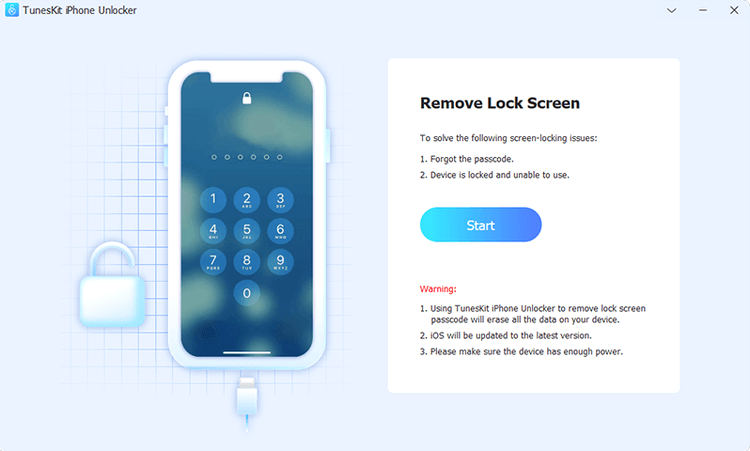
- Launched the tool and chose ‘Unlock Screen Passcode’ right from the straightforward first window. No extra features cluttering the view.
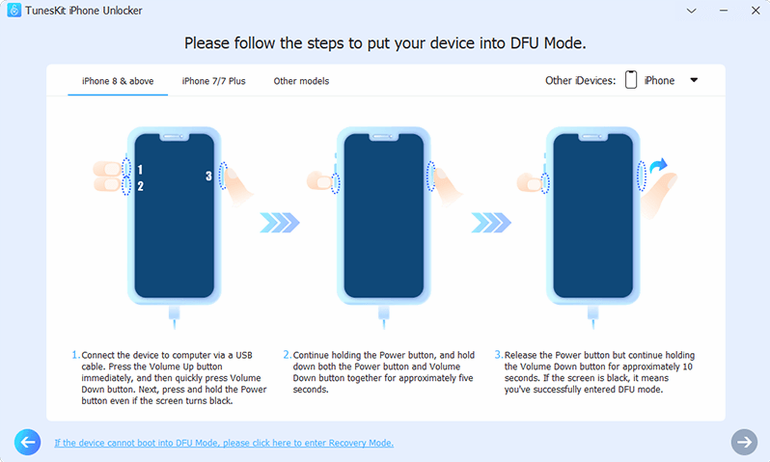
- Connected the iPhone via USB and put it into recovery mode following the on-screen button-press guide. The app detected the device state instantly.
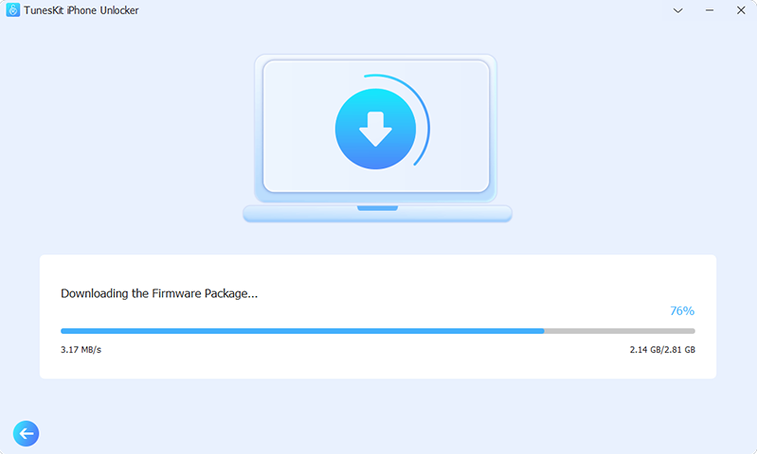
- Downloaded a matching iOS firmware package through the app’s built-in fetch. It pulled the correct .ipsw file without us hunting through browser tabs.
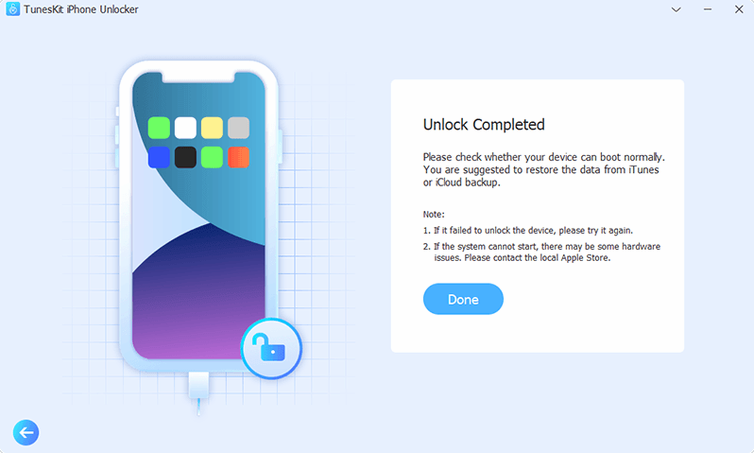
- Hit ‘Unlock’ and waited about fifteen minutes. The phone rebooted clean, free of the old passcode, and we were able to set it up fresh.
- One bonus move: Since we had the credentials handy, we also used the ‘Remove Apple ID’ function to detach the old account before returning the phone.
The whole process felt like Apple’s Device Firmware Update mode but with a clear checklist instead of a generic error. It’s not subtle, but when a screen is toast or Face ID won’t cooperate, having a Mac app that speaks plain English through the recovery is exactly what you need.
A Forgotten Passcode Workflow — From Locked to Ready
Here’s a situation I’ve seen play out more than once: a family member hands you an iPhone SE with the dreaded “iPhone is disabled, connect to iTunes” message after a toddler mashed the passcode screen. The phone still works, but iOS won’t budge. Here’s how TunesKit iPhone Unlocker 2.7.0.16 walks you back from that edge, start to finish.
- Connect and identify. Plug the disabled iPhone into your Mac and launch the app. It spots the device immediately, even in its locked-down state, and shows the current status — no guesswork about whether you need recovery mode or DFU mode yet.
- Choose the right mode for the job. For a disabled-but-responsive device, the ‘Unlock Screen Passcode’ option is the one. The app reads the iOS version and politely suggests putting the phone into recovery mode, with a timed button-press sequence displayed right on screen.
- Let it fetch the firmware. Instead of scrambling to IPSW.me or trusting a random download, you click the firmware download button inside the app. It pulls the exact build needed — matching the device model and iOS generation — and verifies the package before proceeding. For an iPhone SE, the download took under ten minutes on a decent connection.
- Start the removal and step away. Hit ‘Unlock’ and the app begins rewriting the device firmware without the passcode data. The progress bar sits in the foreground, and the phone displays an Apple logo with a progress line. Fifteen to twenty minutes later, the phone reboots to the setup screen, passcode-free.
- Optional: handle an Apple ID hangup. If the previous owner’s iCloud account is still tied to the device and you have the credentials, you can switch to the ‘Remove Apple ID’ function before restoring from a backup. It strips the account association cleanly, which is a step you’d otherwise need a separate tool or a trip to an Apple Store for.
What makes the flow work is that the app doesn’t keep asking you to confirm decisions you already made. It assumes you’re here because you’re stuck, and it stays out of your way except to show essential prompts and download progress. For anyone who has wrestled with Finder’s opaque restore errors, that clarity is a relief.
Pre‑install worries: data, money, and lockouts
Most questions I get about TunesKit iPhone Unlocker boil down to the same few worries. Here’s what you’re probably wondering, answered without the marketing fluff.
Will this keep my data intact? For screen passcode removal, no — the firmware-level process wipes the device. That’s the same as an iTunes restore. The tool is for regaining access, not for salvaging photos you didn’t back up. If you have an iCloud or Mac backup, you can restore it afterward. For Apple ID removal and Screen Time removal, data stays put most of the time, which is a genuine plus over a full wipe.
Does it work with the latest iOS? The screen unlock and Apple ID features support a wide range of iOS versions on the devices listed in the official specs. Activation Lock removal is more limited — it covers iPhone 5s through iPhone X running iOS 12.0 through 16.7.15, so if you’re on an iPhone 11 or later with a locked activation screen, that specific feature won’t help. Check the compatibility before you commit.
Is this a one-click trick? It’s straightforward, but it’s not magic. You’ll need to put the device into recovery mode or DFU mode manually, download a multi-gigabyte firmware file, and wait while the tool works. The app guides you through each step, but it expects you to follow button-press instructions on your device. Think of it as a guided repair, not a single-click wand.
What about the Gatekeeper warning during install? Because the app comes as a disk image, macOS flags it by default. The install process involves mounting the image, running the ‘Open Gatekeeper friendly’ command, pressing Enter in Terminal to bypass the block, and then dragging the app to Applications. It’s a one-time step, and the packaged instructions walk you through it clearly.
Some people search for tuneskit iphone unlocker full version free download or stumble across tuneskit torrent links. Whatever route brings you here, the build described is version 2.7.0.16, ready for Intel Macs running OS X 10.11 and up.
Hand-me-down households and forgotten passcodes
Not every Mac user needs an unlock tool sitting in the Applications folder. But a few groups keep coming back to it, and their reasons make sense.
Households with hand-me-down devices. If you cycle iPhones and iPads through family members, you’ve definitely hit the “previous owner’s Apple ID is still attached” roadblock. The Apple ID removal feature saves a trip to the Apple Support line or an awkward call to a relative who can’t remember their password. It’s the feature you use once and then wonder why Apple doesn’t make it easier.
Repair shops and IT support desks. For anyone who handles a stream of locked devices — cracked screens, forgotten passcodes, MDM-locked work phones — having a single Mac app that covers screen locks, Apple ID, Screen Time, and MDM is a desk-saver. The firmware downloads happen in-app, so you’re not maintaining a side library of .ipsw files for every iOS version. The app’s English-only interface is clear enough that you can hand the steps to a junior tech without a training session.
Users who dread iTunes errors. If you’ve ever seen error 4013 or 9 in Finder and had no idea where to start, TunesKit’s straightforward mode selection feels like a lifeline. It doesn’t solve every hardware failure — nothing will — but it removes the guesswork from the software side of a restore. Pair that with a willingness to follow recovery-mode instructions, and you’ve got a tool that does what Apple’s own utilities should explain better.
If you’re someone who only unlocks a phone once every three years, you might not need this sitting around. But for
- OS X 10.11 or later
- Intel x86 64-bit processor
- English interface
Also on readers' docks
Sign in or create an account to leave a comment.
No comments yet. Tell me how it got on with your other devices.