
Download TG Pro for macOS
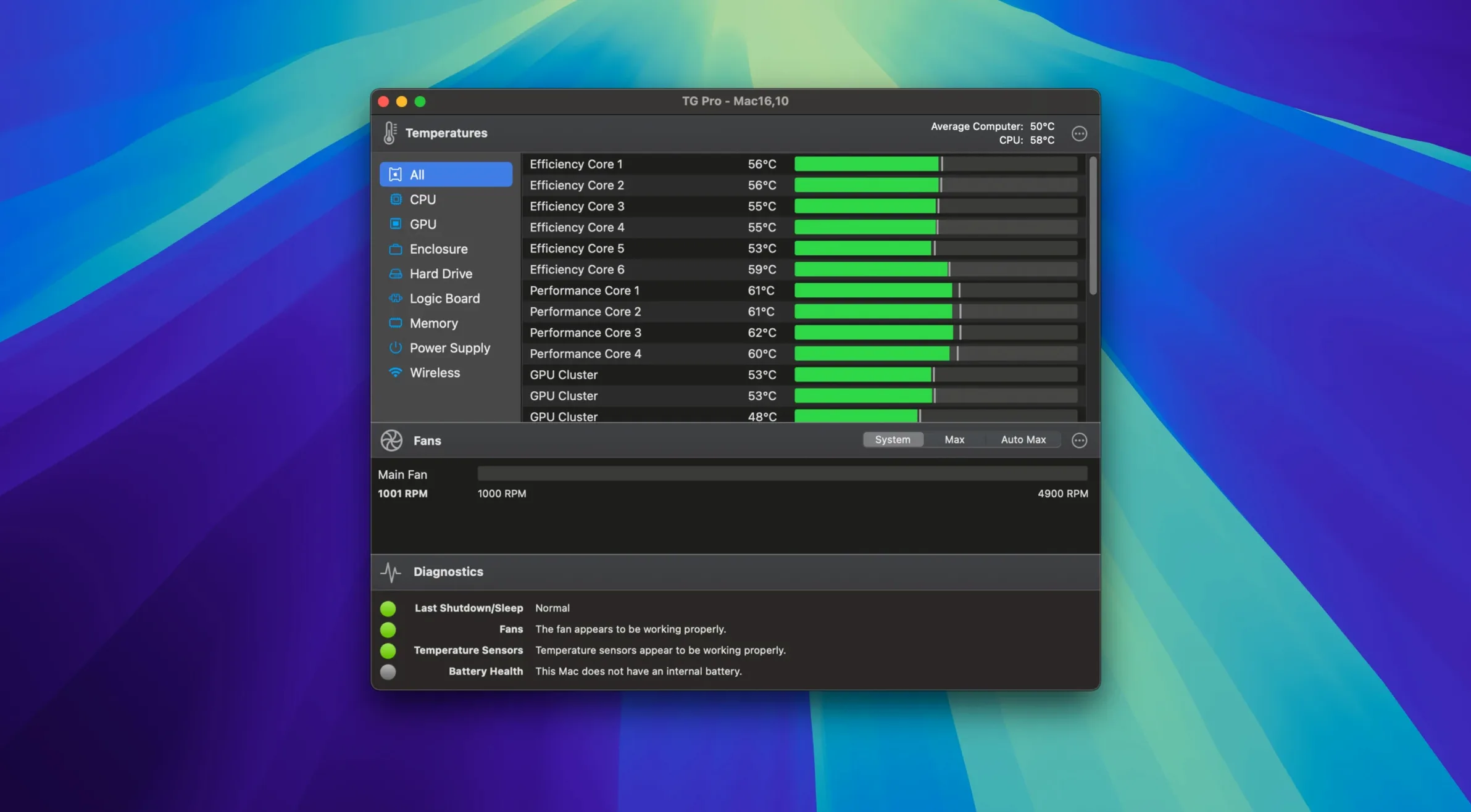
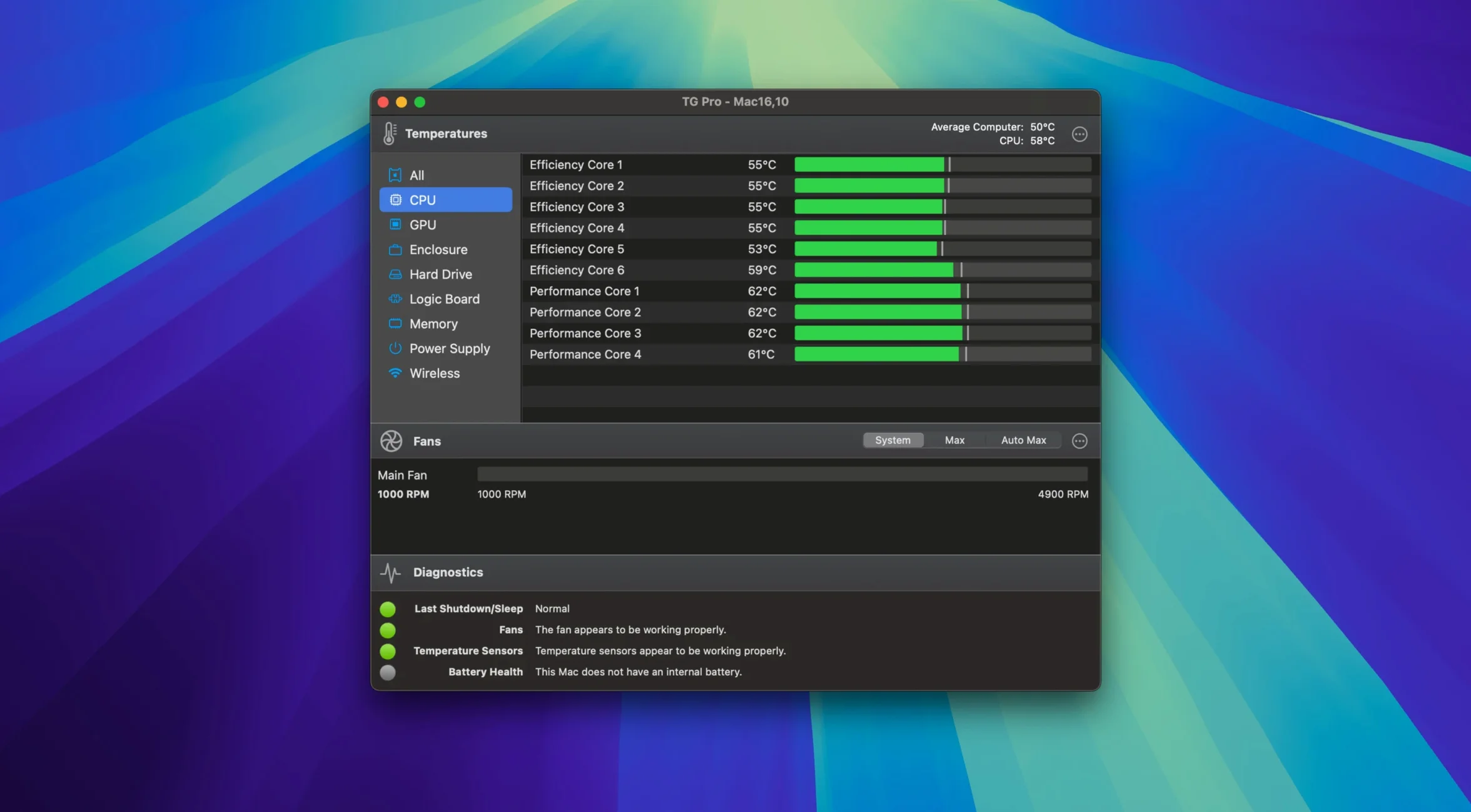
TG Pro runs on a huge range of Macs — officially macOS 10.13 High Sierra through macOS 26, plus Intel and Apple Silicon, with a preference toggle for Hackintosh systems.
Fan control — Manual and automatic adjustments for every fan your Mac has. Version 2.103 adds complete control for M4, M4 Pro, and M4 Max machines, and restores your speeds after Siri or voice dictation finishes.
Diagnostics — A clean, English-only window showing every sensor reading the hardware reports. It sits in the background with barely a blip on the CPU, so you can check temps without the tool getting in the way.
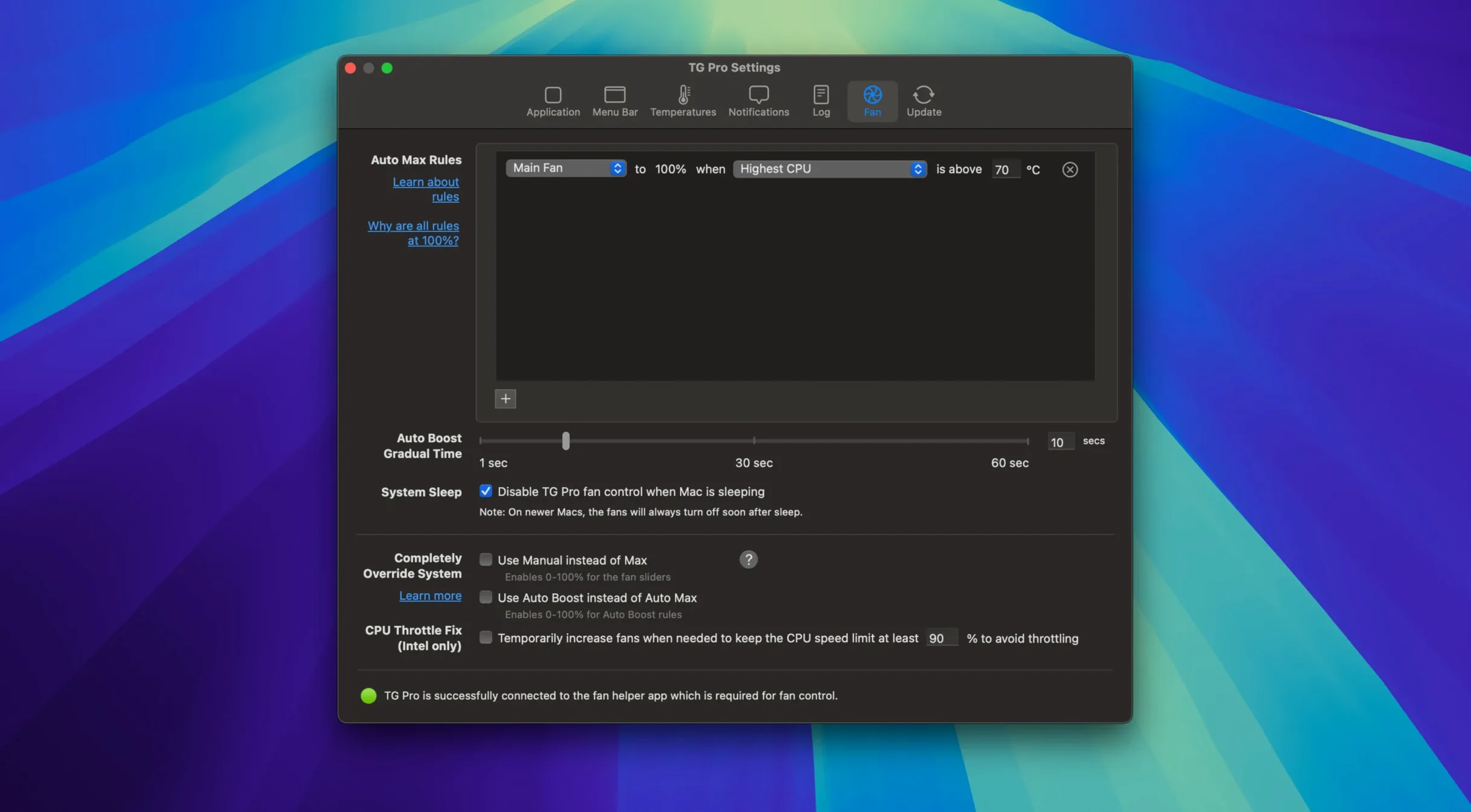
Auto Boost — Rules that raise fan speeds based on the highest temperature. The latest update fixed a hiccup where switching between battery and power adapter could make those rules miss their cue.
How TG Pro Stacks Up Against the Usual Suspects
Macs Fan Control is probably the name most people hear first. It does manual and sensor-based auto control without fuss, and it's been around forever. TG Pro goes further in two directions at once — diagnostics and rule-making. Macs Fan Control shows you temperatures for a handful of sensors; TG Pro lists everything the SMC exposes, including Wi‑Fi, memory slots, and individual disk sensors on machines that report them. If you're troubleshooting an intermittent shutdown or just curious whether your NVMe drive throttles under sustained writes, that extra visibility matters.
Then there's iStat Menus, which is really a system monitor with fan control tacked on rather than the other way around. Its dropdown panels are gorgeous, and it covers network, disk I/O and battery health in ways TG Pro doesn't try to. But for pure thermal management, TG Pro's rule system is more deliberate. You can build Auto Boost rules that watch whichever sensor scares you most and ramp multiple fans together, then write a separate rule that only kicks in on battery to keep things quieter. iStat Menus wants to show you everything; TG Pro wants to keep your Mac cool and then get out of the way.
For Hackintosh folks, TG Pro's dedicated compatibility toggle puts it in a category of its own. Macs Fan Control works on some builds with tinkering, and iStat Menus can read sensors if FakeSMC or VirtualSMC exposes them, but TG Pro explicitly accounts for the odd sensor layouts and missing SMC keys that Hackintosh boards bring. That alone makes it the go-to for anyone running macOS on non-Apple iron.
Where TG Pro Fits in a Mac Workflow
TG Pro doesn't try to be the only tool you run. It pairs naturally with something like Activity Monitor or a network monitor for the big picture, then covers the thermal layer those apps ignore. Its menu bar readout sits comfortably next to other indicators — I keep CPU temperature and the fastest fan RPM visible, so a glance tells me whether the machine's working hard before I even notice the noise.
macOS Shortcuts doesn't directly trigger TG Pro rules, but the app plays nicely with system power states. Plug in an external display and the GPU temperature climbs; if you've set an Auto Boost rule tied to that sensor, the fans respond without you touching anything. On laptops, switching between battery and power adapter triggers the power-source awareness that version 2.103 tightened up. Combine that with macOS Low Power Mode and you've got a thermal strategy that adapts to how you're using the machine without constant fiddling.
For anyone running tg pro mac os on a machine that doubles as a server or render node, the logging feature earns its keep. You can have TG Pro write temperature and fan events to a log file, then feed that into whatever monitoring stack you already use — nothing fancy, just CSV data that scripts can parse. It's the kind of quiet integration that doesn't ask you to change your setup.
Diagnosing a Heat Spike During Exports
Say it's a warm afternoon and I'm batch-exporting RAW files while a YouTube encode runs in the background. The fans on my MacBook Pro spin up audibly, and I want to know what's actually happening under the hood.
I click the menu bar icon and see CPU proximity at 92 °C and the left fan at 5500 RPM. That's hotter than I'd like for a sustained load, so I open the main window and check the full sensor list. The GPU die sits at 78 °C, and the SSD is climbing past 45 °C — normal for this workload, but the CPU is the one screaming.
I switch to the fan control tab and nudge both fans to a constant 6000 RPM. It's louder, sure, but the CPU temperature drops to 87 °C within a minute. With the export still running and the encode about halfway done, I set a temporary Auto Boost rule: if CPU proximity exceeds 85 °C, ramp both fans to 6200 RPM. That way when I step away for coffee, the machine manages itself.
Twenty minutes later I'm back. The encode finished, the export is wrapping up, and the fans have eased to 3500 RPM because the CPU temperature fell below the threshold. The log shows a clean curve — temperature rose, fans responded, temperature dropped, fans relaxed. I disable the temporary rule and let the system default take over again. Total time spent actually interacting with TG Pro: maybe ninety seconds.
M4 Fan Control Finally Unlocked
Version 2.103 landed with a handful of fixes that affect real sessions more than the bullet points suggest. The M4 family fan control is the headline, and it means owners of those Macs aren't stuck with whatever Apple's firmware curve decides — they get the same manual and rule-based control everyone else has enjoyed. For a machine that can stay nearly silent under light load but ramp hard under pressure, custom curves make a genuine comfort difference.
The Siri fix is subtler but just as welcome. Before the update, using voice dictation or summoning Siri could leave fan speeds in a weird state — sometimes stuck high, sometimes dropped to defaults that ignored your rules. Now, once Siri or dictation finishes, TG Pro restores whatever speeds or rules were active beforehand. If you use dictation throughout the day, you'll notice the fans behaving consistently again instead of needing a manual nudge after every voice interaction.
The Auto Boost power-source bug was the kind of thing that drove attentive users nuts. You'd set a rule to keep fans low on battery and aggressive on AC, unplug to move to the couch, and the rule wouldn't switch until you opened TG Pro and poked it. Fixed now. The improved startup flow for new installations also means first-time users see the permission prompts and sensor layout in a more logical order, which cuts down the initial "why isn't this working" confusion that any hardware-level tool faces on modern macOS.
If you've ever searched for TG Pro crack or TG Pro torrent hunting for a specific version, you already know how finicky fan-control software can be when it's not kept current with Apple's hardware changes. The real thing stays updated for each new Mac generation, which matters when a single macOS point release can reshuffle SMC keys. TG Pro cracked builds let you explore the app on your own terms — just check that the build you grab includes the latest fixes like M4 support, Siri restoration, and power-source awareness. For a tool you trust with your Mac's cooling, staying on top of those updates makes all the difference.
Version 2.104 is a quiet maintenance release — no splashy features this time around, just under-the-hood refinements that keep temperature monitoring and fan control running smoothly on older Intel Macs. If you've been waiting for a specific bug fix, this build tidies up a handful of small things the developer spotted.
- macOS 10.13 High Sierra or later
- Intel 64-bit Mac
Questions people ask
Does TG Pro work with voice dictation?
Yes — version 2.103 specifically fixed fan control so speeds recover properly after Siri or voice dictation ends.
Can I use TG Pro on a Hackintosh?
Absolutely. TG Pro includes a preference toggle designed for Hackintosh systems, and it supports macOS 10.13 through macOS 26.
Also on readers' docks
Sign in or create an account to leave a comment.
No comments yet. Tell me how it got on with your other devices.