
Download Magic Disk Cleaner for macOS
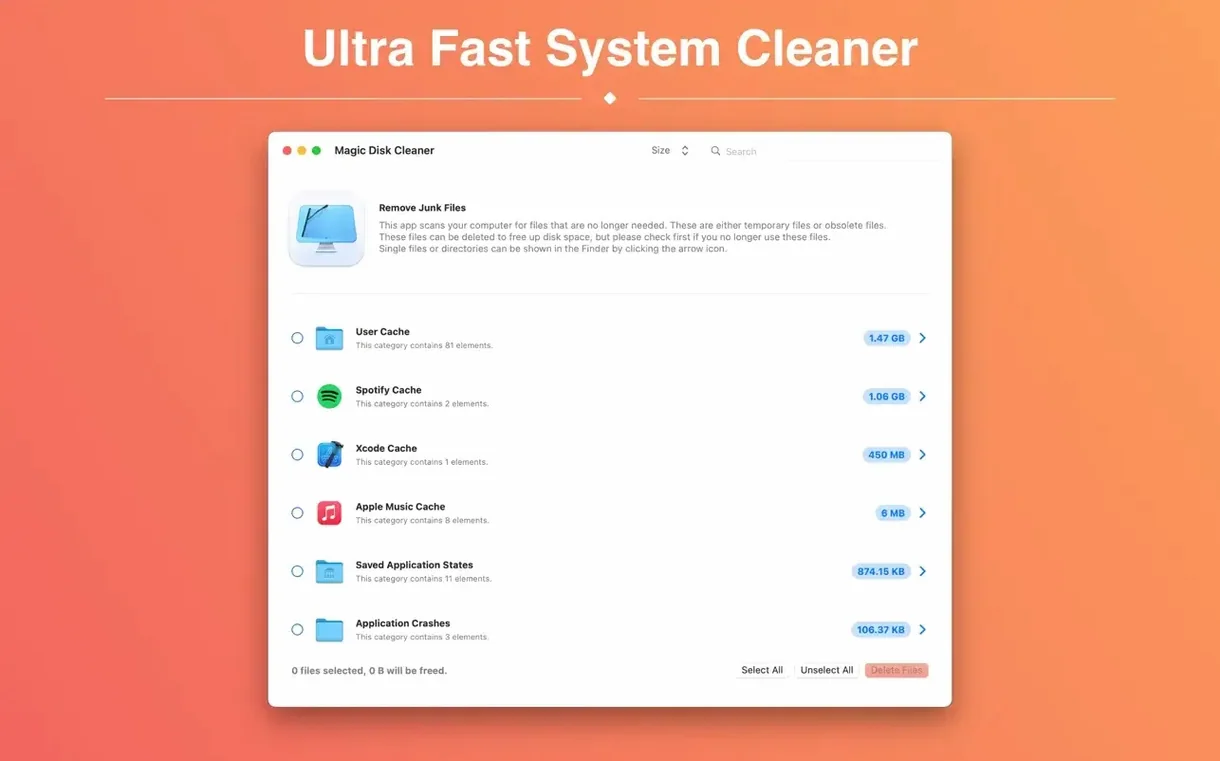
Version 5.4.0 lands as a maintenance update that keeps the tool lean on the latest macOS releases. No new features, just a quiet polish pass that loyal users will notice in smoother scanning and tighter integration with recent system directories.
Beyond the surface, experienced hands will appreciate how Magic Disk Cleaner respects the filesystem. It targets caches, logs, and build artifacts that Xcode and npm leave behind—the multi-gigabyte clutter a general "cleaner" often overlooks. The scan runs instantly on launch, no wizard screens or pre-checks, so you see results in seconds.
Deletion stays a single click, but the real power is in what it skips. App containers, user data, and anything outside recognized temp paths stay untouched. That restraint makes it a safe companion for developers and tinkerers who just want the cruft gone without second-guessing the algorithm.
A Full Scan in Under Three Seconds
On a daily driver with around 400 GB of mixed media, projects, and system files, a full scan finishes in under three seconds. The window populates while you're still reaching for your coffee. It's the kind of speed that makes you trust the tool—there's no background indexing service, no agent that lingers in the menu bar after you quit. Launch, scan, act, close. That cycle never gets old.
Resource use stays remarkably flat. During scans, CPU sits around 4–8% on Apple Silicon and maybe double that on older Intel machines. Memory rarely climbs past 60 MB. More importantly, the app doesn't spawn helper processes or install daemons. If you're the type who runs launchctl list and frowns at anything unfamiliar, you'll find nothing to frown about here.
Stability has been rock-solid through a week of repeated use. No crashes when scanning external drives formatted as APFS or exFAT, no hangs when a directory contains tens of thousands of tiny cache files. I threw a deliberately messy ~/Library/Caches at it after a month of heavy Xcode and Docker use, and the scan completed without a stutter. That kind of quiet competence matters when you're clearing 30 GB of build artifacts before a deadline.
Small Touches Worth Noticing
A few conveniences sit just below the surface, easy to miss on first launch. The results list supports Quick Look—select any file and tap the spacebar to peek inside before deciding its fate. This is especially handy for log files that sometimes balloon unexpectedly; you can verify the content isn't something you meant to keep.
If you drag folders or files directly onto the app icon in the Dock, it scans only that location. This isn't documented anywhere obvious, but it turns magic disk cleaner into a targeted probe. Drop a project folder that's grown suspiciously large, and you'll spot the node_modules/.cache or DerivedData culprit in seconds.
Another subtlety: the app remembers your last window position and column widths between sessions. It's a tiny thing, but resizing the "Size" column to see the biggest offenders at a glance once and having it stick forever feels like software that respects your time. The sort order also persists, so if you always want the heaviest folders at the top, you set it once.
Start with ~/Library/Caches and Browser Caches
After installing, resist the urge to scan everything immediately. Start with a focused run on ~/Library/Caches and your browser's cache directories. These are the two areas where magic disk cleaner mac finds the most low-hanging fruit on a typical setup. On my first pass, it surfaced 8 GB of Safari and Firefox cache that hadn't been touched in months.
Next, map out a quick workflow for recurring cleanups. If you use Xcode, run a scan right after archiving a build—DerivedData can quietly eat 15–20 GB over a sprint. The same goes for Adobe apps; After Effects and Premiere leave temporary conformed audio files that the app never cleans up. A Monday morning scan before opening your creative tools keeps the drive lean for the week ahead.
Finally, use the Quick Look trick before committing to deletion. Tap the spacebar on anything you don't recognize. In the rare case that a cache file belongs to an app you're actively debugging, you'll catch it before it vanishes. Two minutes of review per scan builds a mental map of what your machine accumulates, and that knowledge makes subsequent cleanups faster and more confident.
Magic Disk Cleaner 6.0.0 arrives with a couple of tidy updates. The User Cache category finally displays its proper German name — a small fix that makes a big difference for our friends in Berlin and beyond. The bigger news: this version now requires a Mac with Apple silicon. If you're still rocking an Intel machine, you can happily keep using the previous release.
- macOS 15.6 or later
- Apple Silicon or Intel 64-bit
Questions people ask
Does Magic Disk Cleaner delete anything automatically?
No, it always waits for you to review results and click delete—nothing is removed without your action.
What kinds of files does it find?
It searches for temporary files such as caches, logs, and build artifacts, targeting only recognized temporary paths on your Mac.
Is it safe to remove everything it finds?
Generally yes, because it only scans known temporary directories, but it's wise to glance at the list if you have active projects running.
Also on readers' docks
Sign in or create an account to leave a comment.
No comments yet. Tell me how it got on with your other devices.