








Download DynamicLake Pro for macOS
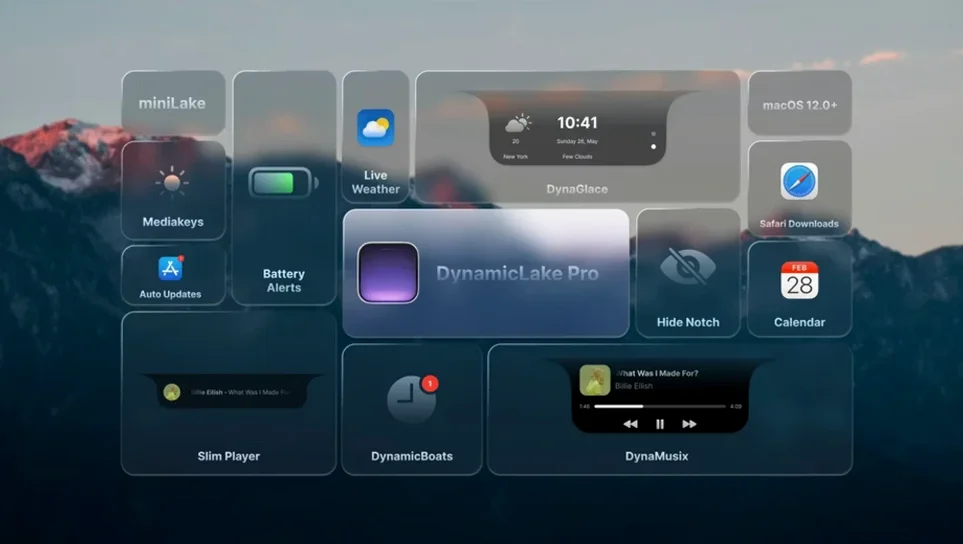

If the notch on your MacBook already feels like borrowed real estate from an iPhone, DynamicLake Pro gives it a proper job. Think of the Dynamic Island you’ve tapped on iOS, then picture those same music controls, calendar peeks, and quick notification replies living right in your Mac’s menu bar area. That’s the core idea Aviorrok has been refining, and the current version keeps that cross-device familiarity while adding a few practical touches.
Clock Timers, DynaConnect, and DynaGlance in 1.8
- Timers you set in the macOS Clock app now pop up inside DynamicLake automatically — no extra setup.
- DynaConnect gives you Bluetooth connection and disconnect alerts at a glance.
- DynaGlance serves real-time schedule and weather updates without opening another app.
- Push notifications with quick replies cover several major communication apps.
The core experience stays familiar
The widgets you’d expect are all here: music playback controls, a weather snapshot, and calendar events that live in your peripheral vision. The app requires macOS 11 or later and runs on both Intel and Apple Silicon machines. Under the hood, it still extends macOS with that animated pill-and-island interface language Apple popularized on the phone, now repurposed for a larger screen where it genuinely helps with multitasking. If you spend half your day in Slack threads or tweaking a playlist while watching the clock, this version makes those tiny interactions feel a step closer to your iPhone’s fluidity.
How DynamicLake Pro plays with the rest of your Mac
One thing I noticed after a few days of leaving the app running was how naturally it slots into existing macOS workflows rather than fighting them. The island doesn't steal focus the way a full notification banner does — it expands and contracts around whatever you're already doing, whether that's writing in Ulysses or sorting a Finder window. Because the app hooks into the same notification center pipeline that feeds your regular alerts, you're not juggling a separate notification silo. A Slack mention, a Calendar alert, or a timer from the Clock app all surface through the same pill-shaped hub, which means less context-switching and fewer trips to the sidebar.
The real glue, though, is how it borrows from system-level shortcuts you already use. Option+Tab for the DynaSwitcher feels instantly right if you've ever flipped between apps with Command+Tab. It's not a replacement — it's an overlay that shows you open windows in a compact strip near the island, handy when you've got a dozen things open and want to jump three apps back without hunting through the Dock. I've caught myself using it more than I expected, especially when my hands are already on the keyboard and I don't want to break rhythm.
miniLake Mode and Other Hidden Refinements
There's a handful of things the app does that won't jump out on a first launch, but they add up once you settle in:
- miniLake mode. If the full island feels intrusive during a focused work session, miniLake collapses it down to a slimmer strip that still shows the essentials — current track, next calendar event, or a timer countdown. Toggling it takes a second from the menu bar icon.
- DynaKeys feedback. When you adjust volume or keyboard brightness, a subtle visual pulse appears in the island. It's faster than glancing at the on-screen overlay macOS shows by default, and it doesn't block content the way the system HUD does.
- Bluetooth awareness. DynaConnect is the kind of feature you forget about until it saves you. AirPods disconnect mid-call? The island flashes a brief alert with the device name. It's a small dignity, but it beats wondering why your audio just went silent.
- Quick replies that actually feel quick. For supported messaging apps, you can tap a notification in the island and type a reply without the chat window ever opening. It's not a full client replacement, but for one-line answers, it keeps the flow going.
Who's going to feel the difference
If your Mac is mostly a browsing-and-email machine, DynamicLake Pro adds some visual flair but won't fundamentally change your day. The users who'll notice the biggest shift fall into a few clear camps.
Notification-heavy workers — people who live inside Slack, Teams, or a stream of calendar pings — get the most immediate benefit. Instead of banners piling up in the top-right corner or stacking silently in Notification Center, everything funnels into one glanceable spot. Reply, dismiss, or snooze without leaving the document you're in. It's a quiet focus saver.
Music and media multitaskers will appreciate DynaMusic more than they might guess. The animated album art and playback controls sit closer to your cursor than Control Center or the mini player, and scrubbing through a track with a quick click-and-drag feels more natural than hunting for a Touch Bar you might not have.
People juggling time zones or tight schedules get DynaGlance pulling double duty: weather and next appointment side by side, updating in real time. Before a meeting, a quick glance at the island tells you whether you need a jacket for the walk and who you're talking to in ten minutes, all without unlocking your phone or opening a widget panel.
If none of that sounds like your routine, the app still works as a lighter notification companion, but the deep integration shines brightest when your Mac is already buzzing with incoming information.
Clock Timer Integration and Friction Fixes
Version 1.8 isn't a headline-rewrite kind of update, but it fixes a few friction points that early adopters complained about. The Clock app timer integration is the standout: previously, timers lived in their own little universe, invisible unless you switched to the Clock app. Now, a boiling-egg countdown or a pomodoro session shows up in the island unprompted. It's the kind of system-awareness that makes the app feel less like an add-on and more like a native extension.
Under-the-hood work on notification routing means fewer duplicate alerts. Earlier builds sometimes echoed a notification both in the island and as a standard banner; that's largely smoothed out now, which cuts down on the noise during busy hours. Bluetooth alerts got smarter about distinguishing deliberate disconnects from dropouts, so you're not pestered every time you intentionally switch audio outputs.
The language support continues to expand — thirteen languages at this point, including right-to-left support for Hebrew — which matters if you switch system languages or work in a multilingual environment. Even the installer stays straightforward: open the disk image, drag the app into Applications, and launch from Launchpad. No activation hurdles, no architecture confusion since the binary handles both Intel and Apple Silicon from the same bundle. For a tool that's essentially grafting a phone interaction model onto the desktop, it's settled into a surprisingly stable groove.
- macOS 11 or later
- Works on Intel and Apple Silicon Macs
Questions people ask
Can DynamicLake Pro show my Mac's Clock app timers?
Yes, as of version 1.8 any timer created in the macOS Clock app appears automatically inside DynamicLake so you can track it without switching windows.
Also on readers' docks
Sign in or create an account to leave a comment.
No comments yet. Tell me how it got on with your other devices.
More in Mac Apps
See all Dynamic Wallpaper Engine
25.4 Mac Apps
26 MB
Dynamic Wallpaper Engine
25.4 Mac Apps
26 MB
 Element 3D
2.2.3 Mac Apps
320 MB
Element 3D
2.2.3 Mac Apps
320 MB
 DxO PureRAW 6
6.4.1 Mac Apps
968 MB
DxO PureRAW 6
6.4.1 Mac Apps
968 MB
 Elmedia Player Pro
8.24 Mac Apps
157 MB
Elmedia Player Pro
8.24 Mac Apps
157 MB
 DxO PhotoLab
9.10.0 Mac Apps
2.3 GB
DxO PhotoLab
9.10.0 Mac Apps
2.3 GB
 DVDFab
12.0.8.2 Mac Apps
413 MB
DVDFab
12.0.8.2 Mac Apps
413 MB
 Updated Duplicate File Finder Pro
9.2.1 Mac Apps
37 MB
Updated Duplicate File Finder Pro
9.2.1 Mac Apps
37 MB
 Dropover
5.3.0 Mac Apps
33 MB
Dropover
5.3.0 Mac Apps
33 MB