









Download BetterZip for macOS
macOS handles ZIP files out of the box, but the moment you need to peek inside a RAR, split a large 7z archive, or yank a single file out of a compressed folder without extracting everything, Finder throws up its hands. That quiet gap between what the system does and what real file wrangling demands is exactly where BetterZip lives.
Editing archives in place without full extraction
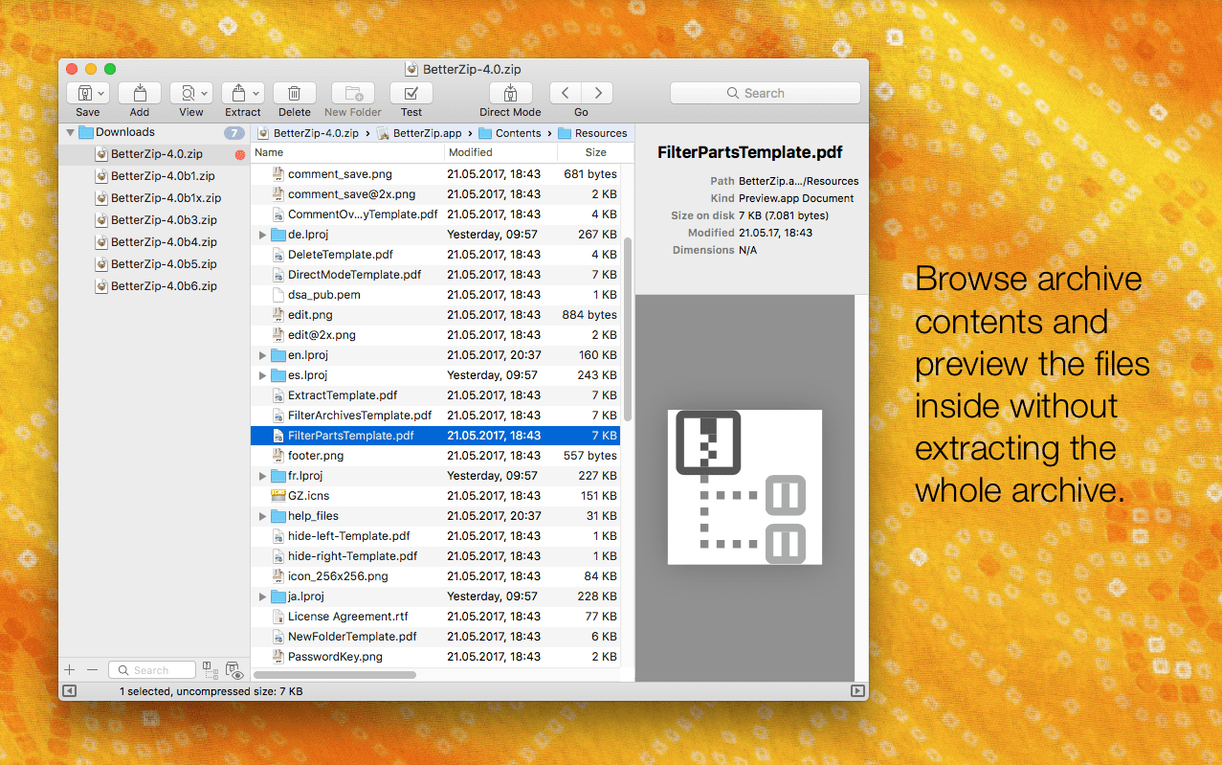
- Opening and managing 7z, RAR, and ZIP archives without unpacking the whole thing first
- Editing archive contents directly — add or remove files inside a compressed folder
- Folder watching and an operations queue that compress or extract without you babysitting the progress bar
- AppleScript support for tying archive tasks into larger workflows
- Adding comments to both ZIP and RAR archives right inside the app
Requires macOS 13.5 or later
- Needs macOS 13.5 or later — not for older machines stuck on Monterey or Big Sur
- Runs natively on Apple Silicon and Intel, but the real speed bump on 7z tasks comes from the updated helper on Apple Silicon
- The Finder extension and contextual-menu tools are great, but you'll want to grant them permission during setup
Stripping working files from a client delivery archive
I keep a folder called To Send on my desktop where finished projects land before they go out. Last week a design client needed twelve logo variations, three brand guideline PDFs, and a font folder — but not the working files, not the notes, and definitely not the embarrassing early concepts still lurking in subfolders.
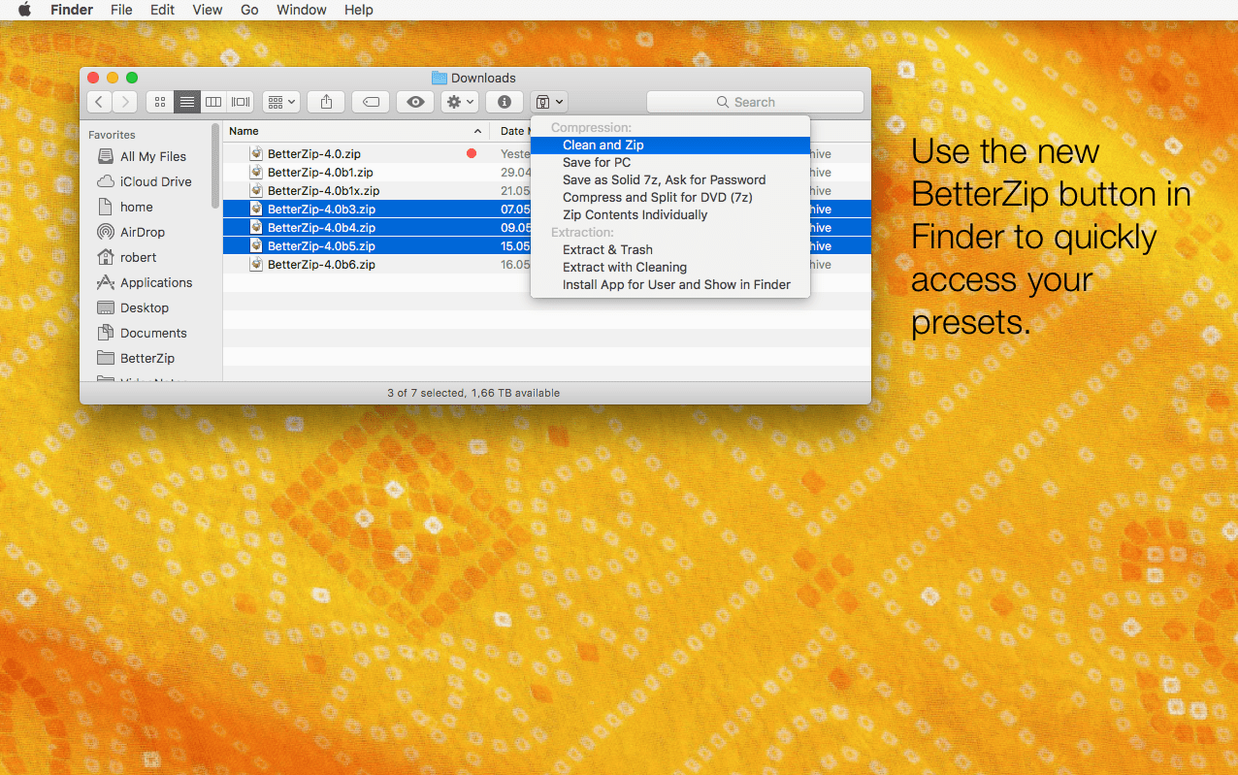
Normally I'd duplicate the whole mess, delete what I don't need, compress the rest, and pray I didn't miss something. With BetterZip I skip the duplication. I highlight the project folder in Finder, right-click, and choose Compress with BetterZip. The archive pops open in the main window before it ever hits disk. From there I browse exactly like Finder — disclosure triangles and all — and delete the Drafts subfolder, three stray .txt notes, and a mood board image the client never approved. Each removal happens inside the still-open archive. No extraction, no repacking, no temporary clutter.
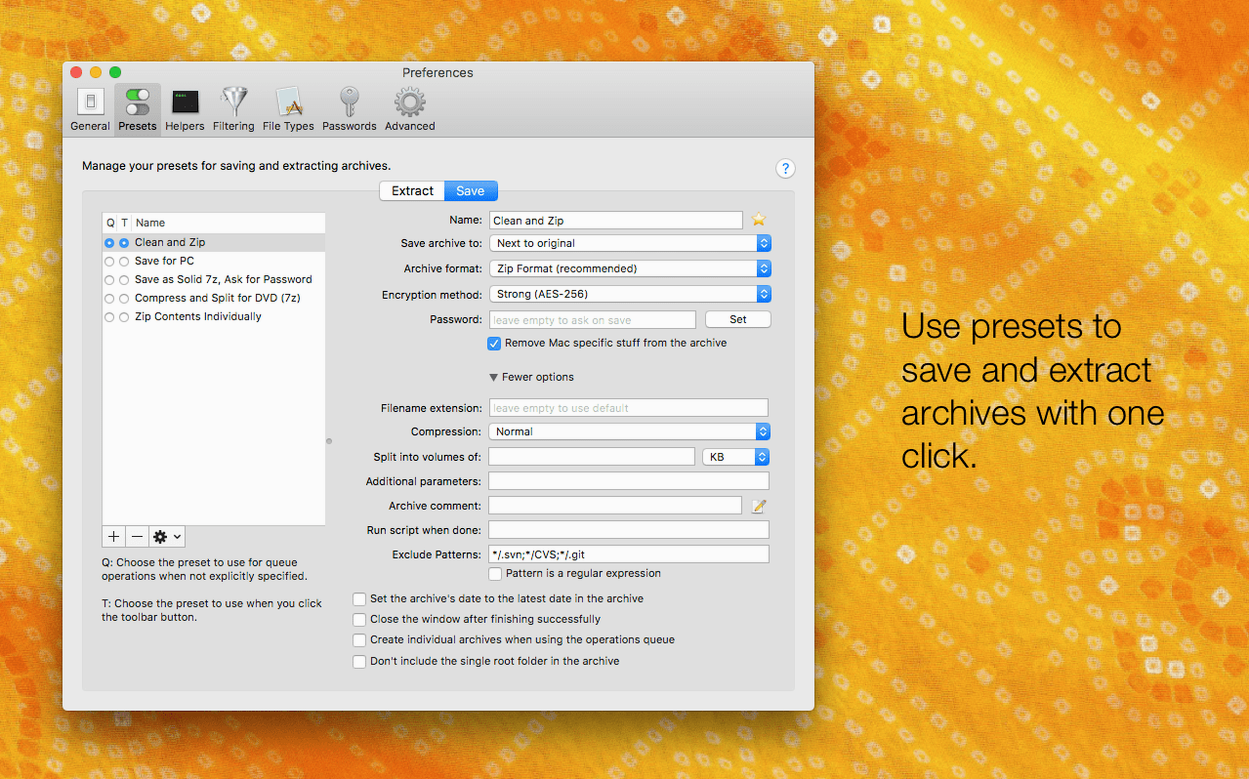
I rename the root folder from Project_Final_v3_fixed to something the client actually wants to see, add a quick ZIP comment with the delivery date and my contact info, then hit Save. Twenty seconds flat from right-click to finished archive. The fonts subfolder gets its own AES-256 encrypted archive (BetterZip's password generator created something I'll never remember, which is the point) and both files land in the To Send folder, clean and client-ready.
Inbox morning: RAR, split 7z, and a dubious ZIP
Monday morning, three archives land in my inbox. One's a RAR from a photographer, one's a split 7z from a developer friend testing a build, and one's a ZIP from a colleague who swears she zipped the right files this time.
I drag the RAR onto BetterZip's dock icon. The window fills with a file list I can actually browse — thumbnails and all — because Quick Look works right inside the archive. I tap Space on a .CR2 raw file and it opens instantly. No extraction to a temp folder I'll forget to delete. Satisfied the photos are the right ones, I select just the selects, drag them to my desktop, and close the window. The RAR stays untouched.
The split 7z is trickier. Finder sees five .7z.001 through .7z.005 files and has no idea what to do with them. BetterZip grabs the first segment and reassembles the whole thing automatically. It takes maybe eight seconds on this M1 machine — the 6.0.6 update with its Apple Silicon-optimized 7z helper shaves off a noticeable beat compared to the previous version I ran. The extracted app bundle lands intact, and I'm already opening the ZIP from my colleague before the coffee finishes brewing.
That ZIP — surprise — has three files she forgot to include. Instead of firing off an awkward email, I open it in BetterZip, drag the missing PDFs straight into the window from Finder, and save. Archive updated, relationship preserved.
Switching BetterZip’s display language independently from macOS
The headline feature sounds small but bites hard in practice: you can now tell BetterZip to use a language different from your system language. I work in English but occasionally share screens with colleagues who prefer German or Japanese. Switching the app independently of macOS system preferences means I'm not digging through Language & Region panes just to show someone a menu item.
The option to skip restoring macOS metadata during extraction is the kind of toggle that makes cross-platform work smoother. Extracting a ZIP that came from a Windows machine no longer sprinkles invisible ._ files everywhere. If you've ever had a Linux server admin ask why your archive left "weird dot-underscore droppings" in their directory, you'll appreciate this checkbox immediately.
Under the hood, the 7z helper bumped to v26.03 with assembler optimizations for Apple Silicon. On large multi-gigabyte 7z archives, extraction feels tighter — not a night-and-day difference, but the progress bar moves with more confidence, fewer of those long pauses where you wonder if the app's frozen. The updated zstd and brotli tools keep pace with the formats as they evolve, and the unrar library refresh closes compatibility gaps with newer RAR variants floating around. A rare crash tied to external helper communication got patched too, which explains why my batch extraction queue hasn't hiccuped once since the update.
Idle memory sits around 40 MB
BetterZip stays lean in daily use. Idle, it sips around 40 MB of RAM on my machine — less than a single Safari tab showing a news site. During a compression job on a 2 GB folder, memory climbs to maybe 180 MB and CPU fans stay silent. The operations queue is the real resource saver: I stack up six compressions, walk away, and come back to a finished list. No beach ball, no "this archive is locked by another process" errors.
Stability in 6.0.6 feels like a known quantity. The app's been around long enough that the weird edge cases — archives with non-UTF-8 filenames, deeply nested folder structures, password-protected RARs from 2007 — get handled without drama. The one crash they fixed in this release was the kind most users wouldn't hit unless they ran batch jobs with external helpers daily, and if you're running a betterzip mac crack you'll want to make sure those helper tool paths are correctly configured to take full advantage of the fix. If you've ever been stuck on betterzip 5.4 or betterzip 5 and noticed the occasional extraction hang on newer 7z files, the tooling updates alone justify the jump.
Quick Look inside archives stays snappy even when previewing large images or multi-page PDFs — a silent win for anyone who's waited through Finder's sluggish preview pane on a network drive. The contextual menu integration loads instantly, and the Finder extension hasn't caused a single Finder restart since I installed it. For an app that hooks this deep into macOS file handling, the restraint is impressive. It does its job, stays out of the way, and doesn't turn my menu bar into a landfill of helper icons.
BetterZip 6.0.6 brings a handful of practical tweaks:
- You can now run BetterZip in a different language than your system language — handy for multilingual setups
- New option to skip restoring macOS metadata during extraction, which keeps things cleaner when moving files to non-Mac systems
- The 7z helper jumps to v26.03 with Apple Silicon assembler optimizations for snappier 7z handling
- A rare crash tied to external helper communication got squashed
- macOS 13.5 or later
- Works on both Intel and Apple Silicon Macs
Questions people ask
Can BetterZip handle RAR files on a Mac?
Yes. BetterZip opens, extracts, and edits RAR archives, and version 6.0.6 includes an updated unrar library. You can even add comments to RAR files.
Does BetterZip work with 7z archives?
It does. BetterZip can open and manage 7z archives on Mac, and the latest release updated the 7z helper to v26.03 with Apple Silicon assembler optimizations for faster performance.
Can I remove a single file from an archive without extracting everything?
Absolutely. BetterZip lets you delete one or more files directly from inside an archive, so you don't have to unpack, delete, and recompress.
Also on readers' docks
Sign in or create an account to leave a comment.
No comments yet. Tell me how it got on with your other devices.
More in Mac Apps
See all BetterTouchTool
6.726 Mac Apps
61 MB
BetterTouchTool
6.726 Mac Apps
61 MB
 BetterMouse
1.7.8995 Mac Apps
7 MB
BetterMouse
1.7.8995 Mac Apps
7 MB
 Binary Ninja
6.0.10601-personal Mac Apps
584 MB
Binary Ninja
6.0.10601-personal Mac Apps
584 MB
 Updated BetterDisplay Pro
4.0.4 Mac Apps
16 MB
Updated BetterDisplay Pro
4.0.4 Mac Apps
16 MB
 Beauty Box Photo
6.0.5 Mac Apps
107 MB
Beauty Box Photo
6.0.5 Mac Apps
107 MB
 Updated Bloom
1.5.46 Mac Apps
19 MB
Updated Bloom
1.5.46 Mac Apps
19 MB
 Bartender
7.0.4 Mac Apps
31 MB
Bartender
7.0.4 Mac Apps
31 MB
 BookReader
5.16 Mac Apps
14 MB
BookReader
5.16 Mac Apps
14 MB