Download Beauty Box Photo for macOS
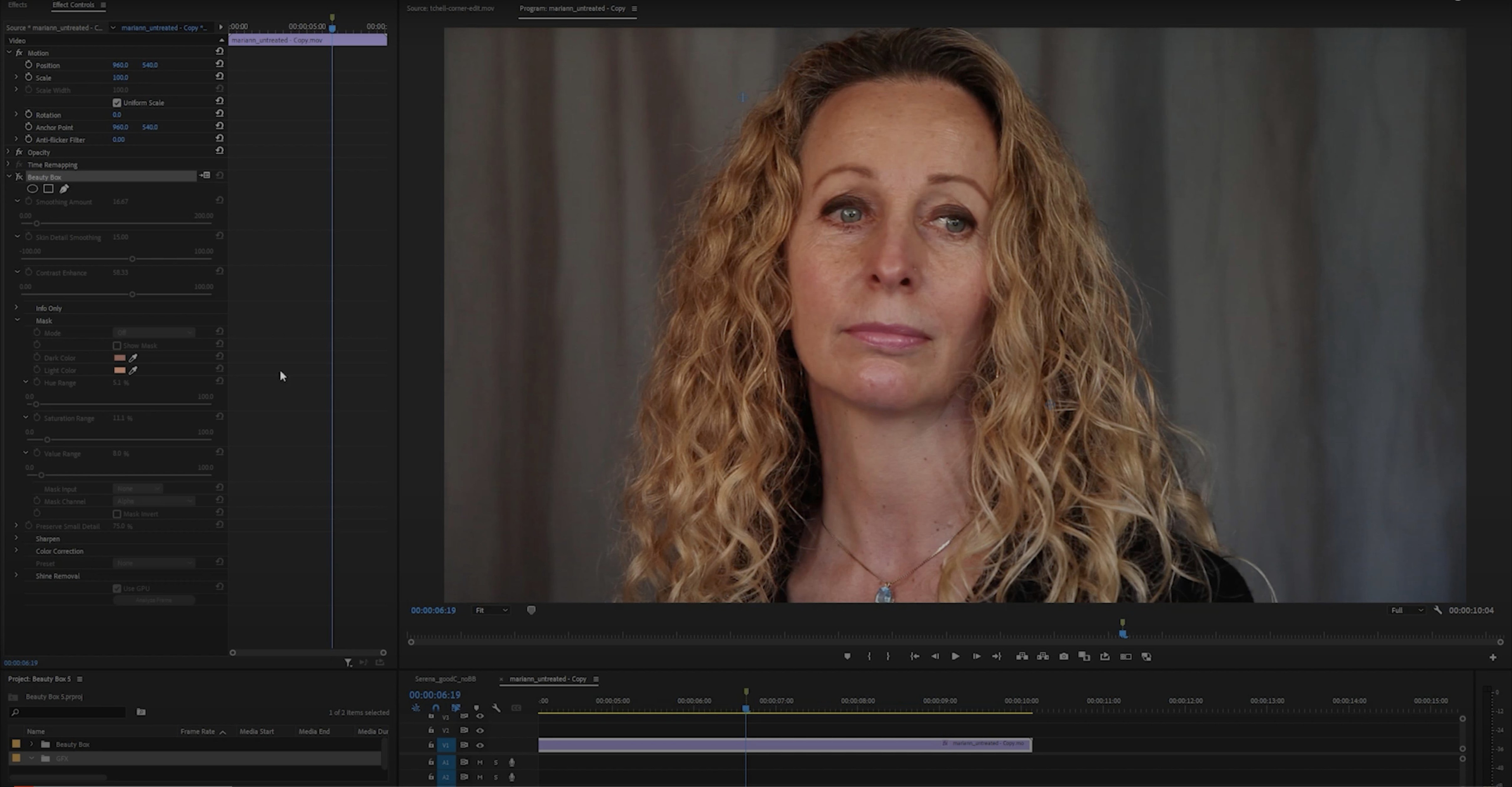
A portrait session wraps and the selects are in. You open the RAW files in Photoshop, drop Beauty Box Photo onto a new layer, and the skin evens out while eyelashes and hair stay crisp. It is that kind of tool: automatic, but not blurry.
The plug-in is Adobe-only, which matters for anyone living in Photoshop or Premiere Pro. It works on both Intel and Apple Silicon Macs, and the current version is 6.0.5. Rendering feels immediate thanks to CUDA and OpenGL, so you see skin smoothing on screen without waiting for a progress bar.
Blemishes and wrinkles fade, but facial structure and fine detail do not turn to plastic. The interface is in English, and installation is a standard disk image routine — open it, run the installer, done.
Pull the Smoothing slider down ten percent
Out of the box, Beauty Box Photo does a strong job, but the defaults lean cautious. I nudge a few controls before I rely on it for a batch.
Pull the Smoothing slider down by about ten percent from its middle starting point. The plug-in often applies a bit more than a natural-light portrait needs, especially on younger skin. Then push the Sharpening value up slightly — just two or three points — so the catchlights in the eyes and the texture of the brows hold their bite. The interplay between those two sliders is where the magic lives.
- Mask view: Hit the mask toggle often during your first few sessions. It shows you the exact area the plug-in detected as skin. If it bled onto the lips or into the hairline, you can refine the mask with the included brush tools right there before applying.
- Presets per lighting setup: Once you have a combo you like for a specific shoot — say, window light with a single reflector — save it as a named preset. The plug-in ships with a few starters, but your own beat them every time.
- Layer blending: Run Beauty Box on a duplicate layer, then drop the layer opacity to 80-90 percent. That tiny bit of unretouched skin underneath keeps the result from crossing into porcelain territory.
Smart Object layer lets you re-tweak anytime
Beauty Box Photo is not a standalone editor, and that is its strength. It sits inside Photoshop as a filter you apply to a Smart Object layer, which means you can double-click it later and tweak the smoothing without redoing your whole stack.
I often run it after frequency separation but before dodging and burning. It handles the broad skin tone evening, and then I paint light and shadow on top with curves. The plug-in plays nicely with Photoshop's history states, so undo is never a problem, and it respects layer masks you already built.
On the macOS side, a few things click into place. The plug-in uses the Mac's native GPU acceleration, so the real-time preview stays fluid even on a 5K Retina display. Quick Look integration is not direct — it works inside Photoshop — but once you save out a retouched TIFF, you can tap the spacebar in Finder to check the result without launching anything. And if you use Automator or a droplet to batch-process files, you can record an action that includes a Beauty Box step and let it churn through a folder while you make coffee.
For video editors hunting for a beauty box for mac premiere pro workflow, the same engine lives in the Premiere version of the plug-in. The mask detection and smoothing logic are identical, so a preset you save in Photoshop can guide your settings in Premiere later.
Split-view preview hides behind a tiny button
The interface is compact, and a few handy pieces hide behind small icons.
- Split-view preview: A tiny button toggles a side-by-side before-and-after view inside the preview window. Drag the divider left or right. It is much faster than switching the effect on and off repeatedly.
- Keyboard scrubbing: Hover over any slider and use the left and right arrow keys to nudge values by single units. Hold Shift to jump in increments of ten. No clicking, no overshooting.
- Skin color memory: The auto-detect button samples the whole image, but you can command-click a specific cheek or forehead patch to tell it exactly which skin tone to target. The sample sticks until you clear it.
- Zoom follows cursor: In the preview pane, the zoom centers on wherever your pointer sits. Move the cursor to an eye, scroll to zoom, and you are checking sharpness without dragging any sliders.
Skin-toned clothing fools the auto-detect mask
Even a plug-in this focused can trip over edge cases.
Mask spills onto clothing or background. When the subject wears something skin-toned — a beige blouse, a peach wall — the auto-detect sometimes includes it. Switch to mask view, grab the subtract brush, and paint the area out. The brush is pressure-sensitive if you use a Wacom, so a light stroke feathers the edge naturally.
Preview stutters on Intel Macs. The plug-in leans hard on the GPU. On older Intel machines with integrated graphics, the real-time preview can lag if your image has large pixel dimensions. Drop the preview quality temporarily — there is a small dropdown for it — while you dial in settings, then restore full quality before you apply.
Photoshop does not see the plug-in after install. Beauty Box lands in the common plug-ins folder, but Photoshop sometimes needs a nudge. Quit Photoshop, confirm the plug-in file sits in /Library/Application Support/Adobe/Plug-Ins/CC, then relaunch. For Apple Silicon Macs running Photoshop natively, make sure you installed the ARM build, not the Intel-only package. The disk image for version 6.0.5 includes both architectures.
Over-smoothing on darker skin tones. The auto-detect can misinterpret shadow areas as texture to smooth. Lighten the mask density with the opacity slider inside the masking panel, or switch the detection mode to a gentler profile. A quick test patch on the forehead usually surfaces the issue before you spend time on the full image.
Some photographers discover the plug-in while looking for a beauty box plugin crack mac search, and version 6.0.5 ships with straightforward activation so you can set up the GPU acceleration and mask tools to work as expected right away—no mysterious Photoshop crashes at 2 a.m.
This is for working retouchers who already live in Adobe apps and want a skin pass without switching to a standalone editor.
- Runs on both Intel and Apple Silicon
- Adobe-only build
- Interface language: English
Questions people ask
Does Beauty Box Photo work in Premiere Pro on macOS?
Yes, it works as an Adobe plug-in in Premiere Pro as well as Photoshop on macOS.
Will Beauty Box Photo run on Apple Silicon Macs?
The current version supports both Intel and Apple Silicon Macs.
Does Beauty Box Photo keep facial details sharp?
It smooths skin and removes blemishes and wrinkles while keeping facial details crisp.
Also on readers' docks
Sign in or create an account to leave a comment.
No comments yet. Tell me how it got on with your other devices.