








Download BetterMouse for macOS
Version 1.7.8995 recently bumped the floor to macOS 12 Monterey, a shift the developer notes was driven by macOS 27 requirements under the hood. If your Mac is still on Big Sur, this release won't install — something to check before you grab the disk image. On the hardware side, BetterMouse runs natively on both Intel and Apple Silicon machines, so there's no Rosetta translation lag to worry about.
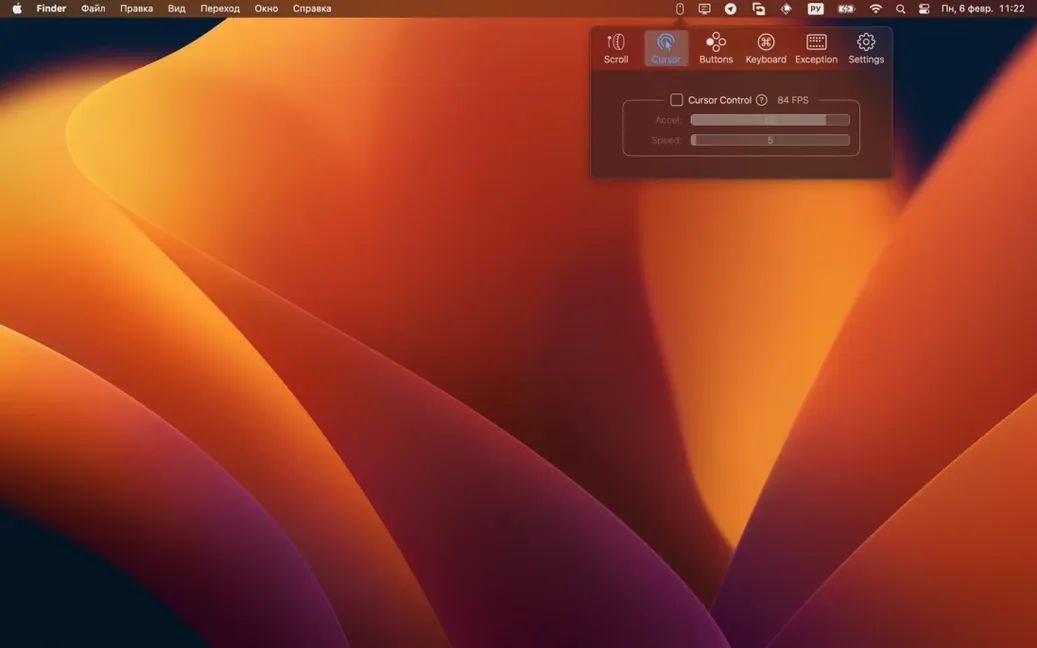
Decoupled acceleration and speed sliders
At its core, BetterMouse is a third-party mouse customizer built to replace the stock acceleration curves and button assignments macOS hands you. You get separate sliders for cursor acceleration and speed — two controls Apple normally ties together — plus per-button mapping that lets you turn extra mouse buttons into keyboard shortcuts, media keys, or special actions. There's also right-button pan scrolling, Ctrl-right-click support, and directional gestures you can bind to the side buttons.
Modifier remapping and click-through settings
The utility doesn't stop at the mouse. It can remap modifier keys independently, including Caps Lock, which is handy if you've built muscle memory on a non-Apple keyboard layout and want the mouse buttons to match. Each mapping also supports its own click-through behavior, so a button can pass a regular click through to the app underneath while still triggering a shortcut. If you've ever used Logitech Options and wished for something lighter or more focused, BetterMouse aims at that same lane — external mouse control without the manufacturer-specific weight.
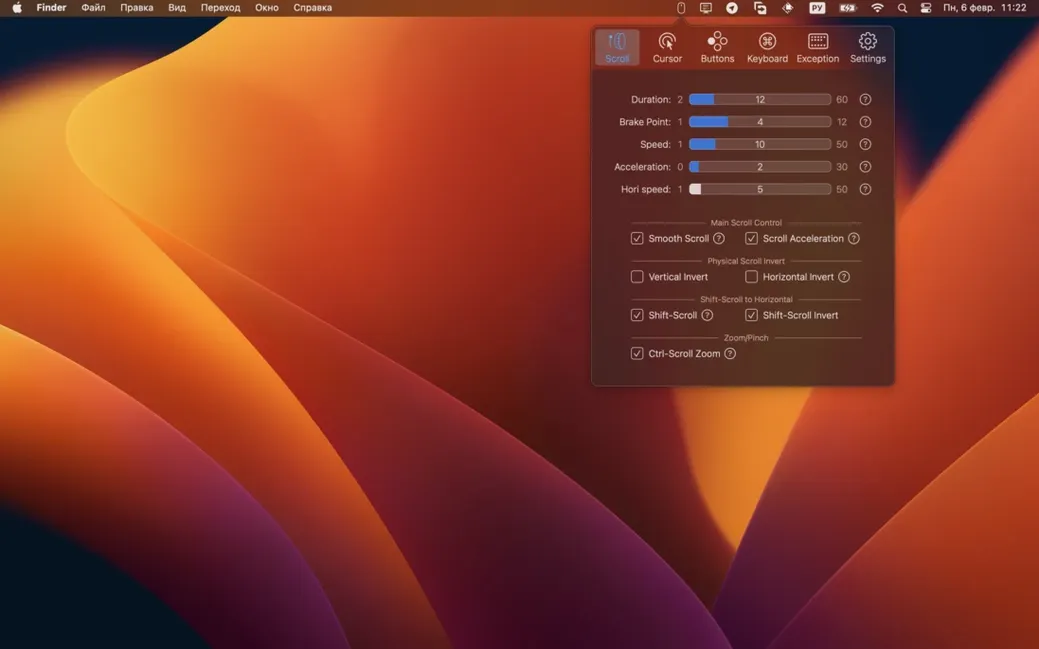
Killing natural scroll in seconds
You plug in whatever mouse you have — Logitech, Razer, or a no-name wireless that never quite felt right on macOS — and BetterMouse picks it up within a couple of seconds. The first thing you do is kill the cursor acceleration entirely, dragging the slider to zero and giving yourself that raw, one-to-one feel that Apple hides behind System Preferences.
Next you open the button-mapping panel. The side buttons get assigned to Mission Control and Launchpad because you miss the gestures when your hand is on a mouse. The scroll wheel's direction gets flipped so it matches your brain, not Apple's default, and you dial the smooth-scroll duration to something snappy — around 250 milliseconds feels right for hopping through long documents without the jitter. You test a few flicks in Safari, then tweak the discrete scroll acceleration until three notches on the wheel reliably move you one full page. Five minutes of fiddling, and the mouse no longer fights the operating system.
You finish by remapping the Caps Lock key to Escape on your external keyboard, something you do in every app that lets you, because the physical key is wasted real estate otherwise. Then you enable click-through for the mapped side buttons on inactive Finder windows, which means a quick flick to the left scrolls a background document without stealing focus from the editor you're typing in. It's the kind of small thing that compounds across a workday.
Mapping dead ergonomic buttons for Figma and Xcode
Consider someone who splits time between Figma and Xcode, using a third-party ergonomic mouse that shipped with Windows-only configuration software. On macOS, half the extra buttons were dead — until they found a mac bettermouse setup that let them map a thumb button to the Option key and a side tilt to horizontal scroll. Now, in Figma, the thumb button plus scroll wheel zooms the canvas smoothly, and the tilt gesture pans artboards left and right without reaching for the keyboard.
They also set the middle click to trigger Mission Control via a keyboard-shortcut mapping, because the physical click on that mouse model is too stiff for comfortable use. The right button, when held and dragged, activates pan scrolling with a speed they tuned over a lunch break — fast enough to cross a large layout quickly, slow enough to stop on a single frame without overshooting. For anyone hunting a bettermouse free alternative to bloated manufacturer drivers, this is the niche it fills: lightweight, focused, and surprisingly deep once you explore the per-mapping options.
- Minimum supported macOS raised to 12.0 Monterey due to macOS 27 requirements.
- Bug and crash fixes.
- macOS 12.0 or later
- Runs natively on Intel and Apple Silicon Macs
Also on readers' docks
Sign in or create an account to leave a comment.
No comments yet. Tell me how it got on with your other devices.
More in Mac Apps
See all Updated BetterDisplay Pro
4.0.4 Mac Apps
16 MB
Updated BetterDisplay Pro
4.0.4 Mac Apps
16 MB
 BetterTouchTool
6.726 Mac Apps
61 MB
BetterTouchTool
6.726 Mac Apps
61 MB
 BetterZip
6.0.6 Mac Apps
25 MB
BetterZip
6.0.6 Mac Apps
25 MB
 Beauty Box Photo
6.0.5 Mac Apps
107 MB
Beauty Box Photo
6.0.5 Mac Apps
107 MB
 Binary Ninja
6.0.10601-personal Mac Apps
584 MB
Binary Ninja
6.0.10601-personal Mac Apps
584 MB
 Bartender
7.0.4 Mac Apps
31 MB
Bartender
7.0.4 Mac Apps
31 MB
 Updated Bloom
1.5.46 Mac Apps
19 MB
Updated Bloom
1.5.46 Mac Apps
19 MB
 BAO Mask Avenger
2.7.5 Mac Apps
6 MB
BAO Mask Avenger
2.7.5 Mac Apps
6 MB