Download Astro Gold for macOS
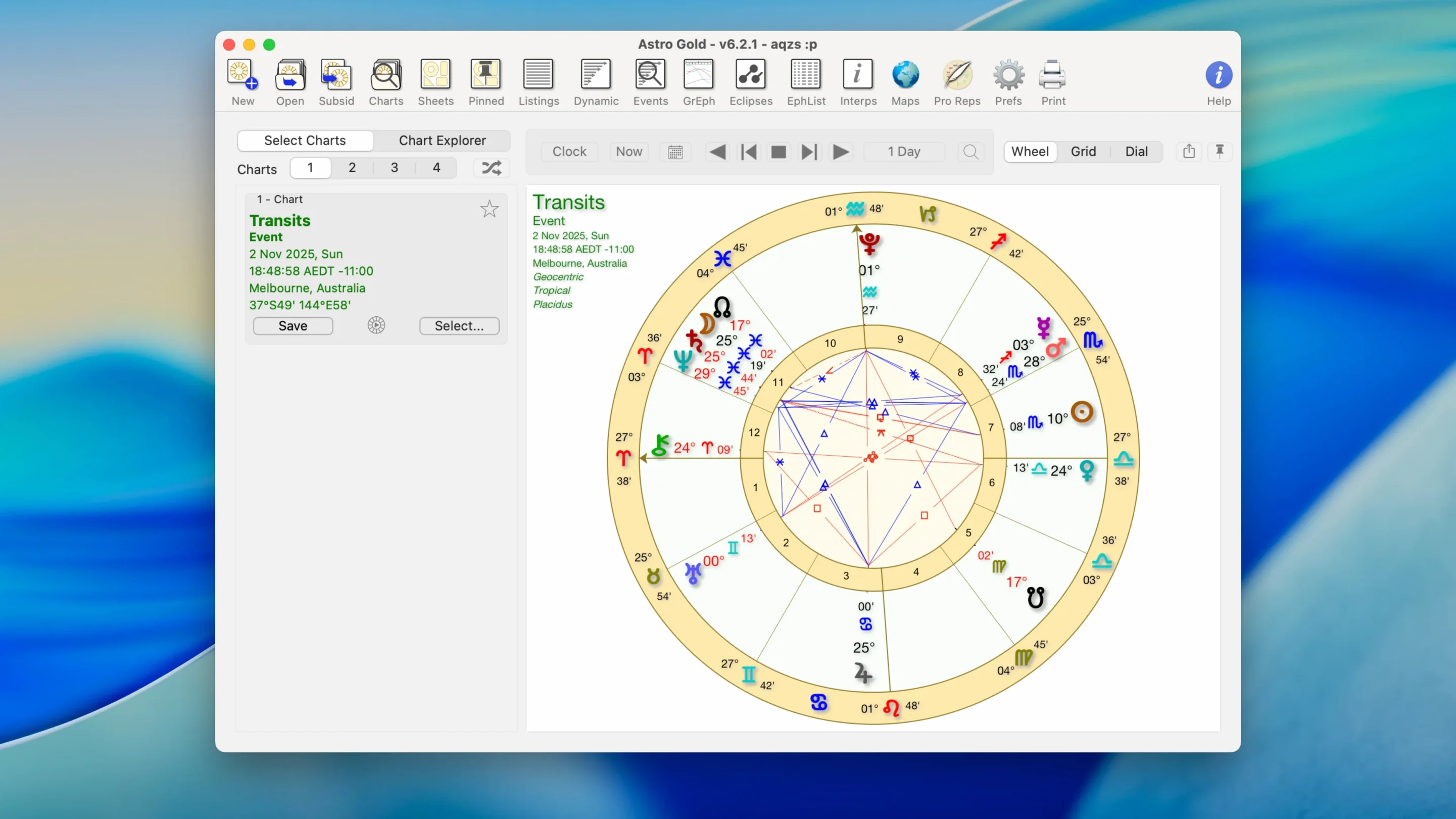
That moment you pull up a Davison chart to see a relationship's combined path, and the software just gets out of the way — that's where Astro Gold finds its groove. Let's cut to the chase and check if it'll run on your machine first.
Mac Compatibility at a Glance
- macOS: Needs 10.13 (High Sierra) or anything newer.
- Architecture: Natively supports both worlds — Apple Silicon (M1, M2, M3, M4) and older Intel x86 64-bit Macs. No Rosetta hand-wringing necessary.
- Language: English.
Medieval Techniques Meet a Modern Mac Interface
Astro Gold packs a serious blend of medieval and modern techniques without feeling like you're reading a textbook from the 1500s. You get a full ephemeris, a fixed star catalog, and chart styles you can flip between — with or without aspects. The filter settings for orbs, aspects, and planets let you dial in the noise level exactly. Beyond the birth chart, you'll find solar, lunar, and Saturn returns, symbolic and solar arc directions, plus secondary progressions. Relocation charts come baked in for those "what if I moved" rabbit holes. And yes, those Davison and composite charts are here too, right where you'd expect them.
How Astro Gold Compares to Other Mac Astrology Apps
Mac astrology software isn't exactly crowded at the coffee shop, but a few names keep coming up when folks ask around. Knowing the differences helps you figure out which tool actually fits your chart-casting habits.
Time Nomad is the friendlier neighbor. It's lighter on features and has a more touch-friendly feel, which makes sense given its iPad roots. If you mostly pull up daily transits and want a quick look at planetary ingresses, Time Nomad feels breezy and uncluttered. Astro Gold swings heavier — more chart types, deeper filters, and a fixed star catalog that Time Nomad simply doesn't carry around. You'll feel the difference the moment you try to compare a Davison chart with a relocated natal side by side.
Astro Gold vs. Kepler or Sirius is a different kind of comparison. Those Windows-first powerhouses carry enormous interpretive databases and research tools, but on a Mac they need workarounds or virtual machines. Astro Gold runs natively on ARM and Intel, which for plenty of Mac users settles the question before it starts. It won't replace a research-grade Windows setup, but for chart erection, synastry, and predictive work on macOS, it holds its own without a compatibility layer.
Astro Gold vs. free web chart services — worth a mention. Online calculators are great for a quick natal wheel, but they rarely handle relocation charts, solar arc directions, or medieval techniques with much grace. Astro Gold keeps everything local and lets you fine-tune orbs, filter planets, and switch zodiac systems without reloading a browser tab.
Testing Relocation Lines Before You Pack the Boxes
Picture someone who reads charts for clients and happens to move a lot — a consultant who splits time between cities, or a student of astrocartography testing planetary lines before a big decision. That's the person who'll feel Astro Gold's pull most strongly.
They start with a client's natal chart, switch from tropical to sidereal to honor the client's tradition, and then generate a relocation chart for a potential new city. The planetary lines view helps them see where Jupiter and Saturn fall across the map. From there they layer in solar arc directions for the coming year and a lunar return for the next month. All of it stays in one app, with the chart styles toggling between round and square as the client prefers. No exporting to three different tools, no rebuilding settings from scratch each session.
Astro Gold won't interpret the chart for you — it doesn't hand you a paragraph of cookbook text. But for the astrologer who already knows what they're looking at, the speed of moving between techniques matters more than hand-holding.
Full Offline Chart Casting, Even with Flaky Café Wi-Fi
Do I need to be online to use it? No. Once installed, everything — ephemeris data, fixed stars, chart calculations — runs locally on your Mac. Airport tarmac, cabin in the woods, flaky café Wi-Fi: none of it interrupts your chart work.
Will it feel bloated on an older Intel Mac? Not particularly. Version 6.2.1 supports Intel x86 64-bit machines alongside Apple Silicon, and the app stays quite responsive on older hardware. You'll want to keep your macOS at 10.13 or later, but beyond that, it doesn't punish aging machines.
Is there an iPad or iPhone companion? The developer offers companions on Apple's mobile platforms, though the macOS version remains its own focused thing. If you chart mostly on the go, you might keep the mobile app for quick looks and save the Mac for deep session work.
Can I print charts or save them as files? Astro Gold lets you work with chart images the way you'd expect from a desktop Mac app — handy when a client wants a PDF of their wheel or when you're building a study binder.
Where Astro Gold Fits In Your Mac Workflow
Astro Gold sits comfortably alongside other Mac utilities rather than trying to replace them. Many users keep it open next to a note-taking app like Apple Notes or Bear — casting a chart, then copying the key placements into a client summary. The ability to save chart images means you can drop a wheel straight into Pages or a Keynote deck for a workshop.
Spotlight plays nice with the app too. Once it's in your Applications folder, launching it is a quick Command-Space away. If you organize client files in Finder, you can keep saved charts in a dedicated folder and pull them up without hunting through the app's internal structure.
For folks who dip into the broader astrology software conversation — searching around for things like astro gold mac or astro gold for mac — this is the version that feels most at home on macOS. It doesn't pretend to be a web app, and it doesn't ask you to boot into another operating system. That native fit matters when you're juggling ephemerides, progressions, and return charts in a single evening.
And for the curious tinkerer who wonders about grabbing it outside the usual channels — maybe searching astro gold free download or astro gold free download for pc — the Mac experience is what actually delivers the smooth ride. The desktop app rewards the person who wants their chart data local, their interface quick, and their technique list long.
- macOS 10.13 or later
- Apple Silicon or Intel 64-bit Mac
Also on readers' docks
Sign in or create an account to leave a comment.
No comments yet. Tell me how it got on with your other devices.