









Download uJAM Cinedream for macOS
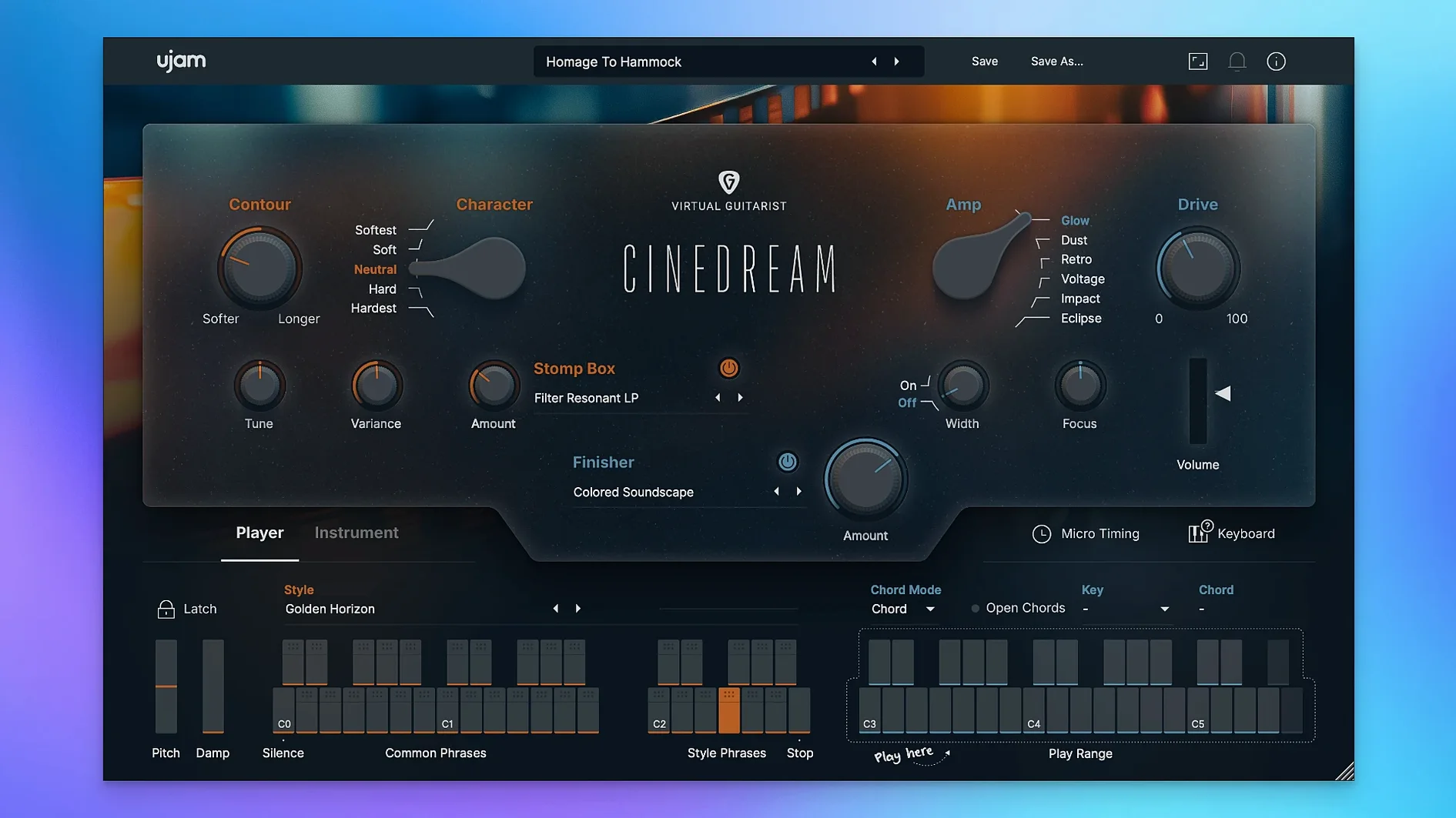
Right out of the gate, the Texture control is where Cinedream earns its name. It doesn't just add reverb — it stretches guitar tones into slow-moving pads that feel designed for scoring a quiet scene or filling the background of a track that needs weight without clutter. This is a virtual instrument that takes a real guitar sound and treats it until it behaves more like a synth, landing somewhere between a shimmer effect and a long-decay hall.
- Texture knob — pushes the dry signal into ambient territory, turning simple chords into evolving cinematic beds.
- Style presets — ready-made moods that dial in a whole signal chain at once, from dark drones to airy, melodic swells.
- Built-in effects — chorus, delay, and reverb sections give you hands-on control over movement and space without leaving the plugin.
- Performance range — the virtual guitar responds naturally across the fretboard, so soft fingerpicking and bowed-like sustains both feel right.
- Mix-ready output — sounds sit in a mix almost immediately; thin out the low end a touch and it tucks neatly behind vocals or dialogue.
It's not a guitar plugin in the traditional sense — you won't find amp models or strum patterns here. Instead, Cinedream treats the guitar as raw material for sound design. For ambient producers, soundtrack composers, or anyone layering texture under a sparse arrangement, it's a focused tool that does one thing with real character.
A Session with Cinedream, Step by Step
Last Thursday I sat down to sketch a cue for a short film scene — a character walking through misty woodland at dawn. Dialogue would sit on top later, so the music needed to carry emotion without getting in the way. Here's how Cinedream fit into that hour.
I opened Logic, created a software instrument track, and loaded the AU version. The plugin's interface came up clean — a dark, uncluttered panel with the guitar visual front and center. First move: I browsed the Style menu and landed on Ethereal Swells. Instantly, the tone shifted from a dry guitar pluck to something airy and distant, with a slow attack that felt like a bow being drawn across strings. I played a simple Dm–Am–C–G progression on my MIDI keyboard, holding each chord for two bars, and the engine did the rest — the chords bloomed into layered pads that evolved on their own, no arpeggiator needed.
Next, I pushed the Texture knob to about 2 o'clock. The sound stretched further, losing its transient almost entirely and becoming a wash of harmonics. It was gorgeous but a little too thick for dialogue, so I pulled the low end back with an EQ in the channel strip. The plugin's internal reverb was already adding space, but I dialed in a touch of the onboard delay — dotted eighth, feedback around 30% — to create a gentle rhythmic tail that pulsed under the chords. Within ten minutes I had a two-minute bed that felt cinematic and unhurried, leaving plenty of room for footsteps and whispered lines.
What struck me most was the lack of fuss. I wasn't stacking three reverbs, automating filter sweeps, or hunting for the right impulse response. The instrument shaped itself around the playing, and the results sat in the mix with minimal processing. For a composer on a deadline, that kind of immediacy matters.
Texture Knob Sets the Wet-Dry Line
A few questions come up every time someone considers a specialized instrument like this. Let's walk through them plainly.
Does it only do ambient washes, or can it handle drier parts too? The Texture knob is the key here. At its minimum setting, you get a clean, close-miked guitar tone — still processed, still cinematic, but with a clear attack and shorter decay. It works for arpeggiated figures or sparse melodic lines that need to cut through a mix. Crank it clockwise and you're in full pad territory. The range between those extremes is wide, so you're not locked into one sound.
Do I need to play guitar to use it? Not at all. Everything triggers from MIDI notes — a keyboard, a pad controller, or even drawn-in notes in your DAW. The engine interprets chord voicings and dynamics, responding to velocity for softer or more aggressive attacks. If you've ever played a piano patch and wished it had the organic movement of a real stringed instrument, you'll find the learning curve almost nonexistent.
Will it bog down an older Mac? I ran it on a 2019 Intel MacBook Pro alongside a modest session — about fifteen tracks, a couple of EQs, one convolution reverb. Cinedream's CPU meter stayed low, rarely nudging past 10% on a single instance. More on resource use in a moment.
Is it a one-trick pony? In the sense that it doesn't do funk strums or metal riffing, yes. But within its lane — cinematic texture, ambient beds, emotional underscoring — the Style presets cover a lot of ground. Switching from Dark Drones to Shimmering Harmonics feels like loading a different instrument entirely, even though the core engine stays the same.
A Crash-Free Week of Daily Scoring
Over a week of daily use — scoring, sound design, and a couple of late-night ambient experiments — Cinedream stayed out of trouble. No crashes, no hung notes, no sudden spikes in memory. Loading a preset takes under a second on an M1 machine; on Intel, maybe two. The plugin recalls its state correctly when reopening a project, which isn't always a given with AU instruments that rely on large sample pools.
Memory footprint sits around 400–500 MB per instance, which is reasonable for a sample-based instrument with this much processing under the hood. You'll want that 8 GB of RAM the developer recommends, but you won't need to freeze tracks constantly unless you're running a dozen instances in a dense orchestral template. Disk streaming felt smooth — no glitches when playing rapid chord changes or jumping across octaves.
The plugin format support covers the essentials: VST2, VST3, AU2, and AAX. I used the AU version in Logic and the VST3 in Ableton Live without hiccups. On Apple silicon, it loads natively — no Rosetta translation layer needed — which keeps latency consistent and battery drain lower on MacBooks. If you're still on an Intel machine, the 64-bit build performs just as reliably.
Dial Back Texture for a Drier Default
Out of the box, Cinedream sounds polished, but a few quick tweaks make it feel more like your own instrument.
- Texture default position. The knob starts at noon, which already adds significant ambience. If you prefer a drier starting point for building your own effects chains outside the plugin, pull it back to 9 o'clock and save that as your user default. You can always push it up later.
- Reverb tail length. The onboard reverb is lush, but its default decay can overlap with other elements in a busy mix. Open the effects panel and shorten the reverb time slightly — around 1.2 to 1.8 seconds — for tighter cues where clarity matters more than atmosphere.
- Velocity response. The instrument ships with a balanced velocity curve, but if you're using a weighted keyboard or drawing MIDI by hand, experiment with the sensitivity. A softer curve lets you ride the dynamic range more expressively; a flatter curve gives consistent output for drones and pads where you don't want variation.
- MIDI channel and key range. Cinedream responds across a wide range, but the sweet spot for cinematic work is roughly C2 to C5. Limiting the input range in your DAW prevents accidental triggering of samples outside that zone, which keeps performances focused.
- macOS 10.13 or later
- Apple Silicon or Intel processor
- 8 GB RAM
- 4 GB free disk space
- 1280 × 768 minimum display
- Internet connection required
Questions people ask
Can Cinedream run on Apple Silicon Macs?
Yes, it supports both ARM (Apple Silicon) and 64-bit x86 architectures natively.
What genres work best with Cinedream's sounds?
It's built for soundtracks, ambient music, and any project that needs atmospheric depth and emotional texture rather than lead guitar parts.
Also on readers' docks
Sign in or create an account to leave a comment.
No comments yet. Tell me how it got on with your other devices.
More in VST Plugins
See all UJAM Beatmaker VICE
2.4.0 VST Plugins
262 MB
UJAM Beatmaker VICE
2.4.0 VST Plugins
262 MB
 UJAM Symphonic Elements STRIIIINGS
1.3.1 VST Plugins
4.4 GB
UJAM Symphonic Elements STRIIIINGS
1.3.1 VST Plugins
4.4 GB
 UnderTone Audio UnFairchild
1.0.8 VST Plugins
220 MB
UnderTone Audio UnFairchild
1.0.8 VST Plugins
220 MB
 Valhalla DSP Bundle
2025.12 VST Plugins
61 MB
Valhalla DSP Bundle
2025.12 VST Plugins
61 MB
 VocalNet
1.0.4 VST Plugins
669 MB
VocalNet
1.0.4 VST Plugins
669 MB
 VocalSynth 2
2.6.1 VST Plugins
259 MB
VocalSynth 2
2.6.1 VST Plugins
259 MB
 Toontrack EZmix Bundle
3.2.2 VST Plugins
977 MB
Toontrack EZmix Bundle
3.2.2 VST Plugins
977 MB
 Toontrack EZkeys
2.1.5 VST Plugins
707 MB
Toontrack EZkeys
2.1.5 VST Plugins
707 MB