









Download VocalSynth 2 for macOS
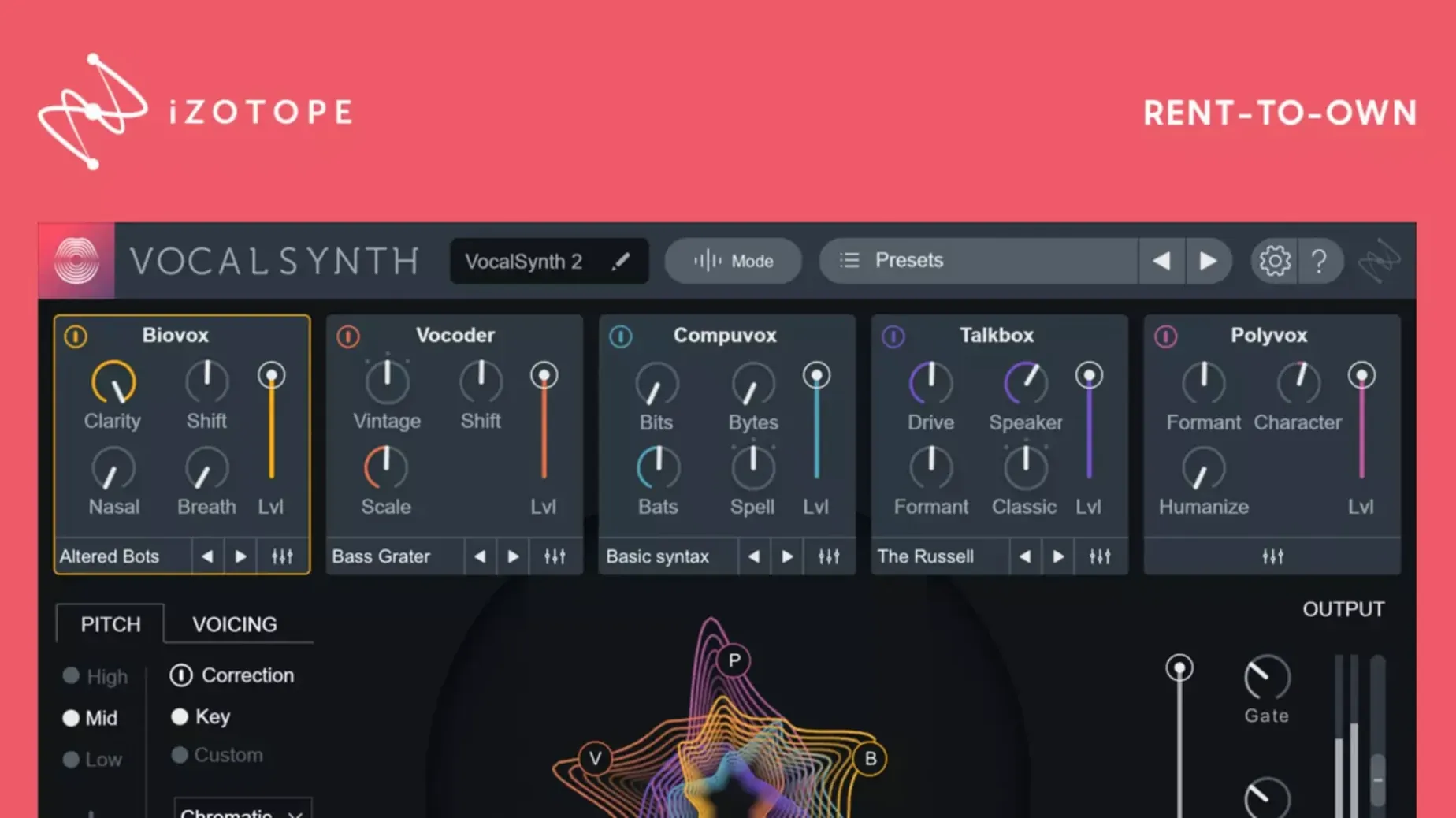
Version 2.6.1 landed as a small but meaningful housekeeping update, fixing a hiccup where users who jumped from 2.5.0 would find their existing authorization suddenly unrecognized. With that sorted, the plug-in settles back into its usual role as a color box for vocals.
Where does it live in a mix?
I reach for VocalSynth 2 on individual vocal tracks when the part calls for obvious character — think chopped, talkbox-style hooks or lush, shimmering pads behind a lead. It’s an insert effect, not a subtle bus processor.
What jobs suit it best?
Pushing a dry vocal into vocoder territory, adding synth-like doubling, or running wild with the stompbox effects. The enhanced spectral display helps you see how vowel sounds trigger the processing, which makes dialing in a talkbox or harmonized layer much faster.
Cross-Plugin Mix Oversight Inside the iZotope Family
It talks comfortably with Neutron, Ozone, and Tonal Balance Control, so you can shape a vocal inside VocalSynth 2 and keep an eye on the overall mix curve without leaving the iZotope family.
Apple Silicon Support That Ended the CPU Tax
Version 2.5.0 was the one that really shook things up for Mac users. Native Apple silicon support arrived, and suddenly the plug-in stopped feeling like a translation layer was eating your CPU cycles. Sessions with a dozen VocalSynth 2 instances — not uncommon when you're layering talkbox whispers under stacked harmonies — went from occasional buffer stutters to genuinely smooth playback on M-series machines.
Monterey 12.3.x compatibility came in the same update, which meant folks on newer macOS builds could finally stop holding their breath during plugin scans. The 2.6.1 fix was quieter but just as practical: nobody wants to open a mix and find their carefully tuned vocal chain showing an authorization error because an updater got confused. It's the kind of fix that doesn't make feature lists exciting, but it keeps the workday from derailing.
Installation Prerequisites and Early-Use Notes
Plugin-Only Architecture Across AU, VST3, and AAX
VocalSynth 2 is a plug-in — AU, VST3, and AAX — so it lives inside your host. There's no standalone application. You'll need something like Logic Pro, Ableton Live, or Pro Tools to load it up. That said, the included installation and activation instructions walk through getting it recognized by your DAW of choice.
Universal Binary Compatibility for Intel and M-Series Macs
Yes, the universal binary covers both architectures. If you're moving projects between an older Intel machine and a newer M-series Mac, VocalSynth 2 follows along without drama. The native ARM code means you're not leaning on Rosetta on the newer side, and the x86 path keeps Intel Macs in the loop.
What if I'm already deep into the iZotope ecosystem?
Then it slots right in. Inter-plug-in communication with Neutron, Ozone, and Tonal Balance Control means you can tweak a vocal layer inside VocalSynth 2 and see how the overall tonal balance shifts without flipping between plugin windows. It's not a gimmick — it genuinely speeds up decisions when you're auditioning wild processing choices against a full mix.
A Session with VocalSynth 2, Step by Step
I pulled up a dry verse vocal from a synth-pop track yesterday — a breathy, close-miked take that needed something less polite. Here's how the next twenty minutes played out.
First, I dropped VocalSynth 2 onto the track as an insert. The enhanced spectral display lit up immediately, tracing vowel shapes in real time. I switched into Auto mode, which listens to the incoming signal and triggers processing based on pitch and dynamics — no MIDI keyboard needed yet.
I dialed up the Biovox module first, pulling the human-to-synthetic slider about sixty percent toward the artificial side. The vocal thickened without losing intelligibility. Then I layered in a little Polyvox for octave-up and octave-down doubling, keeping the mix knobs conservative so it sat behind the main signal.
Next came the stompbox-style effects. I threw a distortion block into the chain — the kind that sounds like a pedal board on a budget, in the best way — and pushed the drive until the consonants started buzzing. A touch of the onboard delay softened the edges, and I had a vocal that sat between a robot confession and a fuzz-guitar melody.
I toggled over to Sidechain mode briefly, feeding a percussive synth stab into the sidechain input. The vocoder effect pulsed in time with the stabs, which gave the chorus an extra rhythmic hook I hadn't planned. Back in Auto mode, I saved the preset — something I'd want again for the bridge.
Twenty minutes, one vocal track, a few module blends, and the part went from placeholder to personality. That's the kind of session VocalSynth 2 encourages: fast, tactile, and a little reckless.
Version 2.6.1 sorted out a single but frustrating snag: some folks who updated from 2.5.0 found their existing authorization wasn't recognized. That's now fixed.
- macOS 10.14 or later (including Monterey 12.3.x and newer)
- ARM and x86 64-bit architecture supported
Questions people ask
Does VocalSynth 2 run natively on Apple Silicon Macs?
Yes, version 2.6.1 supports both ARM and x86 64-bit architectures, so it runs natively on M-series chips without Rosetta translation.
What did the 2.6.1 update fix?
It resolved a bug where existing authorization wasn't recognized for some users after updating from version 2.5.0.
Also on readers' docks
Sign in or create an account to leave a comment.
No comments yet. Tell me how it got on with your other devices.
More in VST Plugins
See all VocalNet
1.0.4 VST Plugins
669 MB
VocalNet
1.0.4 VST Plugins
669 MB
 WaveLab Pro
13.0.30 VST Plugins
WaveLab Pro
13.0.30 VST Plugins
 Waves Ultimate
v17-26.10.07 VST Plugins
10.3 GB
Waves Ultimate
v17-26.10.07 VST Plugins
10.3 GB
 Valhalla DSP Bundle
2025.12 VST Plugins
61 MB
Valhalla DSP Bundle
2025.12 VST Plugins
61 MB
 XLN Audio Life
1.2.3 VST Plugins
442 MB
XLN Audio Life
1.2.3 VST Plugins
442 MB
 XLN Audio XO
1.8.10-2026.09.04-Complete VST Plugins
2.3 GB
XLN Audio XO
1.8.10-2026.09.04-Complete VST Plugins
2.3 GB
 UnderTone Audio UnFairchild
1.0.8 VST Plugins
220 MB
UnderTone Audio UnFairchild
1.0.8 VST Plugins
220 MB
 UJAM Symphonic Elements STRIIIINGS
1.3.1 VST Plugins
4.4 GB
UJAM Symphonic Elements STRIIIINGS
1.3.1 VST Plugins
4.4 GB