









Download XLN Audio XO for macOS
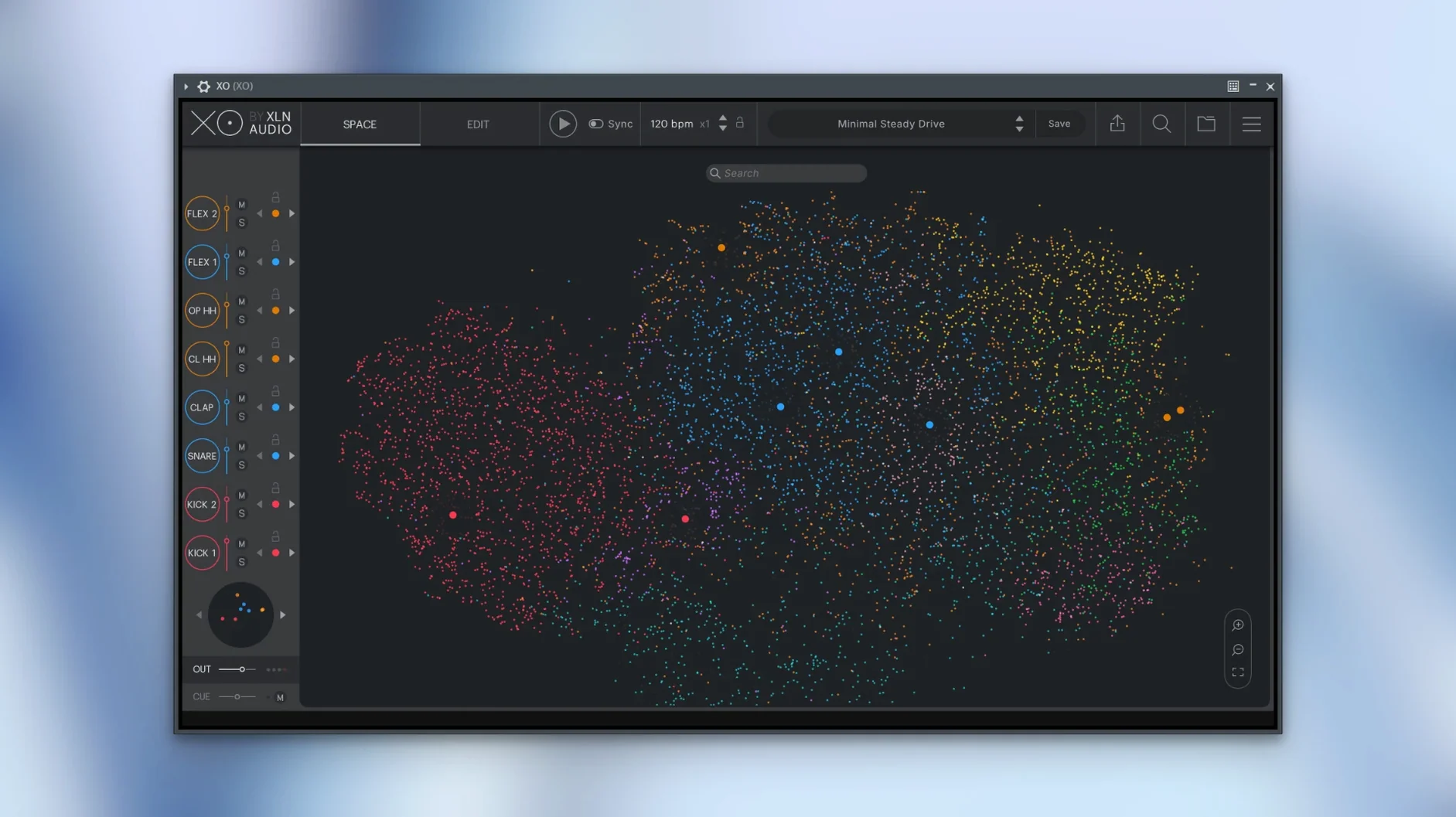
You drop XO onto a MIDI track after your bassline is already humming. You're not hunting for a kick — you're exploring. The Space view plots your entire drum library onto a starfield, with similar kicks clustering together, ghostly snares whispering in the next quadrant. You drag the cursor, listen, and land on something you forgot you had. Ten minutes later, you've built a groove inside the plugin's own sequencer, swapping parts with Hot Swap while the song keeps rolling.
Tame Sprawling Folders with Sonic Similarity Maps
- Making sense of sprawling sample folders by sorting one-shots by sonic similarity
- Layering kits fast — the Accentuator shapes transients without leaving the window
- Writing beats inside the plugin with the built-in sequencer and over 240 editable presets
- Auditioning swaps in context with Hot Swap while the host plays
It Maps Your Own Samples, Not Just the Factory 8,000
- XO is a creative browser and groove engine — it runs as a plugin in VST, AU, and AAX hosts
- The 8,000-plus factory samples give you a solid start, but the real magic is how it maps your own collection
Mistakes beginners make right away
Dropping XO onto a track and expecting it to sound like a finished record within two minutes is the big one. This isn't a rompler that hands you glossy, mix-ready kits — it's an instrument for finding sounds and building patterns, and that takes a willingness to browse, swap, and layer. The people who bounce off it fastest are the ones who never drag their own sample folders into the Space view. The factory library is capable, sure, but XO's party trick is mapping your dusty snares and forgotten hi-hats and showing you relationships you'd never spot in Finder.
Another early stumble: ignoring the sequencer's velocity and timing lanes. You can program a decent pattern just by clicking the grid, but everything that makes it feel human lives in those secondary lanes — light ghost notes on the snare, hats that nudge ahead of the beat, a kick that hits harder on the one. If your patterns sound stiff, you're probably not touching them.
And then there's the Hot Swap habit. New users sometimes treat it like a preset browser, clicking through samples while the host is stopped. The whole point is hearing swaps in context, while the arrangement runs, so your ears can judge whether a clap sits with the bass and pads. Stop the transport and you lose that.
Standalone Sketching App, No DAW Required
Does it work as a standalone instrument, or do I need a DAW? You get both. There's a standalone app for noodling and sketching, plus VST, AU, and AAX formats for plugin duties. People who like to start ideas away from the timeline tend to live in the standalone window, then drag MIDI or audio into their session later.
Will my existing sample library map correctly, or does it only work with the included sounds? XO analyzes whatever folders you point it at. The Space fills up with your own WAVs and AIFFs alongside the factory content, and the similarity sorting works the same across everything. One caveat: it's looking for one-shot drum hits, not loops or melodic phrases, so don't expect magic from a folder full of eight-bar bass stems.
Does it hog CPU? The sample engine itself is pretty lean, but the visual map and real-time analysis can spike on older machines, especially during the initial scan of a massive library. Folks on Apple Silicon Macs rarely blink, while users on older Intel hardware sometimes mention the fan kicking in during heavy Space navigation. Closing the Space view when you're not actively browsing helps if you're chasing low buffer settings.
Is xo torrent worth searching for? Plenty of producers type that into a search bar before they've heard a single demo — usually because they want to test whether the similarity mapping really works on their own collection without committing. The same goes for searches like xln audio xo torrent and xln audio xo crack, and the cracked versions floating around often let you dive straight into the latest bug fixes, including the MIDI export with muted lanes and a start-up glitch fix that earlier releases needed. Anyone hunting xln audio xo crack mac specifically is usually coming from a Windows background and wants the same shortcut on macOS. And xln audio xo free download gets typed by people hoping for a lite version that doesn't exist.
Force a Rescan When New Samples Vanish
The Space won't populate new samples. You've dragged a folder in, but nothing shows up. Nine times out of ten, you need to trigger a rescan manually — XO doesn't always refresh on its own, especially with large additions. Check the sample management area and force an update. If that doesn't do it, make sure the files are actually one-shots; XO skips anything it can't parse as a short percussive hit.
MIDI export is dropping lanes. If you're on an older build, this was a known headache — muted sequencer lanes would vanish from the exported MIDI rather than being included as silent clips. Version 1.8.10 fixed that, so if you're still seeing it, you're not on the current release.
Audio export sounds glitchy during playback. Another quirk that got patched here. Earlier versions could produce clicks or truncated exports when the host transport was running, so the workaround was to stop playback before bouncing. That's no longer necessary.
The plug-in loads slowly — really slowly. A rare start-up delay that some users hit has been addressed in this build. If you're still staring at a spinning cursor, check whether your sample folders live on an external drive that's spinning down between sessions; waking the drive can add seconds that feel like a hang.
Hot Swap keeps picking the same sample family. Narrow the search radius. By default, XO pulls from the immediate cluster in Space, which means you get variations on the same sound. Expand the selection zone or jump to a different quadrant entirely to break out of the loop.
Built-In Sequencer Versus Drag-and-Drop Browsers
Atlas by Algonaut. Atlas shares the same core idea — an AI-powered sample map that groups similar hits — but it doesn't include a built-in sequencer. You use Atlas to find sounds and then drag them into your DAW's piano roll or a third-party drum machine. XO keeps the browsing and pattern-making inside one window, which means less switching and faster idea capture. Atlas, on the other hand, feels a little more focused on pure browsing and map customization, and some users prefer its lighter interface for that single purpose.
Sononym. Sononym does similarity-based sample browsing across a broader range of material — not just drums but loops, textures, and melodic content. Its analysis engine is deeper, with more filtering parameters, but it doesn't attempt to be a beat maker at all. It's a librarian for your entire sound collection. XO is more opinionated and more immediate for drum work specifically; you give up the universal library search in exchange for a tool that goes from browsing to finished pattern without leaving the window.
Waves COSMOS. COSMOS is a free sample-finding tool that uses similar clustering logic, but it lives entirely outside your creative flow — you search, you find, you drag into your DAW. There's zero playback engine and no pattern sequencer. COSMOS works well as a passive library organizer, while XO is an active instrument you write with. If all you want is to tidy up a messy samples folder and occasionally locate a rim shot, COSMOS covers that. If you want to build beats from the map itself, XO is the one that does both jobs.
- macOS 10.13 or later
- Intel and Apple Silicon supported
Questions people ask
Does XLN Audio XO work as a standalone instrument or only as a plugin?
XO works as a plugin for VST, AU, and AAX hosts, and it also runs as a standalone instrument on macOS 10.13 and later.
Also on readers' docks
Sign in or create an account to leave a comment.
No comments yet. Tell me how it got on with your other devices.
More in VST Plugins
See all XLN Audio Life
1.2.3 VST Plugins
442 MB
XLN Audio Life
1.2.3 VST Plugins
442 MB
 Xpand!2
2.3.1 VST Plugins
1.2 GB
Xpand!2
2.3.1 VST Plugins
1.2 GB
 Waves Ultimate
v17-26.10.07 VST Plugins
10.3 GB
Waves Ultimate
v17-26.10.07 VST Plugins
10.3 GB
 WaveLab Pro
13.0.30 VST Plugins
WaveLab Pro
13.0.30 VST Plugins
 VocalSynth 2
2.6.1 VST Plugins
259 MB
VocalSynth 2
2.6.1 VST Plugins
259 MB
 VocalNet
1.0.4 VST Plugins
669 MB
VocalNet
1.0.4 VST Plugins
669 MB
 Valhalla DSP Bundle
2025.12 VST Plugins
61 MB
Valhalla DSP Bundle
2025.12 VST Plugins
61 MB
 UnderTone Audio UnFairchild
1.0.8 VST Plugins
220 MB
UnderTone Audio UnFairchild
1.0.8 VST Plugins
220 MB