









Download Xpand!2 for macOS
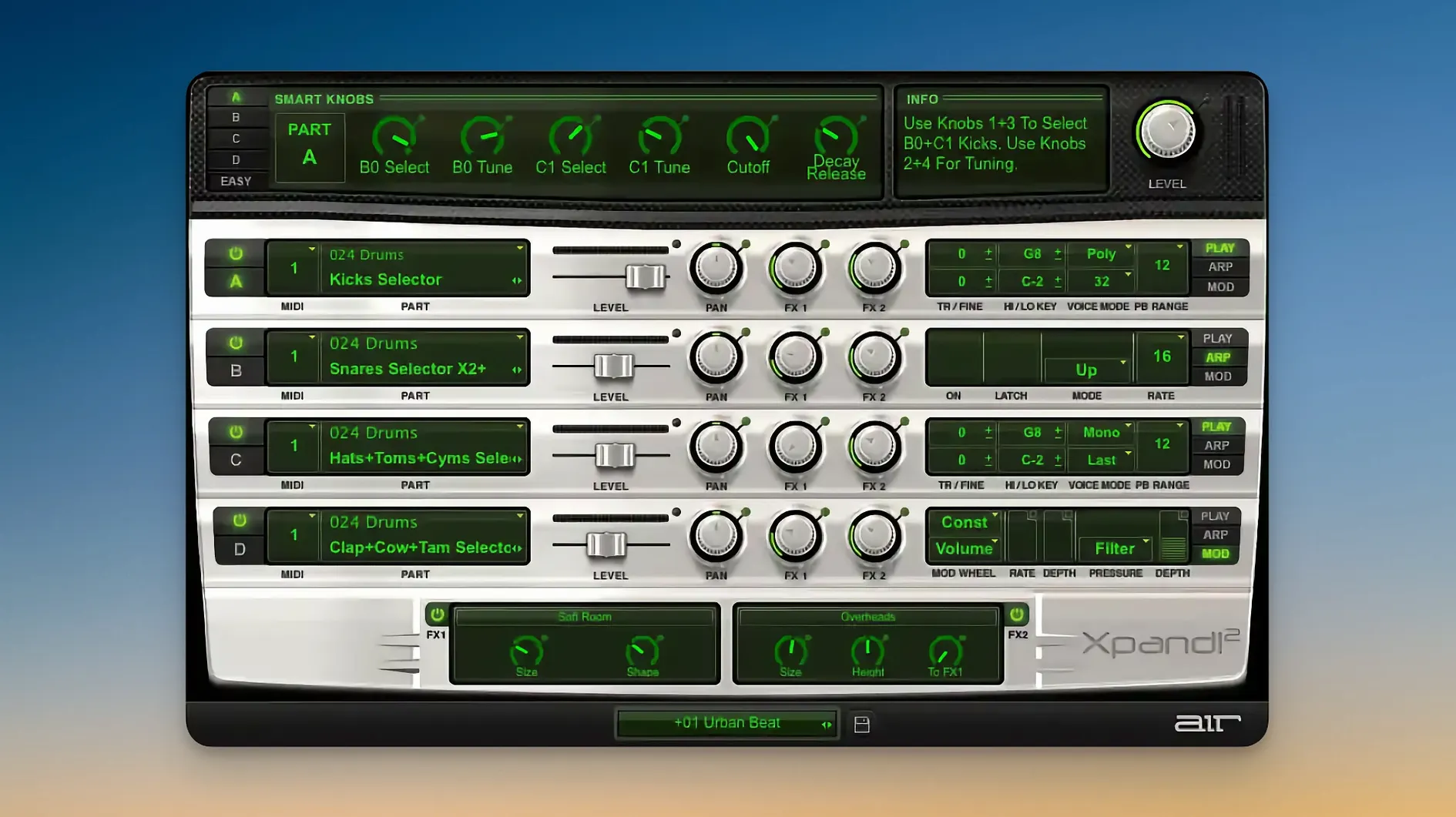
Xpand!2 runs on Apple Silicon Macs and requires macOS 13 or later. It shows up as a multitimbral virtual instrument with four slots, so you can load it once and build a quick stack of sounds without crowding your session with extra plugin instances.
Where does it live in a project?
I usually drop it on an instrument track and treat it like a mini rack. With four parts per patch, it handles layered pads, a bass line on slot two, and a percussive arp on slot three — all inside one window. Because each slot responds to its own MIDI channel, it also works well on multi‑out setups where a drum bus needs a kick, snare, and hat from the same plugin.
What kind of sounds come out of it?
Each slot pulls from subtractive, FM, wavetable, or sample‑based synthesis. You can set a part to polyphonic (up to 64 voices) or monophonic with First, Last, Highest, or Lowest priority. The arpeggiator, modulation, and effects live per slot, so a mono lead on one part doesn’t interfere with the long‑release pad on another.
Which controller tricks does it respond to?
Pitch Bend, Aftertouch, and MIDI Learn are all supported. I like mapping Aftertouch to a slot’s filter cutoff — it keeps performances expressive without leaving the keyboard. The scalable interface helps on a Retina screen, and the whole thing traces back to Avid’s old Creative Collection, which explains why it feels at home next to a Pro Tools channel strip.
A properly scaled Retina interface at last
Version 2.3.1 is the kind of update that doesn't rewrite the spec sheet but makes the plugin feel less like a relic. The most noticeable shift for me was the properly scaled interface on a Retina display. Earlier builds got fuzzy when you dragged the window larger; now the knobs stay crisp and the text in the preset browser doesn't fight your eyes after an hour.
Under the hood, native Apple Silicon support means one less AUHostingService bridge in your session. On an M‑series Mac, patch loading is snappier — not night‑and‑day different, but enough that flipping through the 2,500 presets with the arrow keys feels fluid instead of hiccupy. The MIDI Learn implementation also got quieter improvements: it remembers controller assignments across session reloads more reliably, which matters if you've mapped eight faders to slot volumes and don't want to re‑teach the plugin every morning.
The Chaos Delay effect, one of the fifty onboard processors, picked up a timing refinement. Before, sync'd delays could drift slightly at odd tempo divisions; now a dotted‑eighth ping‑pong stays locked to the grid even when the transport loops for ten minutes. Small thing, but if you build evolving soundscapes with feedback trails, you'll notice the difference.
Right‑click any knob to reset it instantly
A few things in Xpand!2 are easy to overlook because the interface doesn't shout about them:
- Right‑click a knob to reset it. It works on Smart Controls, effects parameters, and the arpeggiator rate. No modifier key needed — just a right‑click and the value snaps to default.
- Shift‑drag for fine adjustments. When a filter cutoff jumps too far with a normal drag, holding Shift gives you hundredth‑level precision. Useful for dialing in resonance without squealing.
- The arpeggiator's hidden latch mode. It's not a dedicated button — hold a chord, click the arp's On switch twice, and it latches without needing a sustain pedal. Release the keys and the pattern keeps cycling.
- Slot copy‑and‑paste. If you've tweaked a pad on slot one and want a variation on slot two, there's no official copy button — but saving the patch, loading it on the new slot, then adjusting is faster than rebuilding from scratch.
- Category jump via keyboard. In the preset browser, typing the first letter of a category name jumps straight to it. Hit "B" and you're in Basses; hit "P" for Pads. Works when the category list has focus.
A start‑to‑finish workflow: building a tension cue with three slots
Here's how I use Xpand!2 when I need a dark, pulsing underscore that doesn't eat up CPU on other instruments.
Step one: set up the container. I load Xpand!2 on an instrument track and immediately open the Mix page to set each slot's output routing. Slot one goes to the main stereo out, slot two to a bus with a room reverb, slot three to a dry bus for later processing.
Step two: slot one — the low pulse. I browse to the "Basses" category and audition a few until I land on something with a soft attack and a subby tail. I switch the voice mode to monophonic with Last priority so overlapping notes slide rather than stack. The arpeggiator goes on with a 1/8 note pattern, octave range set to 1, gate shortened to 40% for a plucky feel.
Step three: slot two — the harmonic bed. Over in "Pads," I grab a wavetable‑based patch with slow movement. Poly mode, 64 voices, a touch of the onboard chorus effect. I restrict its MIDI note range to C3–C5 so it doesn't muddy the bass. The arp stays off; I'll play long chords manually.
Step four: slot three — the rhythmic element. A percussive pluck from the "Arpeggiated" category, set to its own arpeggiator with a 1/16 note pattern and a two‑octave spread. I add a dash of Chaos Delay at 30% wet, sync'd to dotted‑eighth notes, feedback around 25%. The delay creates a stereo tail that dances around the pad without cluttering the center.
Step five: tie them together with Smart Controls. I map the six macro knobs so Cutoff and Resonance affect all three slots' filters, a reverb send fades the pad in and out, and the remaining knob dials the arp rates up or down together. By the time I hit record, I'm playing one plugin that feels like a small ensemble.
Who ends up leaning on this the most
A composer friend of mine scores short‑form documentary work — tight deadlines, no time to audition eighty synth patches across twelve tracks. She keeps Xpand!2 as her template's first instrument, pre‑loaded with a four‑part patch she calls "the insurance policy." Slot one is a sub bass, slot two a soft brass swell, slot three a mallet arpeggio, slot four a muted string pad. Each part sits on a separate MIDI channel routed to pre‑mixed audio busses.
When a director asks for "something urgent but not aggressive" during a picture lock session, she arms the track, plays a few chords, and blends the four slots with fader moves. No loading new plugins, no switching windows. The whole thing fits into a session that already has forty dialogue tracks and a temp mix. She told me it's less about the synthesis engine and more about the architecture — four independent sound sources that share one plugin window and one CPU footprint. For anyone working under picture with a deadline clock ticking, that kind of efficiency isn't a luxury, it's the only way to finish on time.
If your own setup leans toward electronic scoring, hybrid orchestral work, or quick sound design stacks, Xpand!2 slots into that workflow without demanding you rethink your entire template. It's the plugin you reach for when you need three ideas running at once and don't want to manage a dozen tracks to hear them.
- macOS 13 or later
- Apple Silicon Mac
Also on readers' docks
Sign in or create an account to leave a comment.
No comments yet. Tell me how it got on with your other devices.
More in VST Plugins
See all XLN Audio XO
1.8.10-2026.09.04-Complete VST Plugins
2.3 GB
XLN Audio XO
1.8.10-2026.09.04-Complete VST Plugins
2.3 GB
 XLN Audio Life
1.2.3 VST Plugins
442 MB
XLN Audio Life
1.2.3 VST Plugins
442 MB
 Waves Ultimate
v17-26.10.07 VST Plugins
10.3 GB
Waves Ultimate
v17-26.10.07 VST Plugins
10.3 GB
 WaveLab Pro
13.0.30 VST Plugins
WaveLab Pro
13.0.30 VST Plugins
 VocalSynth 2
2.6.1 VST Plugins
259 MB
VocalSynth 2
2.6.1 VST Plugins
259 MB
 VocalNet
1.0.4 VST Plugins
669 MB
VocalNet
1.0.4 VST Plugins
669 MB
 Valhalla DSP Bundle
2025.12 VST Plugins
61 MB
Valhalla DSP Bundle
2025.12 VST Plugins
61 MB
 UnderTone Audio UnFairchild
1.0.8 VST Plugins
220 MB
UnderTone Audio UnFairchild
1.0.8 VST Plugins
220 MB