








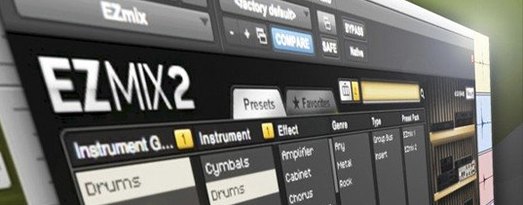
Download Toontrack EZmix Bundle for macOS
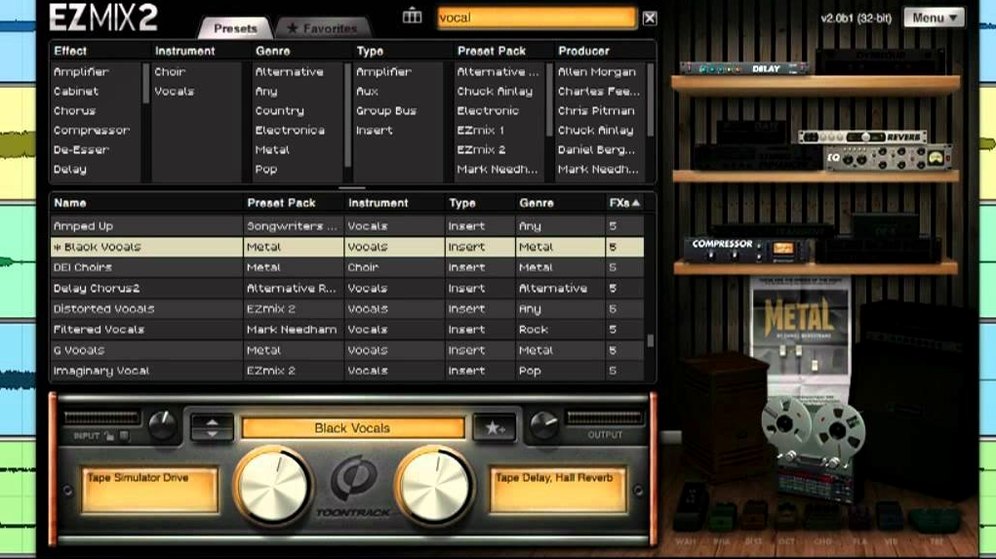
EZmix is a channel strip plugin that puts finished, mix-ready sounds behind a single preset browser — you insert it on a track, scroll through categories like drums, vocals, or guitars, and click a preset to hear your audio processed through chains designed by working engineers. The Toontrack EZmix Bundle wraps that engine together with an independent host app for plugging in your guitar and practicing through the same amp and cabinet simulations without opening a DAW.
- Grab a vocal preset that stacks EQ, compression, reverb, and saturation in one click.
- Open the standalone host, pick an amp-and-cabinet combo, and practice with zero latency setup.
- Treat the plugin as a lightweight mastering chain by dropping it on your stereo bus.
- Browse bass tones that sit right in a mix without tweaking five separate plugins.
- Run the same project on an Intel Mac or an Apple Silicon machine — the installer covers both.
- Stay current with pack compatibility: version 3.2.2 keeps everything working with EZmix packs released from Q4 2025 onward.
Songwriters who’d rather finish tracks than stare at compressor ratios will feel right at home. The whole idea is one interface, one click, and a sound that already works in context — whether you’re shaping a kick drum, warming up a bass DI, or just jamming through a simulated 4x12 cab at midnight.
What the newest builds actually change day to day
Version 3.2.2 isn’t a feature splash — it’s a quiet compatibility gate. If you grab any EZmix pack released in Q4 2025 or later, the preset browser simply won’t show those new sounds unless you’re on 3.2.2. That’s the whole story. Toontrack tied pack availability to the point release, so skipping the update means scrolling past blank slots where fresh guitar tones or vocal chains should be.
In practice, the upgrade keeps your library intact and adds nothing that breaks existing sessions. Projects that rely on EZmix 3 presets open identically — the plugin recalls settings by name, not by version number. The standalone host behaves the same way too: amp models load with the same latency performance, and cabinet IRs don’t shift. What you gain is forward compatibility, which matters only if you plan to expand your collection with newer EZmix packs as they drop.
The bread-and-butter chain slot between utility and deep suites
EZmix sits in a specific slot between utility plugins and deep mixing suites. It won’t replace a surgical EQ like Pro-Q or a character compressor you’ve tuned for years, but it handles the bread-and-butter chains that eat up time: a drum bus that needs parallel compression plus some top-end air, a bass DI that wants amp grit and a low-end bump, a lead vocal that should just work without eight inserts. You drop it in, pick a preset, and move on — then use your other plugins for what only they can do.
On macOS, it integrates as a standard AU, VST3, or AAX plugin inside any DAW that supports those formats. The standalone host is a separate app — it doesn’t show up in your plugin list, and that’s intentional. It’s a practice tool. Plug your interface in, pick an amp preset, and play. It also respects macOS audio routing, so you can feed the standalone host into a streaming setup or a recording app via BlackHole or Loopback if you want to capture late-night ideas without launching a full session.
A less obvious fit: the mastering-style presets work as quick reference chains on your stereo bus while you mix. They’re not a substitute for a proper mastering engineer, but they can reveal how your balance translates through a finished-feeling signal chain — and you can bypass the plugin with one click when you’re ready to export stems for someone else to handle.
Mistakes newcomers keep making
The most common one is treating EZmix like a learning tool for mixing. It’s not designed to teach you what the underlying chain is doing — you don’t see the compressor thresholds, the EQ curves, or the reverb decay times. Beginners sometimes click through presets hoping to reverse-engineer the settings, then get frustrated that the plugin hides everything behind a single knob. The right approach is to trust your ears, not your curiosity about parameters. If you want to study signal flow, pair EZmix with a traditional channel strip plugin where every module is visible.
Another trap: running the standalone host for guitar practice while your DAW is open, with both apps pointing at the same audio interface. On some systems that causes sample rate conflicts or glitchy playback, especially if your interface driver doesn’t handle multi-client access gracefully. Close the DAW or switch the standalone host to use the built-in output while you practice — it’s less glamorous than studio monitors, but it avoids digital crackle at midnight.
Lastly, don’t assume every vocal preset works on every voice. A chain designed for a bright female pop vocal will sound harsh on a baritone with a different mic and preamp. Scroll with purpose — try three or four presets in the category, not just the first one that catches your eye. The same guideline holds for bass and drum presets: the right chain depends on the source, not just the instrument label.
Version 3.2.2 is one of those quiet-but-essential updates: it adds support for EZmix packs released from Q4 2025 onwards. If you pick up a newer expansion, you’ll need this build to see and load those presets.
- macOS 10.13 or later
- Apple Silicon or Intel processor
Also on readers' docks
Sign in or create an account to leave a comment.
No comments yet. Tell me how it got on with your other devices.
More in VST Plugins
See all Toontrack EZkeys
2.1.5 VST Plugins
707 MB
Toontrack EZkeys
2.1.5 VST Plugins
707 MB
 Tone Empire EDYN
1.0.2 VST Plugins
198 MB
Tone Empire EDYN
1.0.2 VST Plugins
198 MB
 UJAM Beatmaker VICE
2.4.0 VST Plugins
262 MB
UJAM Beatmaker VICE
2.4.0 VST Plugins
262 MB
 uJAM Cinedream
1.0.1 VST Plugins
3.5 GB
uJAM Cinedream
1.0.1 VST Plugins
3.5 GB
 UJAM Symphonic Elements STRIIIINGS
1.3.1 VST Plugins
4.4 GB
UJAM Symphonic Elements STRIIIINGS
1.3.1 VST Plugins
4.4 GB
 UnderTone Audio UnFairchild
1.0.8 VST Plugins
220 MB
UnderTone Audio UnFairchild
1.0.8 VST Plugins
220 MB
 T-RackS
6.3.2 VST Plugins
2.3 GB
T-RackS
6.3.2 VST Plugins
2.3 GB
 Synapse Audio The Legend HZ v2.0.2.R1
2.1 VST Plugins
472 MB
Synapse Audio The Legend HZ v2.0.2.R1
2.1 VST Plugins
472 MB