








Download iZotope Insight for macOS
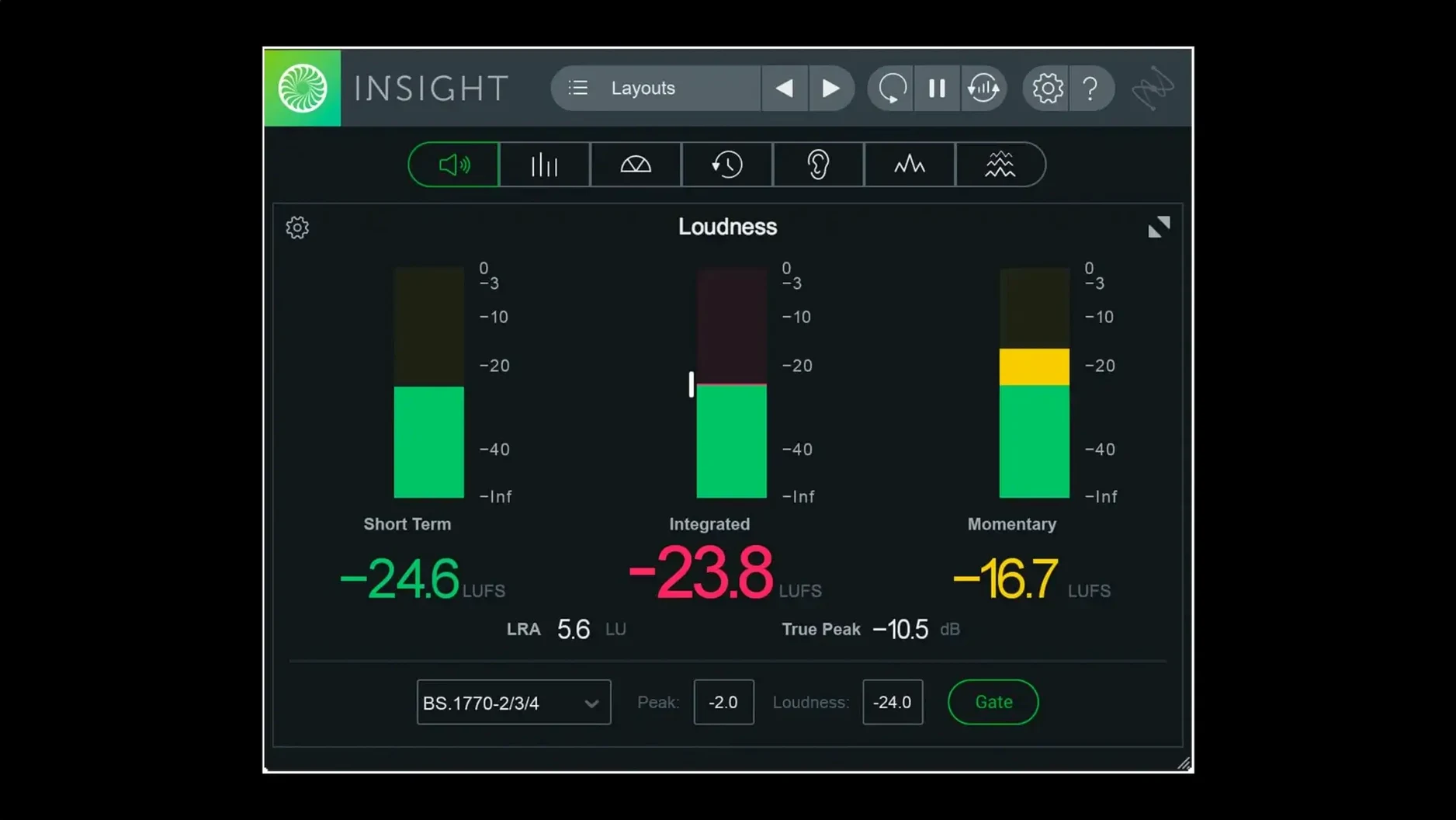
Opening the Loudness History Graph feels like pulling back a curtain on your entire mix, showing you not just a moment but the momentum of a track. That’s where Insight 2 lives—it’s a comprehensive analysis suite meant to give you eyes on what your ears might be negotiating. The plug-in packs True Peak Meters and Loudness Meters that sit obediently at the front, while a Stereo Vectorscope and Surround Scope let you chase phase gremlins or map a wide field. Deeper in, the 2D and 3D Spectrograms reveal frequency collisions over time, and the Spectrum Analyzer gives you a real-time snapshot of spectral balance, so you can stop guessing whether the low-end is actually out of control.
| Key Detail | Info |
|---|---|
| Developer | iZotope |
| Current Version | 2.4.0 |
| Minimum OS | macOS Big Sur |
| Architecture | Intel & Apple Silicon (native arm64) |
You can route audio from any track or bus into its scalable metrics, making it a central hub for deep analysis without juggling windows. The plug-in helps you lock in on mix loudness and intelligibility, which is a godsend when you’re trying to hit a delivery spec without crushing the life out of a mix. With native arm64 AAX support now in the fold for Pro Tools 2023.3+ on Apple silicon Macs, it slots into modern workflows without a hiccup.
Preset Manager and Metering Prefs in Five Minutes
Don't just launch Insight 2 and start staring at pretty meters—spend five minutes in the preferences and it'll pay back hours of faster decisions. Hit the preset manager after installing and you'll spot the new factory and custom preset tabs straight away. This is where you save your go-to meter layouts, like a tight broadcast-loudness stack for a podcast delivery or a sprawling surround template for a 7.1.2 film session, so you're not dragging windows around every time you open a project.
Dial in the meter ballistics next—the default is a solid starting point, but slowing the Loudness History Graph a tick can make long-form dynamics easier to read, while a faster response on the True Peak Meters catches stray overshoots before they bite. And if you're working late, swap the bright white background for the darker interface option; your eyes will stick with you through a double-check of an hour-long timeline. The scalable meters are smart, but they really shine once you pin the most critical readouts—LUFS integrated, true-peak maximum, momentary loudness—to the front and let the less urgent ones shrink behind them. It takes maybe two minutes per template.
Master Bus Loudness History Before Touching a Fader
Start by dropping Insight 2 on your master bus and just watching. Don't change a single fader—let the loudness history roll while the track plays through twice. You'll spot exactly where the chorus pushes too hot and where the bridge loses energy, all before you touch a compressor. Then patch a pre-fader send from a trouble bus—maybe the drum group or the dialogue stem—into a second instance on an aux track and flip between the Spectrogram and the Spectrum Analyzer to isolate a low-mid buildup that the master view averaged out. This routing trick is where the plug-in stops being a passive meter and starts being a diagnostic tool.
Real-time color signals become surprisingly intuitive after a day or two: green means you're in the clear for a given loudness standard, yellow means you're skating the edge, and red is a quiet tap on the shoulder to pay attention. When you're checking intelligibility on a dense podcast mix, keep an eye on the Spectrogram's 2D view—vocal sibilance that felt fine on headphones will show up as a sharp vertical spike around 6–8 kHz, easy to tame before it fatigues a listener.
Apple Silicon Native Load and Multi-Instance Footprint
On an Apple silicon Mac running natively, the plug-in loads like it was part of the DAW. I tend to keep three or four instances open across a busy session—master bus, dialogue stem, a dedicated loudness-check aux, and occasionally a spot on the reverb return—and the CPU hit sits low enough that I rarely think about disabling them. The native arm64 AAX path in Pro Tools 2023.3+ is a notable improvement over the Rosetta hop; metering updates feel direct, with none of the sluggish redraw that older analysis tools sometimes suffered on dense 7.1.2 beds.
Memory use stays modest even with the 3D Spectrogram scrolling through a five-minute pop track, and I haven't triggered a single beachball during loudness-standards switching, which used to be a small gamble in earlier releases. If you're still on an Intel machine under Big Sur, the experience holds up fine—slightly longer window resizes, nothing that interrupts a mix—but the native silicon build is where the plug-in feels most at home. Stability across Logic, Ableton Live, and the current Pro Tools has been uneventful in the best way: Insight 2 just sits there, faithfully reporting, never inserting itself into a crash log. For a metering suite, that's about the highest compliment you can give.
Version 2.4.0 lands with a few quality-of-life lifts that make it feel more at home on recent Macs:
- Native arm64 AAX support for Pro Tools 2023.3+ on Apple silicon Macs.
- Native arm64 install support for Apple silicon Macs.
- Factory and custom preset tabs were added to the preset manager.
- macOS Big Sur or later
- Intel or Apple Silicon Mac
Questions people ask
What meters does iZotope Insight 2 include?
It includes True Peak Meters, Loudness Meters, a Loudness History Graph, a Stereo Vectorscope, a Surround Scope, 2D and 3D Spectrograms, and a Spectrum Analyzer.
What was updated in iZotope Insight 2 version 2.4.0?
Version 2.4.0 added native arm64 support for Apple silicon Macs and AAX support for Pro Tools 2023.3+, raised the minimum OS to macOS Big Sur, and added multi-user installation support.
Also on readers' docks
Sign in or create an account to leave a comment.
No comments yet. Tell me how it got on with your other devices.
More in VST Plugins
See all iZotope Nectar
4.1.0 VST Plugins
545 MB
iZotope Nectar
4.1.0 VST Plugins
545 MB
 iZotope Neutron
5.2.0 VST Plugins
928 MB
iZotope Neutron
5.2.0 VST Plugins
928 MB
 Updated iZotope RX
12.1.0 VST Plugins
3.6 GB
Updated iZotope RX
12.1.0 VST Plugins
3.6 GB
 iZotope Tonal Balance Control
3.0.0 VST Plugins
264 MB
iZotope Tonal Balance Control
3.0.0 VST Plugins
264 MB
 Kalifornia Dynamic KD Alkane
1.0.17.0 VST Plugins
270 MB
Kalifornia Dynamic KD Alkane
1.0.17.0 VST Plugins
270 MB
 Komplete FX Bundle
2026.1 VST Plugins
3.2 GB
Komplete FX Bundle
2026.1 VST Plugins
3.2 GB
 Komplete Kontrol
3.5.4 VST Plugins
785 MB
Komplete Kontrol
3.5.4 VST Plugins
785 MB
 KORG Collection
1.0.3 VST Plugins
175 MB
KORG Collection
1.0.3 VST Plugins
175 MB