









Download Komplete Kontrol for macOS
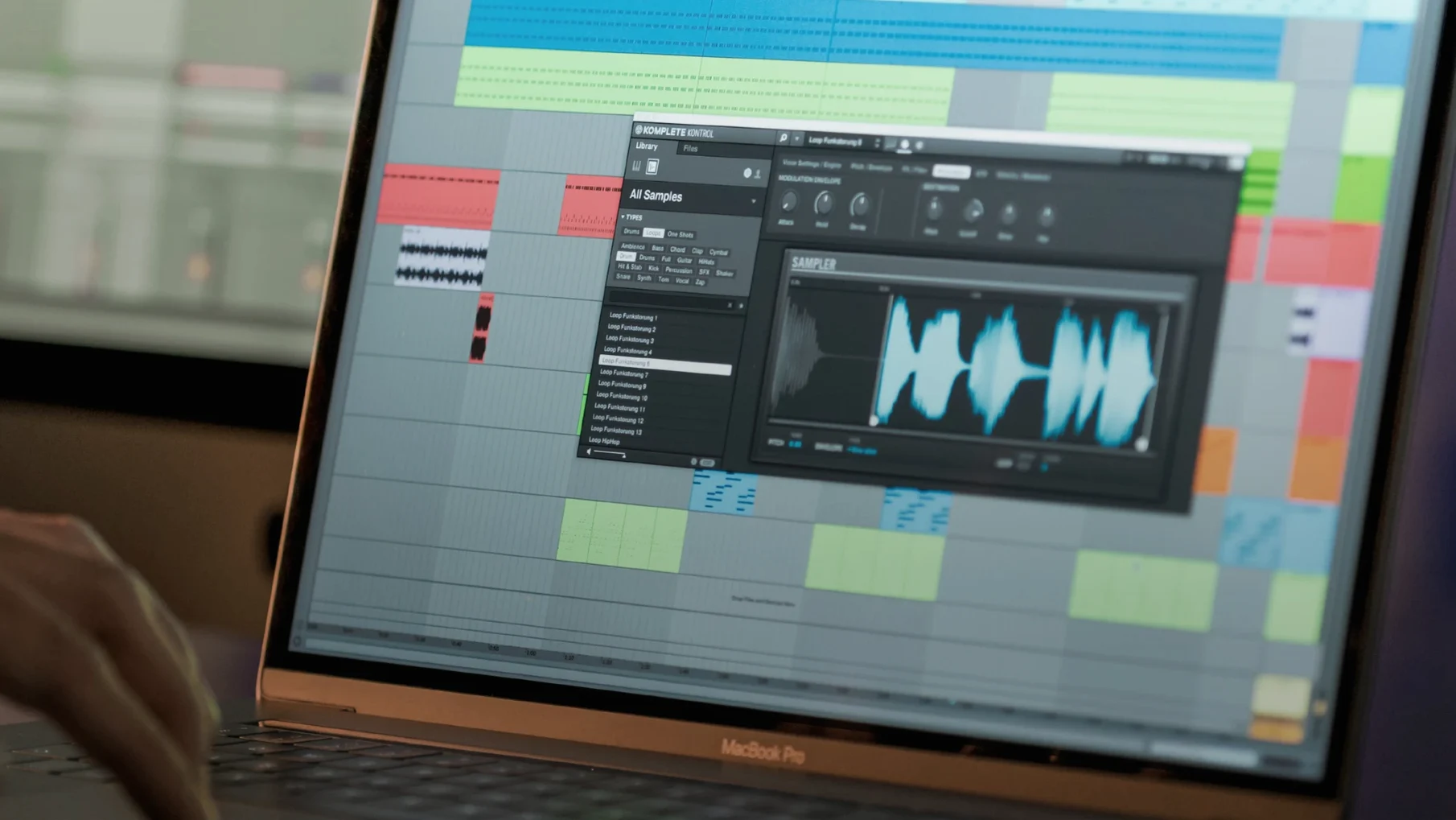
Producers who live inside Komplete Kontrol tend to treat it less like a browser and more like mission control. It's where instruments, effects, presets, loops and samples get organized, auditioned and triggered without leaving one window. On a Mac it runs as a standalone app or as a plug-in inside any DAW, which means the same library and the same muscle memory follow you from a quick jam to a full arrangement session.
Formats and Hosts First
- Runs standalone or as a plug-in in any DAW.
- Organizes instruments, effects, presets, loops and samples in one workflow.
- Drags loops and one-shots straight to the DAW timeline.
- Plays chords with one finger and plays sounds through its built-in sampler.
- Shows visual feedback on S-Series keyboards through the Light Guide.
- Syncs collections with Sounds.com.
The Sound Workflow
Version 3.5.4 brings NKS Connect support into Komplete Kontrol, and that matters most for anyone working with compatible NKS Connect controllers. The update also tightens up performance when changing plug-in parameters from a Kontrol S-Series MK3, which removes a specific kind of friction during editing sessions. Between the Light Guide feedback on S-Series keys and the one-finger chord playing, the setup leans hard into keeping hands on the keyboard instead of the mouse. It's a workflow built for people who want their instrument library to feel as immediate as a hardware synth while keeping the full flexibility of a Mac-based DAW.
Snags People Actually Run Into
The plug-in can go quiet after a DAW update, and nine times out of ten it's because the host hasn't rescanned plug-ins. A quick forced rescan inside Logic or Ableton Live usually brings it back. Another classic: S-Series keyboards lighting up but not controlling anything. That's often a missed firmware update on the hardware side — Native Instruments ships keyboard firmware separately, and skipping it leaves NKS mapping half-working.
If Komplete Kontrol launches as a standalone app but refuses to show up as a plug-in, check that it's installed in the correct component and VST folders. Some DAWs are picky about where they look, and a custom install path can cause the plug-in to vanish. The fix is straightforward: re-run the installer and let it place files in the default locations. Users also occasionally hit a blank browser after importing third-party libraries. A database rebuild — hold the Alt key while clicking the rescan button — clears that up.
Next to Similar Mac Apps
Arturia Analog Lab covers a lot of the same ground with its own preset-browsing approach, but it's tied tightly to Arturia's emulations. Komplete Kontrol's NKS ecosystem reaches much further into third-party territory — over 750 plug-ins from 90 developers show up with tagged presets and mapped controls. Analog Lab feels more like a curated synth museum, while Komplete Kontrol acts as a universal librarian that doesn't care who made the instrument.
UVI Workstation loads soundware and plays it back with minimal fuss. It's lighter on tagging and browsing smarts, though. Where Komplete Kontrol lets you filter by character, type and genre across libraries, UVI expects you to know which expansion a sound lives in. The Smart Play scales and chord modes in Komplete Kontrol also have no direct equivalent in UVI's player — it's a playback host, not a performance tool.
Akai VIP maps plug-ins to controller keyboards and organizes presets, but development has slowed and the Mac version lags on newer macOS releases. Komplete Kontrol stays current (3.5.4 runs on macOS 12 and later, both architectures) and ties into an active hardware line that still gets updates.
Who Finds It Indispensable
MIDI controller users who own S-Series or other NKS-compatible keyboards get the full picture — the Light Guide alone changes how you navigate scales, chords and key switches. Producers with sprawling third-party collections also benefit. When you've got Serum, Diva, Omnisphere and a dozen smaller synths, having one tagged browser that loads them all with pre-mapped controls cuts session drag dramatically.
Loop-based beatmakers get less out of it. The loop browsing and drag-to-DAW feature is solid, but it's not the headline act. People who work entirely with audio, or who only use stock DAW instruments, won't feel the gap Komplete Kontrol fills. It shines brightest when you already have too many plug-ins and not enough time to hunt through them manually.
Version 3.5.4 is a focused update for controller users. Here's what landed:
- Added NKS Connect support in Komplete Kontrol.
- Added NKS Mode integration for compatible NKS Connect controllers.
- Fixed performance issues when changing plug-in parameters from Kontrol S-Series MK3.
- macOS 12 or later
- Apple Silicon and Intel
- Interface language: English
Questions people ask
Does Komplete Kontrol work inside any DAW?
Yes, it runs as a plug-in in any DAW and also works as a standalone app.
Can I drag loops into my DAW from Komplete Kontrol?
Yes, you can drag loops and one-shots directly to the DAW timeline.
What does NKS Connect support add in version 3.5.4?
It adds NKS Connect support and NKS Mode integration for compatible NKS Connect controllers, along with performance fixes for Kontrol S-Series MK3 parameter changes.
Also on readers' docks
Sign in or create an account to leave a comment.
No comments yet. Tell me how it got on with your other devices.
More in VST Plugins
See all Komplete FX Bundle
2026.1 VST Plugins
3.2 GB
Komplete FX Bundle
2026.1 VST Plugins
3.2 GB
 KORG Collection
1.0.3 VST Plugins
175 MB
KORG Collection
1.0.3 VST Plugins
175 MB
 KORG Software Modwave Native
1.4.2 VST Plugins
111 MB
KORG Software Modwave Native
1.4.2 VST Plugins
111 MB
 KORG TRITON
1.4.7 VST Plugins
586 MB
KORG TRITON
1.4.7 VST Plugins
586 MB
 Kalifornia Dynamic KD Alkane
1.0.17.0 VST Plugins
270 MB
Kalifornia Dynamic KD Alkane
1.0.17.0 VST Plugins
270 MB
 LANDR Mastering Plugin PRO
1.1.35 VST Plugins
365 MB
LANDR Mastering Plugin PRO
1.1.35 VST Plugins
365 MB
 LANDR Vocal Bundle
2025.12 VST Plugins
447 MB
LANDR Vocal Bundle
2025.12 VST Plugins
447 MB
 iZotope Tonal Balance Control
3.0.0 VST Plugins
264 MB
iZotope Tonal Balance Control
3.0.0 VST Plugins
264 MB