









Download EZdrummer for macOS
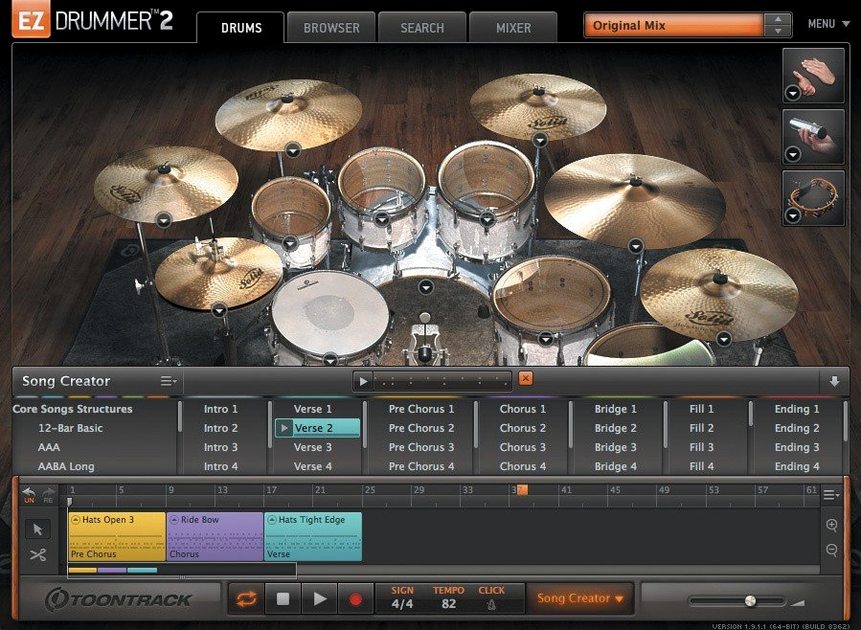
Songwriters and home producers reach for EZdrummer when they need real-sounding drum tracks without the recording-studio headache. It gives you seven kits, a pile of percussion, and a workflow built around finding ideas quickly. If you've just opened it for the first time, a handful of tools will get you from silence to something that grooves. Here are the first two you should try.
Search the Groove Library
The MIDI groove library is the quickest path to a finished feel. You browse by style or kit piece, preview patterns in real time, and star the ones that click. Drag a groove straight to the song track and it snaps into place — no programming required. Combine that with the mix-ready presets and you've got a polished drum sound with almost no tweaking.
Build a Pattern or Ask the Bandmate
When a library groove isn't quite right, open the built-in Grid Editor and write a pattern from scratch. It's straightforward enough that tapping out a verse or fill feels natural, even if you're not a drummer. For something more playful, drag a guitar riff or a vocal melody into Bandmate. It listens to the audio or MIDI and suggests drum ideas that fit — a proper songwriting partner inside the plugin.
First Days: The Settings That Actually Matter
Fresh install, you launch the standalone and it hits you with a full kit loaded in the default room. That's fine for a quick bang-around, but two settings make the whole experience click. Head straight to the Audio/MIDI Setup dialog and check your buffer size. EZdrummer 3 runs happily at 128 samples on most modern Macs, but if you hear little crackles while tapping around the kit, bump it to 256 — the latency difference is negligible for programming drums and your CPU will thank you.
The second one lives in the song track view. Open any groove from the library and look at the Follow Host button. When it's lit, the groove locks to your DAW's transport. When it's off, EZdrummer runs independently — perfect for the days you're just auditioning ideas in the standalone and want playback control from within the plugin itself. New users miss this and wonder why their spacebar does nothing.
While you're poking around, hit the Mixer tab and save your first user preset. Pick any of the mix-ready starting points, tweak the kick level up a couple of dB — almost every songwriter does — and save it. You'll reuse that one preset across half your demos without thinking about it again.
A Writing Session, Step by Step
Tuesday evening. You've got a verse and chorus riff mapped out in Logic, guitars tracked scratchy but good enough. The drum track is just a click — not exactly inspiring. You swap the click for EZdrummer.
First move: drag the roughest guitar part into the Bandmate window. It chews on the transient information for a few seconds and spits out four groove suggestions, each with a different ride and kick pattern. The second one has a hi-hat feel that sits under the riff without crowding the vocals you haven't recorded yet. You drag it to bar one of the song track.
Now the chorus. The verse groove works but feels flat when the guitars open up. You open the library browser, filter by Style → Rock → 4/4, and hit the spacebar. Three previews in, you find a pattern with a half-open crash and a snare that lands harder on the backbeat. You drag it to bar 33 and let it loop.
The transition between sections needs a fill. You open the Grid Editor, click into the last bar of the verse, and tap out a simple snare-and-tom build across the last two beats. It's not flashy — four sixteenth notes climbing from the floor tom up to the rack — but it pulls the ear into the chorus. You save the project as "Tuesday Sketch" and it sounds like a band, not a weekend warrior with an interface.
Tap2Find Is the Hidden Shortcut
Most users find the groove library by clicking through menus. Tap2Find is faster and honestly more musical. You click the little microphone icon, wait for the count-in, and tap the rhythm on your desk — or your keyboard, or a single drum pad if you've got one connected. EZdrummer searches the entire library for grooves that match your rhythmic phrasing, not just a tempo range.
It works especially well when you've already got a vocal melody in your head. Hum it, tap the syllable rhythm with two fingers, and the matches often land surprisingly close to what you imagined. The feature doesn't need a perfect performance; it's looking for the spacing between your hits, not your drumming chops. Songwriters who can't program a hi-hat pattern to save their lives lean on this constantly.
Three Mac User Types Who Instantly Click With This Plugin
Three kinds of Mac users will open this plugin and immediately feel like it was built for them.
The songwriter who records demos alone. You've got a guitar, an interface, and a stack of half-finished ideas. You don't want to hire a drummer for a scratch track, and you definitely don't want to spend an afternoon drawing MIDI notes with a mouse. EZdrummer's groove library and Bandmate cut the drum-programming step down to minutes. You spend more time writing and less time clicking.
The producer who needs drum tracks fast. Maybe you're tracking a vocalist on a Tuesday and you need a full arrangement by Friday. The mix-ready presets mean you don't build a drum sound from raw samples every session. Pick a room, pick a kit, drag a groove, tweak the Play Style knob to shift the feel from "straight" to "swung" or "halftime," and move on. The percussion layer — shakers, tambourines, hand claps — sits right inside the same interface, so you can sweeten a chorus without loading a separate plugin.
The MIDI-curious beginner. You've never programmed drums before. The Grid Editor is visual enough that you can see what a kick-and-snare pattern looks like, and the groove library gives you thousands of examples to study and reverse-engineer. Drag a pattern onto the song track, double-click to open it in the editor, and you're looking at a real drummer's phrasing — ghost notes, velocity variation, the works. It's a learning tool disguised as a time-saver.
Power users with massive expansion libraries will appreciate that version 3.1.2 ensures EZX packs released later this year slot right in. If you've been collecting Toontrack expansions for years, this version keeps your library intact and forward-compatible.
A Full Song from Start to Finish: The Singer-Songwriter Workflow
Let's walk through a complete drum track for a three-minute acoustic-rock tune — the kind with a quiet verse, a building pre-chorus, and a big, open chorus. No prior drum programming knowledge required.
Step 1: Set the tempo and structure. Your DAW is set to 92 bpm. You open EZdrummer as a plugin, load the Main Room with the Bright kit preset — it's got the snappy snare and present kick that cuts through acoustic guitars. First thing you do is open the Song Creator panel and tell it you want an Intro, two Verses, two Choruses, and an Outro. You set the verse length to 8 bars, chorus to 8, and let it generate. In ten seconds you've got a skeleton arrangement with distinct parts, fills between sections, and an ending that doesn't just stop dead.
Step 2: Dial in the verse feel. The generated verse pattern is fine but it's playing a busy ride cymbal that fights the fingerpicking. You highlight the verse blocks on the song track, open the library, and browse to Brushes → 16th-note feel. You find a pattern with a soft snare rim-click and a shaker ghosting underneath. You drag it across both verses. Instantly the track breathes.
Step 3: Build the pre-chorus. The Song Creator left you a four-bar pre-chorus that uses the same verse groove. You want tension. You open the Grid Editor, take the basic kick pattern, and add eighth-note floor tom hits on the "and" of every beat. You copy the hi-hat line but open it slightly — from closed-tip to half-open shoulder hits — by adjusting the MIDI notes' articulation. The whole section pushes forward now, leaning into the chorus.
Step 4: Explode the chorus. The generated chorus groove is almost there. You open Edit Play Style and crank the complexity up two notches, then shift the time feel from straight to a slight swing. The snare fills out, ghost notes appear on the kick, and the crash hits land on beat one with authority. You layer in a tambourine from the percussion library — just quarter notes — and pan it slightly right. The chorus sounds twice as wide as the verse without touching a mixing desk.
Step 5: Humanize and finish. You select the entire song track, open the Humanize function, and apply subtle random velocity and timing shifts — about 3% on timing, 5% on velocity. The machine-grid tightness loosens just enough that it breathes like a player. You save the project, bounce a rough mix, and send it to the vocalist. Total drum-programming time: under 15 minutes.
That's the promise EZdrummer makes good on. You don't learn to program drums for three months before you write a song. You open it, you generate ideas, you tweak what needs tweaking, and you get back to the part that matters — the song itself.
Version 3.1.2 is a tidy stability and polish update. Here's what changed:
- The standalone icon and project icon now use the macOS Tahoe style.
- Internal improvements were made for Infinity Grid EZX.
- Fixed an issue where hi-hat pedal and other CC data could fail during recording on the song track.
- Fixed a bug where toggling Solo or Mute in the mixer could clear the opposite recall state.
- macOS 10.15 or later
- Supports Intel and Apple Silicon Macs
- Interface language: English
Questions people ask
Does EZdrummer 3 come with percussion sounds?
Yes, the software includes percussion instruments alongside the seven core drum kits.
Can I drag my own audio into EZdrummer 3 for ideas?
Absolutely. The Bandmate feature accepts dragged audio or MIDI and suggests drum parts to match.
What's the easiest way to find a beat in EZdrummer 3?
Use the MIDI groove library to browse and preview patterns, then star favorites and drag them directly onto the song track.
Also on readers' docks
Sign in or create an account to leave a comment.
No comments yet. Tell me how it got on with your other devices.
More in VST Plugins
See all EZbass
1.3.3 VST Plugins
81 MB
EZbass
1.3.3 VST Plugins
81 MB
 FabFilter Total Bundle
25.06.2026 VST Plugins
347 MB
FabFilter Total Bundle
25.06.2026 VST Plugins
347 MB
 elastiquePitch
2.5.0 VST Plugins
17 MB
elastiquePitch
2.5.0 VST Plugins
17 MB
 Effectrix
1.4.8 VST Plugins
20 MB
Effectrix
1.4.8 VST Plugins
20 MB
 Devious Machines Infiltrator
2.5.26 VST Plugins
46 MB
Devious Machines Infiltrator
2.5.26 VST Plugins
46 MB
 Cymatics VOXITY
1.0.0 VST Plugins
97 MB
Cymatics VOXITY
1.0.0 VST Plugins
97 MB
 Cymatics QUAKE
1.0.0 VST Plugins
1.6 GB
Cymatics QUAKE
1.0.0 VST Plugins
1.6 GB
 iZotope Insight
2.4.0 VST Plugins
iZotope Insight
2.4.0 VST Plugins