









Download Cymatics VOXITY for macOS
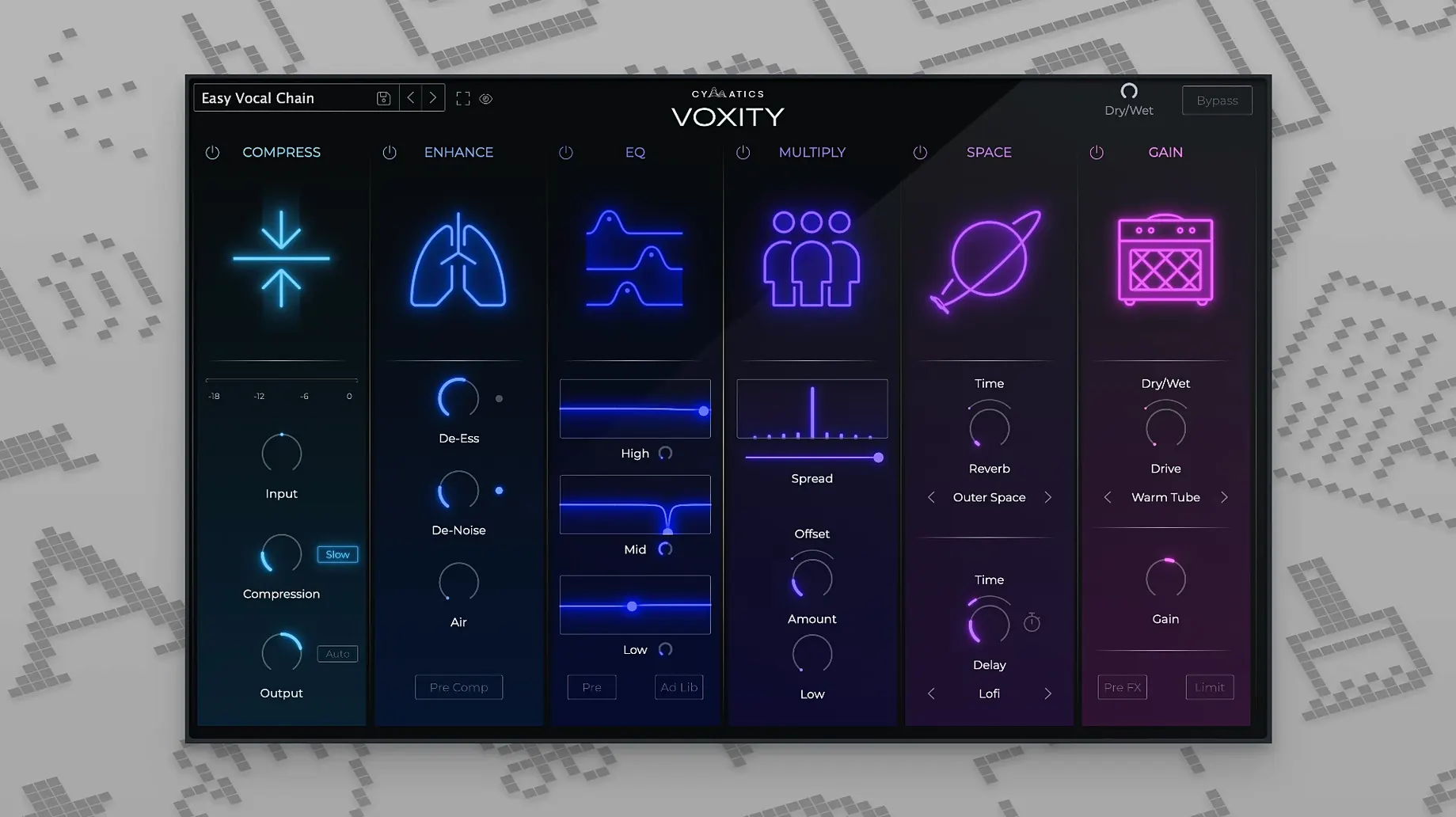
The VOXITY plugin from Cymatics is a vocal-processing tool that packs a full mixing chain into one window. It's built to shape a raw vocal take with a handful of controls that cover the essentials — de-breathing, harshness reduction, space, and width.
I started with a dry, close-mic'd verse that had a few sharp sibilant peaks and an audible breath between lines. Loading up VOXITY, I pulled the De-Breath knob to the left until the inhale between phrases dropped away without slicing the take manually. The high-frequency roughness softened nicely when I dialed back the Harsh control, and I didn't lose the air at the top end.
Next, I added a touch of echo and reverb from the built-in send-style section. The reverb stayed out of the way of the consonants, and the slap echo gave the vocal just enough bounce to sit in a sparse beat. I pushed the Width slider a little, and the vocal bloomed to the sides while the center stayed anchored — no phase weirdness on a mono check.
In under two minutes, the take went from thin and unpolished to present and controlled. VOXITY won't replace a full channel strip for every job, but it's a fast way to get a vocal to a solid starting point when you're producing in the flow.
A Fast Shaper, Not a Surgical Tool
Version 1.0.0 landed as a focused first release, and the design choices make sense once you've spent a few sessions with it. The plugin doesn't try to be a deep surgical tool — it's a fast shaper, and the parameter ranges reflect that. The De-Breath control, for instance, isn't a full noise gate. It tapers the inhales and mouth noises with a single knob throw, which means less time drawing automation clips and more time staying in the creative headspace.
The Harsh control targets the 2–5 kHz zone where sibilance and digital edginess pile up, but it does so with a broad curve rather than a tight notch. In practice, that means a vocal recorded on a budget condenser can lose its brittle quality without sounding dull. I've found it particularly useful on stacked background harmonies where four or five tracks of the same singer start to accumulate a fizzy buildup around 4 kHz — a quick pull on Harsh across the group tames the whole blend.
The stereo width section behaves more like a mid-side balance tweak than a heavy stereoizer. Pushing it introduces width without pulling the center image apart, which kept my doubled choruses phase-coherent even when I summed the mix to mono on a Bluetooth speaker test. That's the kind of practical thinking that makes the 1.0.0 release feel deliberate rather than bare-bones.
Drop the Output Gain Early
The factory presets are solid starting points, but a few quick adjustments make VOXITY fit into different workflows much better right away:
- Drop the output gain early. The plugin can run hot when you stack Width and the space effects together. I pull the master fader inside VOXITY down by 3–4 dB before dialing in anything else — it leaves headroom for the reverb and echo tails without clipping the next insert slot.
- Flip the internal routing order. By default, the width stage comes after the space sends, but I prefer widening before reverb and echo. It puts the ambience around the already-spread vocal rather than spreading a wet reverb tail, which sounds more natural in a dense arrangement.
- Set De-Breath to catch only the loudest inhales. Aggressive de-breathing can chop off the start of quiet phrases. I aim for a setting where the softest breath is still faintly audible — that keeps the performance human while cleaning up the obvious gasps.
- Use the echo as a pre-delay trick. Set the echo time very short, around 30–50 ms, and keep the feedback at minimum. It acts like a pre-delay for the reverb, pushing the vocal forward in the mix without an obvious slapback effect.
Slots Right After an EQ Cut
VOXITY runs as an AU component, which means it slots into Logic Pro, Ableton Live, and any AU-compatible host on a Mac. I've been inserting it right after a basic EQ cut in Logic's channel strip — usually a high-pass around 80 Hz — and before any compression. That order lets the plugin clean up breaths and harshness on the raw signal, so the compressor downstream isn't reacting to spikes that don't belong in the final sound.
On Apple Silicon machines, the plugin loads quickly and sits comfortably in a session with 30-plus tracks. I haven't seen it trigger the system overload message even when running alongside a handful of other Cymatics plugins, which is worth noting for producers who build template projects with multiple vocal chains ready to go.
For users who stumbled across a voxity plugin mention while browsing vocal processing tools, the workflow integration is refreshingly straightforward. It doesn't require a separate iLok manager or complex authorization — just drop the component into the system folder and rescan. That simplicity matters when you're setting up a new machine or moving between a studio Mac and a travel laptop.
The plugin also pairs well with macOS's built-in audio routing. Using the AU Lab utility (included with Xcode's additional tools), I set up a lightweight standalone host for VOXITY to process live vocal input during writing sessions, applying a touch of De-Breath and reverb before the signal hits my voice notes app. It's not the intended use case, but it turns the plugin into a zero-latency vocal conditioner for quick idea capture.
On iPad and iPhone
VOXITY is desktop-only at version 1.0.0 — no iPad or iPhone companion exists yet. Producers working across devices can bounce processed stems from the Mac and transfer them, but there's no mobile version to run inside GarageBand for iOS or Logic Remote.
- macOS 10.14 or later
- Intel or Apple Silicon Mac
- 64-bit host
Questions people ask
What does the VOXITY plugin do for vocal mixing?
It's designed to process and shape vocals with controls that reduce harsh sounds, manage breathing noise, and add echo, reverb, and stereo width.
Is VOXITY compatible with my Mac?
Yes, it runs on macOS 10.14 and later and supports both Intel and Apple Silicon Macs as a 64-bit plugin.
Also on readers' docks
Sign in or create an account to leave a comment.
No comments yet. Tell me how it got on with your other devices.
More in VST Plugins
See all Cymatics QUAKE
1.0.0 VST Plugins
1.6 GB
Cymatics QUAKE
1.0.0 VST Plugins
1.6 GB
 Devious Machines Infiltrator
2.5.26 VST Plugins
46 MB
Devious Machines Infiltrator
2.5.26 VST Plugins
46 MB
 Effectrix
1.4.8 VST Plugins
20 MB
Effectrix
1.4.8 VST Plugins
20 MB
 elastiquePitch
2.5.0 VST Plugins
17 MB
elastiquePitch
2.5.0 VST Plugins
17 MB
 EZbass
1.3.3 VST Plugins
81 MB
EZbass
1.3.3 VST Plugins
81 MB
 EZdrummer
3.1.2 VST Plugins
786 MB
EZdrummer
3.1.2 VST Plugins
786 MB
 FabFilter Total Bundle
25.06.2026 VST Plugins
347 MB
FabFilter Total Bundle
25.06.2026 VST Plugins
347 MB
 Cableguys Snapback
1.1 VST Plugins
37 MB
Cableguys Snapback
1.1 VST Plugins
37 MB