
Download Serato DJ Pro for macOS
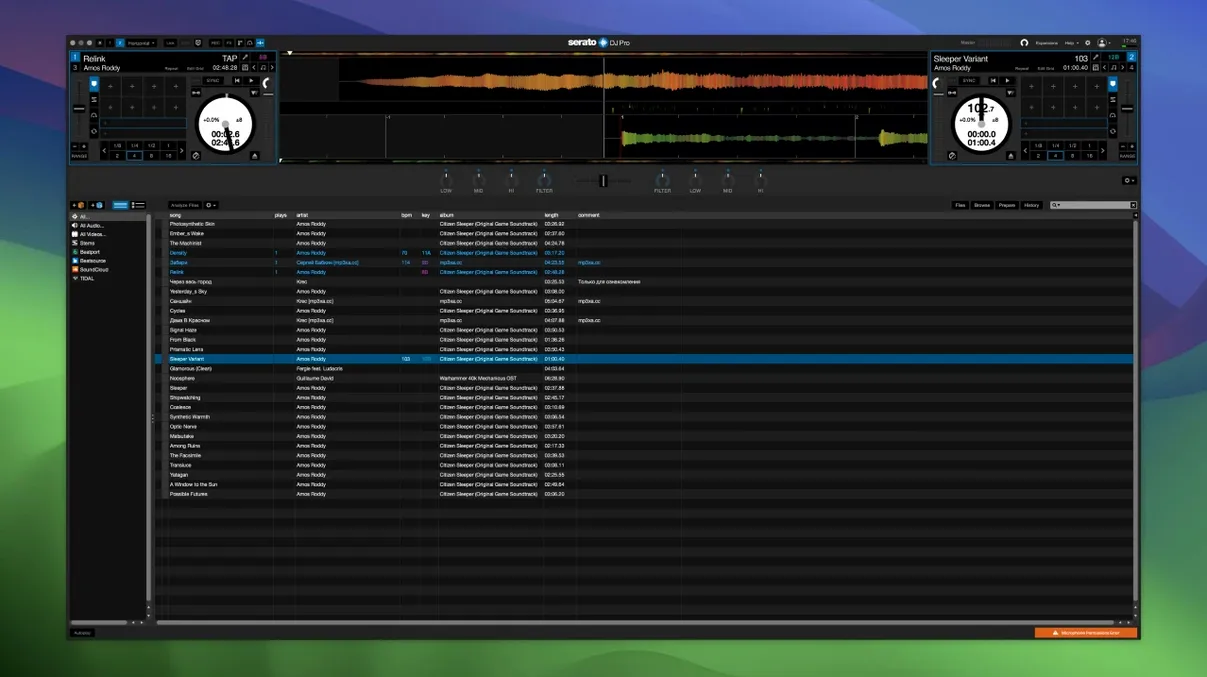
If you've ever tinkered with Serato DJ Lite and wished you could crack open tracks mid-performance, Serato DJ Pro is the upgrade that makes it real. I'm talking about pulling an acapella out of a full song while the crowd is still moving — no prep work, just one button press.
What makes it more capable than the Lite version?
Serato DJ Pro unlocks the full Stems feature set, letting you isolate or remove vocals, melody, bass, and drums right on the decks. It also opens up far deeper hardware integration, with official support for over 90 controllers and mixers from industry manufacturers.
How does Stems work during a live mix?
You load a track and tap the vocal or instrumental pad. The software splits the audio in real time, so you can drop a pure rhythm section into the next deck while the original hook still rings out. The result feels immediate and genuinely fun to play with.
Instant platter mapping for Pioneer DJ, Rane, and Denon DJ gear
Practically everything. Pioneer DJ, Rane, Denon DJ — if it's a flagship controller, Serato DJ Pro likely recognizes it instantly and maps the platters, faders, and performance pads without fuss.
Is the Slip Release noticeable?
Absolutely. You can scratch, loop, or needle-drop all you want, and when you let go, the track snaps back to exactly where it should be. It's customizable per hardware setup, keeping your timing tight even when you're pushing things.
A club gig scenario — opening with the unexpected
Picture a DJ walking into a Friday-night slot at a mid-sized venue. The crowd is chatty, still warming up, and the headline act wants a slow build. Instead of fading between two full tracks, the DJ loads a classic R&B vocal, taps the acapella pad, and layers it over a deeper house groove that nobody expects. That moment — when heads turn because something familiar suddenly feels brand new — is exactly where Serato DJ Pro earns its keep.
I watched a friend do this last month with a Rane Four and a MacBook Air. The vocal isolation didn't sound like a cheap filter; it held the warmth of the original studio recording while the instrumental underneath stayed clean. The crowd didn't know why it worked, only that it did. That's the Stems promise delivered in a live setting, not a demo video.
Building a mashup from scratch during soundcheck
Here's a workflow I've seen work beautifully when there's fifteen minutes to kill and a controller plugged in:
- Load two tracks into Deck 1 and Deck 2 — one vocal-heavy, one rhythm-driven — and set cue points on the downbeats.
- On Deck 1, hit the vocal Stem pad and mute the bass and drums. On Deck 2, mute the vocal and melody Stems, leaving only the rhythm section.
- Nudge the tempo fader until both decks run at the same BPM, then use the sync button to lock them tight.
- Slide the crossfader to center and bring up Deck 1's acapella while Deck 2's bassline and kick drum roll underneath.
- Apply a touch of Stems Pad FX — a quick Braker on the vocal every fourth bar — so the blend breathes instead of droning.
- Record the mix internally, then export a snippet to Dropbox for the promoter.
The whole process takes under two minutes once muscle memory kicks in. The real trick is that Stems processing stays responsive even while both decks are hot, so you can tweak the EQ or swap out the drum Stem without stopping playback. That's not something every DJ platform handles gracefully.
Rock-solid through hours of Stems and slip-mode scratching
Over several hours of continuous mixing — library browsing, track analysis, Stems separation, and a healthy dose of slip-mode scratching — Serato DJ Pro 4.0.5 stays planted. On an M1 MacBook Pro with 16GB of RAM, the CPU meter barely nudges past 35% even when four Stems are running across two decks. Memory use hovers around 1.2GB, which leaves plenty of headroom for streaming software if you're broadcasting a set.
Launch time from a cold start is roughly eight seconds, and loading a fresh track onto a deck with Stems pre-analyzed takes under a second. The real stability win, though, is how it handles hot-plugging hardware. Yank a controller cable mid-set and plug it back in — something that happens more often than anyone admits — and Serato DJ Pro reconnects without dropping audio or freezing the waveform display. I've seen it recover in about three seconds flat while the emergency internal playback kicked in.
One thing worth setting expectations on: analyzing Stems on an older Intel machine is noticeably slower than on Apple Silicon. A four-minute track might take twelve to fifteen seconds on a 2019 MacBook Pro, whereas the same file processes in under five seconds on an M-series chip. The difference isn't a dealbreaker, but it shapes how you prep your crate before a gig.
Double-click Stems pads to instantly solo an element
There's a handful of touches in daily use that don't make the feature list but change how fluid the software feels:
- Double-click a Stem pad to solo it. Most people single-click to toggle, but the double-click instantly mutes everything else — perfect for isolating a bassline when you want to check its key against the next track.
- Shift + Slip activates momentary slip. Instead of leaving slip mode on, hold the modifier and scratch, then release. The track jumps back the moment your fingers lift. It's a quick way to add texture without committing to the full slip workflow.
- Library column customization remembers per-view settings. You can show BPM and key in the main library but hide them in the prepare panel, keeping the screen clean where it matters. The layout survives restarts, which a surprising number of DJ apps forget.
- Stems Pad FX volume is controllable per channel. If the Braker effect hits too hard, you can dial it back from the FX panel without affecting the main channel gain. Subtle, but it stops those effects from overwhelming a mix.
- Undo for track loads. Accidentally load a banger onto the wrong deck? Cmd+Z puts the previous track back, cue points and all. Tiny feature, massive relief mid-set.
None of these are headline material, but together they make the software feel like it was built by people who actually mix. The keyboard shortcuts are consistent with macOS conventions, and the hardware integration doesn't fight muscle memory from other DJ platforms.
Version 5.0 is a huge leap forward for beat detection and library management. The centerpiece is the new Lucid Beatgrids analysis engine — it's noticeably sharper at nailing down strong beats and can automatically follow tempo changes as they happen. You'll now see BPM values right on the waveform wherever the speed shifts, and you can set the grid resolution to adjust tempo by bars or individual beats. Manual tools like Set Grid Start and Set Beat / Set Bar give you surgical control when a track needs a human touch.
Cue Loops is a clever addition that fires a Cue point and a loop at the same moment, and Open Streaming means you can pull tracks from multiple streaming services side by side. I'm especially excited about Serato iOS Transfer — it pushes tracks, playlists, Cue points, beatgrids and metadata straight to Serato DJ for iOS, which makes prepping a set on iPad a genuinely smooth experience.
The library gets some overdue love too: M3U import, a reset button for your played tracks list, an Explicit column for age-restricted content, and the ability to hide the Status and Type columns. BPM and key display from Tidal and SoundCloud tracks is improved when those services supply the data, and you can save tracks from supported streaming services to your favorites. Under the hood, Pioneer DJ drivers have been updated for macOS Tahoe devices, and there are across-the-board fixes for crashes, memory leaks, interface glitches, track loading, hardware connection and streaming quirks. Startup time and search speed on big libraries feel snappier too. Just note that macOS Big Sur 11 and earlier are no longer supported.
- macOS 12 or later
- Apple Silicon or Intel 64-bit Mac
Questions people ask
Can I create instrumentals with Serato DJ Pro?
Yes. The Stems feature lets you mute vocals with one press, turning any loaded track into an instrumental or acapella instantly during a set.
Also on readers' docks
Sign in or create an account to leave a comment.
No comments yet. Tell me how it got on with your other devices.