









Download QLab for macOS
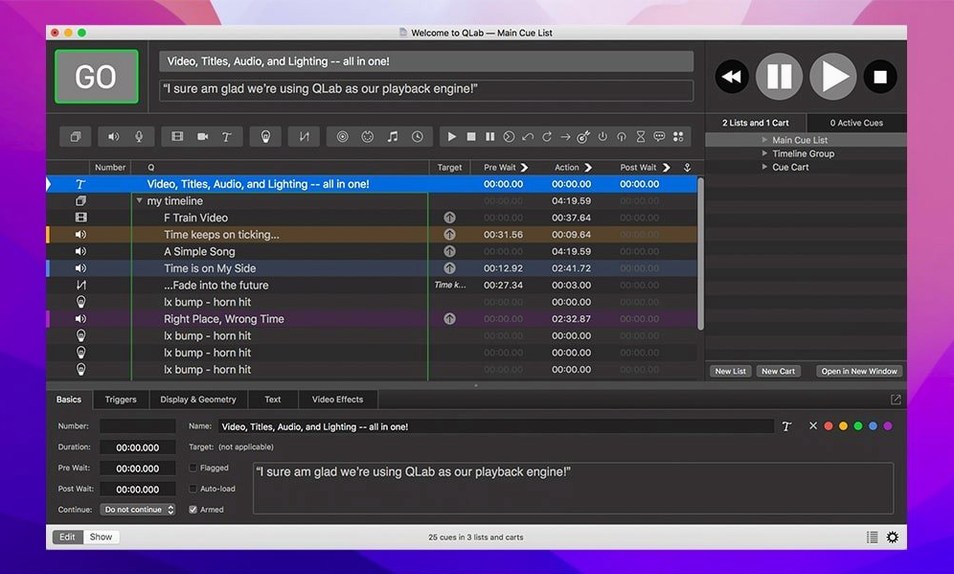
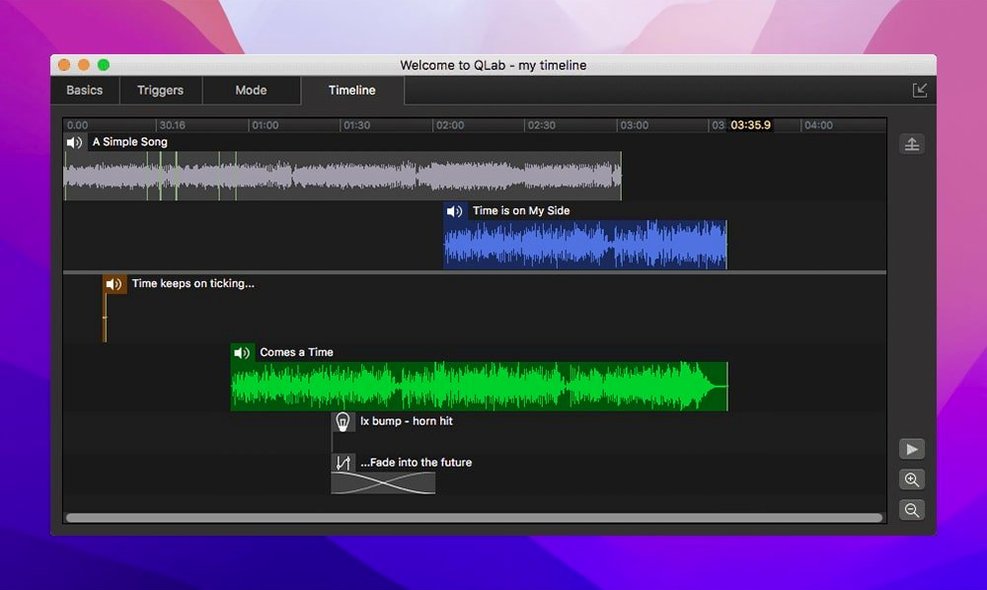
QLab is a macOS workspace where you design and run every cue in your show — sound, video, lighting, and stage control — from a single timeline.
| Developer | Current version |
|---|---|
| Figure 53 LLC | 5.6.3 |
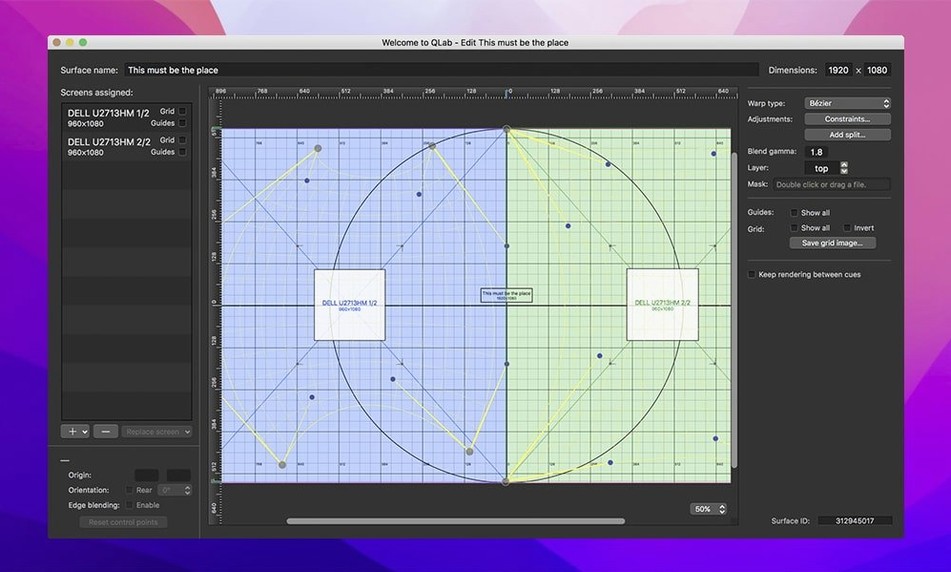
When you first open QLab 5, the blank workspace can feel like a theatre before load-in. The best way in is to drag a few audio files onto the cue list. You’ll see them stack up as numbered cues, and hitting the spacebar runs through them in order — immediate reward, zero routing headaches. After that, pull in a video file and pop open the video fader from the workspace sidebar. The faders for both audio and video live right there, and you can crossfade with a couple of clicks while the cue plays. Undo is built in, so you’re free to experiment. If you have a projector connected, try the geometry tab: you can reverse or center the image on the lens without touching the projector menus, and overlay titles by adding a text cue above the video. The animation tools are worth poking at early too, especially adjustable playback speed with independent pitch control — great for stretching a sound bed under a scene change. For anyone running Blackmagic gear, live video input feeds straight into a cue the moment you plug in, which makes camera cues feel properly integrated rather than bolted on.
Built for Cue-Fire Thinking, Not Casual Tinkering
QLab wasn't built for casual tinkering — it rewards people who think in cues and sequences. Theatre sound designers get the most obvious head start. The whole app is shaped around the way a tech rehearsal runs: you fire a cue, listen, tweak the fade, fire it again. Having 48 audio outputs and 24 inputs means you can route a full band mix to separate stage monitors while sending a different balance to the house, and still have channels left for backstage paging. Lighting programmers who come from a console background might need a beat to adjust to the cue-list paradigm, but once they spot the Light Library and the patch editor, the workflow clicks — especially now that 5.6.3 highlights misconfigured instrument definitions with a colour change instead of letting you discover the problem during a dress run.
Installation artists and museum show-control operators are another group that settles in fast. The combination of MIDI, OSC, and Syphon in one project file means a single Mac can drive audio, trigger projection mapping adjustments, and listen for sensor input from an Arduino rig without a rat's nest of helper apps. If you're the person who gets called when a gallery interactive stops responding, having all the logic in one timeline that you can scroll through makes fault-finding less of a detective job. Corporate event techs also pick it up quickly — dragging a walk-in playlist, a stinger, and a video roll into one workspace and firing them from one keyboard feels natural within an hour.
The Free Tier’s Video Limit Is the Real First Question
Most people searching for a qlab 5 download have already heard it's the standard for theatre. The first thing they ask isn't about features — it's whether the free tier locks you out the moment you need video. The workspace itself opens the same way regardless of which set of features you're using, and you can build an audio-heavy show without hitting a paywall that stops playback. The second question is always about stability during a show run. In daily use, QLab 5.6.3 runs as a native app on both Intel and Apple Silicon Macs, and the recent fix for a rare video-playback crash suggests the team is chasing edge-case gremlins even when most users never see them.
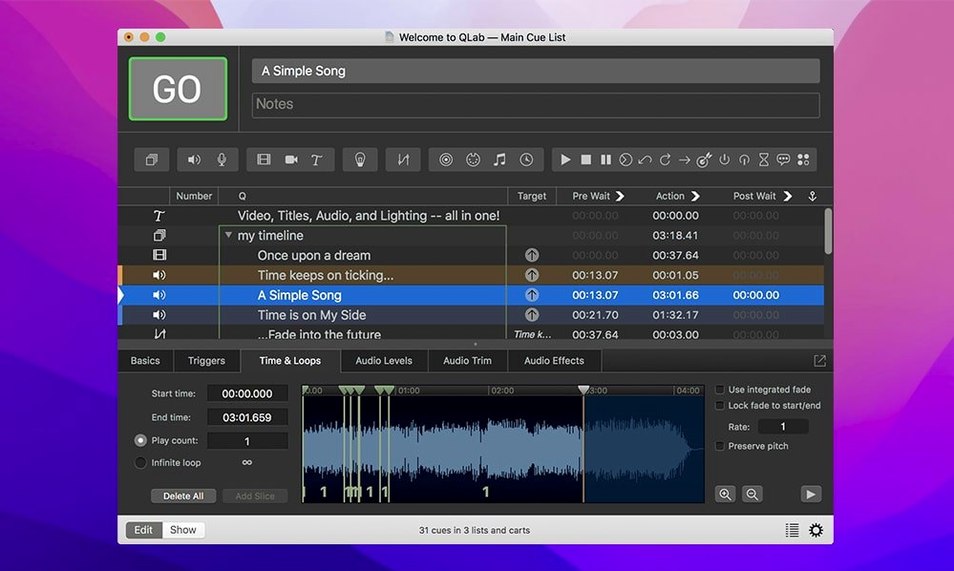
Another frequent question: can you edit audio without jumping out to another program? The integrated editor handles trim points on the start and end of a track, which covers the most common backstage task — topping and tailing a sound effect so it starts clean and doesn't trail into silence for ten seconds. For anything involving spectral cleanup or multi-track layering, you'll still want a dedicated editor, but the built-in tools mean you don't break flow for simple cuts. People also wonder about projector alignment, and the keystone correction and corner pinning answer that directly — you can square up an image on a screen that's hung slightly off-axis without touching the projector's physical lens shift.
Gatekeeper Blocks the Launch Before You Even See the App
The most common snag isn't inside QLab at all — it's Gatekeeper blocking the first launch. The install steps are straightforward once you know the order: mount the disk image, run the terminal command to bypass Gatekeeper, drag the app into Applications, then launch. Skipping the terminal step and double-clicking the app just produces a refusal dialog that doesn't explain what went wrong, which trips up newcomers who aren't used to macOS security prompts.
Inside the app, the cue numbering system catches people out. QLab auto-numbers cues when you drag them in, but those numbers are just labels — they don't determine playback order. You can have cue 1 fire cue 42 next if you set the continue mode that way, and forgetting this leads to a workspace that looks sequential on screen but jumps around during playback. The fix is to glance at the continue column in the cue list whenever playback order matters. Another snag: network device definitions for Right On Cue Services Stage|Tracks. The migration that 5.6.3 adds for older workspaces means projects from 5.6.2 and earlier now pick up the built-in definition automatically, but if you've manually configured a device in an older workspace and it stops responding, checking the Light Patch editor for a Broken status is the first move — that indicator is new in this release and it's there specifically to surface misconfigurations before you're standing in the dark during a cue-to-cue.
Video routing to Blackmagic devices occasionally stalls when the device isn't connected before QLab launches. Plugging in after the app is open sometimes leaves the input source greyed out. The reliable order is to connect everything, power on the external device, then open the workspace. If you've already launched, a quick app restart usually brings the input back.
Mistakes Beginners Make (That the Manual Won't Tell You)
Relying on the spacebar for every playback decision is the biggest early habit to unlearn. The spacebar fires the next cue in the list and pauses the current one if it's playing — which is fine for a cue-by-cue tech run but disastrous mid-show when you meant to hit GO on a specific cue number and instead you've paused the underscore. Learning the separate hotkeys for GO, pause, and panic stops takes an afternoon and saves a show. Another beginner move: stacking video cues on the same surface without checking the opacity and geometry tabs. Two full-screen video cues with no fade or scale adjustment fight each other, and the result is a flickering mess on the projector that looks like a GPU fault. Setting the second cue to appear on a different surface, or adding a fade-and-remove to the first, clears it up immediately.
Audio routing mistakes are quieter but just as common. Dropping a stereo file onto a cue without assigning outputs sends it to the default stereo pair, which works in a studio but not in a venue where you need that sound cue to hit the upstage left speaker only. Setting the audio output patch before you start building the cue list means every cue you drag in inherits sensible routing. Doing it after means opening each cue individually, which is tedious by the time you hit cue sixty. Also, the adjustable playback speed with pitch control is brilliant for stretching a sound bed, but beginners sometimes leave the speed at 0.8x after sound-check and wonder why every cue in act two feels sluggish — the speed fader in the workspace sidebar persists across cues if you don't reset it.
Interface Stays Lag-Free Through Hundreds of Cues
In daily work on a Mac running macOS 11 or later, QLab 5.6.3 feels tightly built. The interface draws cues in the list without perceptible lag even with a few hundred items, and the integrated audio editor opens with a single click on a waveform thumbnail — no loading spinner, no beachball. Video playback starts quickly, and scrubbing through a long video cue with the fader is smooth on Apple Silicon; on older Intel machines with integrated graphics, a 4K file can introduce a brief stutter when you first jump to a new position, but once the frame buffers, continuous playback holds steady.
Memory use scales with the project. A workspace with a dozen audio cues and a couple of MIDI triggers barely registers. A full musical with 90 minutes of multi-track audio, video projections on three surfaces, and OSC commands firing lighting changes will push RAM up, but the app's architecture keeps the workspace responsive by loading what's needed for the next few cues rather than holding everything in memory at once. The 5.6.3 release specifically patched a rare crash during video stop, which is the kind of under-the-hood fix that matters more the closer you get to opening night — nobody wants to discover that crash during a sold-out performance.
For anyone who's been hunting for a QLab cracked or QLab torrent route to try the app, the experience of using the full workspace on a project of any scale tells you whether the tool fits your workflow. QLab's real test isn't a feature checklist — it's whether you can build a show, fire it, and trust that cue 147 lands exactly where you put it, every single time.
A small but focused update lands with version 5.6.3. Workspaces created in 5.6.2 or earlier now migrate automatically to the built-in network device definition for Right On Cue Services Stage|Tracks. And over in the Light Library, misconfigured instrument definitions get a visual nudge — rows change color in the editor so you can spot trouble before it reaches the stage.
- macOS 11 or later
- Intel and Apple Silicon Macs
- Interface language: English
Questions people ask
How many audio outputs does QLab support?
QLab supports up to 48 audio outputs and 24 audio inputs, giving you extensive routing for complex sound designs.
Can I adjust playback speed without changing pitch?
Yes. The playback speed control includes independent pitch adjustment, so you can stretch or compress audio and video without altering the original pitch.
Does QLab work with Blackmagic video devices?
It does. You can use live video input from external devices, including Blackmagic hardware, directly inside a cue.
Also on readers' docks
Sign in or create an account to leave a comment.
No comments yet. Tell me how it got on with your other devices.
More in Audio
See all Plugin Alliance Brainworx bx_mastering studio
1.0.0 Audio
24 MB
Plugin Alliance Brainworx bx_mastering studio
1.0.0 Audio
24 MB
 Updated Serato DJ Pro
5.0.0 Audio
1 GB
Updated Serato DJ Pro
5.0.0 Audio
1 GB
 Serato Studio
2.5.0 Audio
540 MB
Serato Studio
2.5.0 Audio
540 MB
 SoundSource
6.1.5 Audio
46 MB
SoundSource
6.1.5 Audio
46 MB
 Steinberg HALion
7.1.51 Audio
943 MB
Steinberg HALion
7.1.51 Audio
943 MB
 Native Instruments Reaktor
6.5.0 Rev2 Audio
144 MB
Native Instruments Reaktor
6.5.0 Rev2 Audio
144 MB
 Steinberg Nuendo
15.0.30 Audio
1.6 GB
Steinberg Nuendo
15.0.30 Audio
1.6 GB
 My Metronome - Tempo Keeper
1.4.8 Audio
103 MB
My Metronome - Tempo Keeper
1.4.8 Audio
103 MB