








Download WinZip Mac Pro for macOS
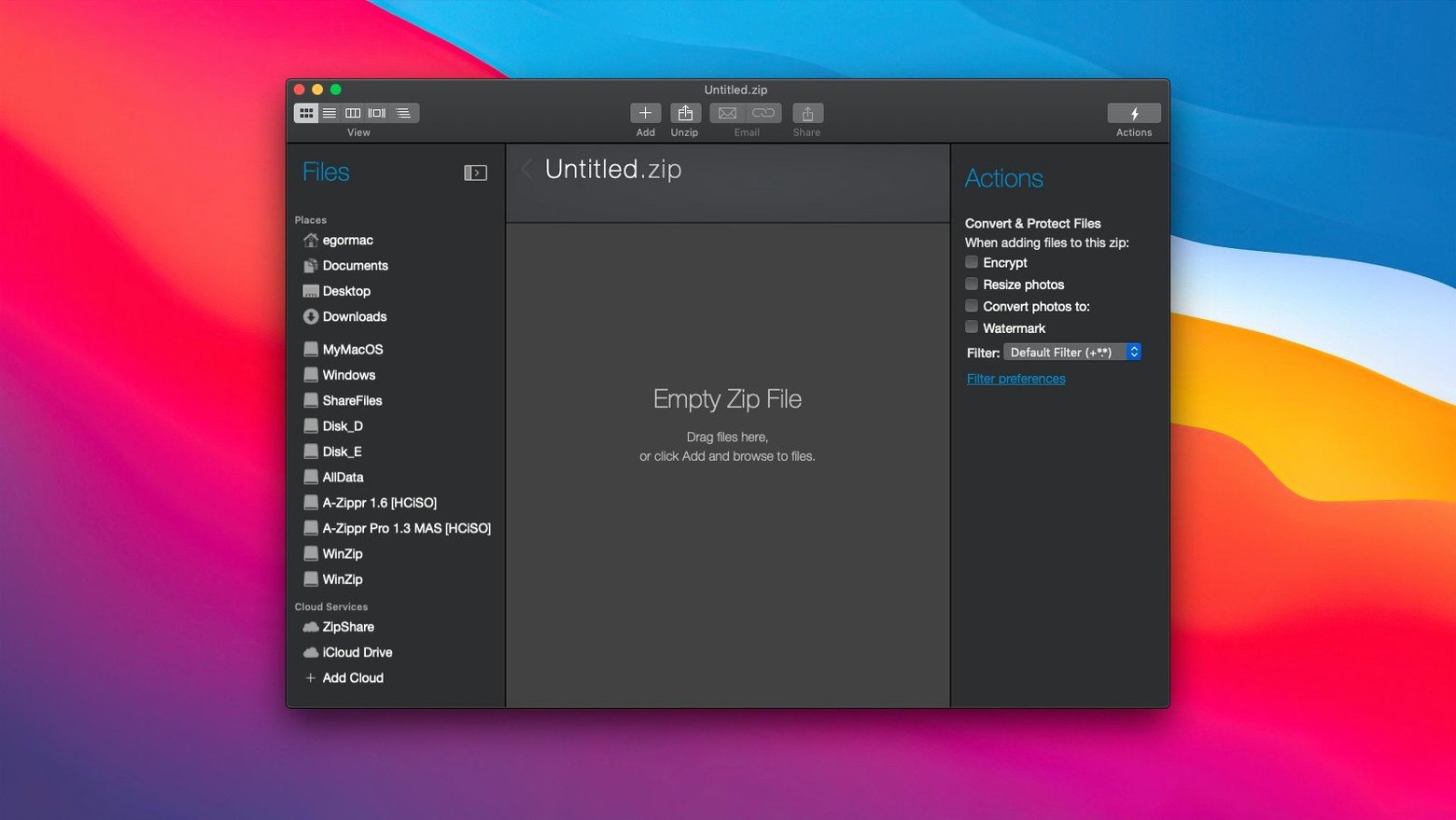
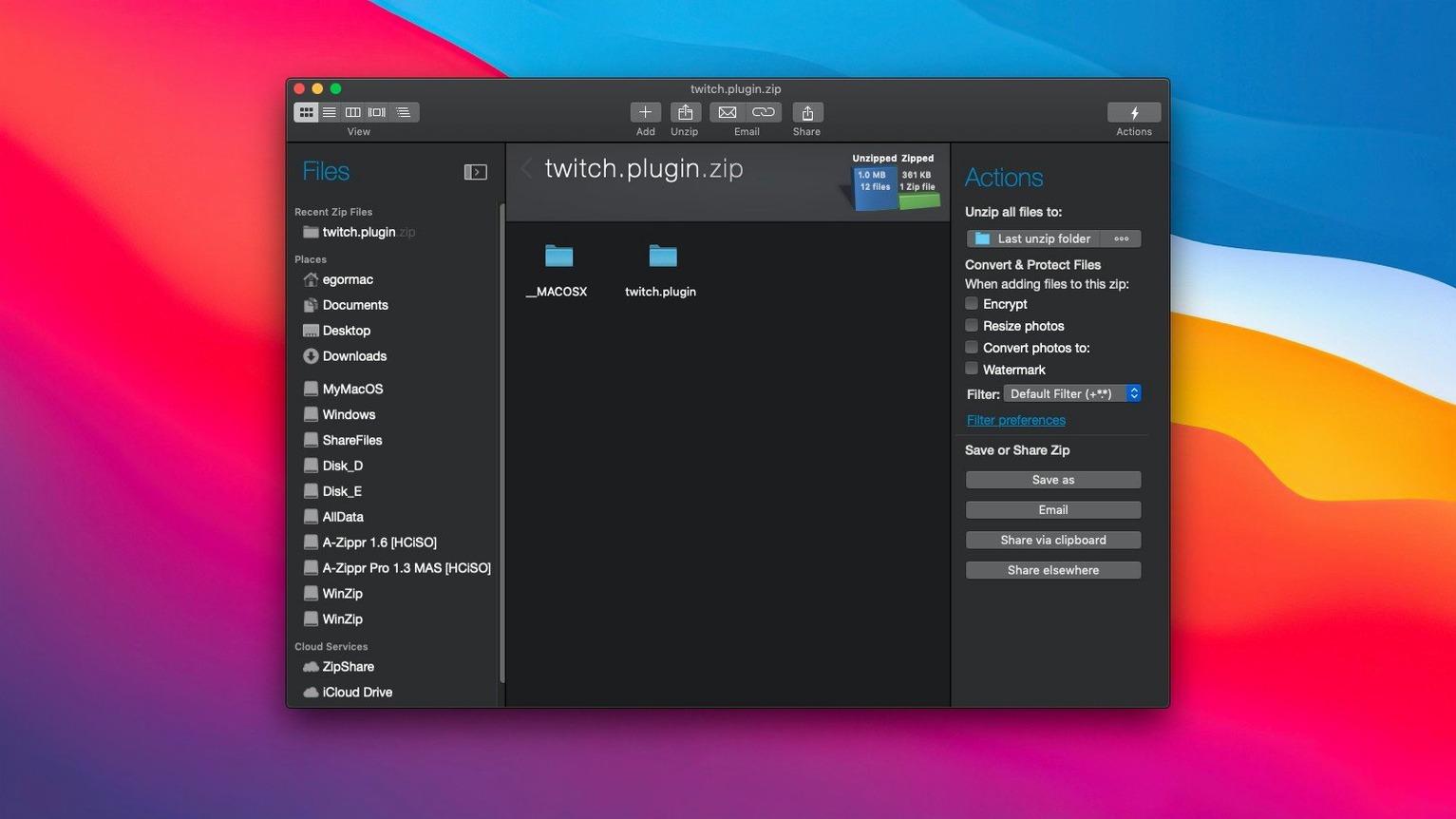
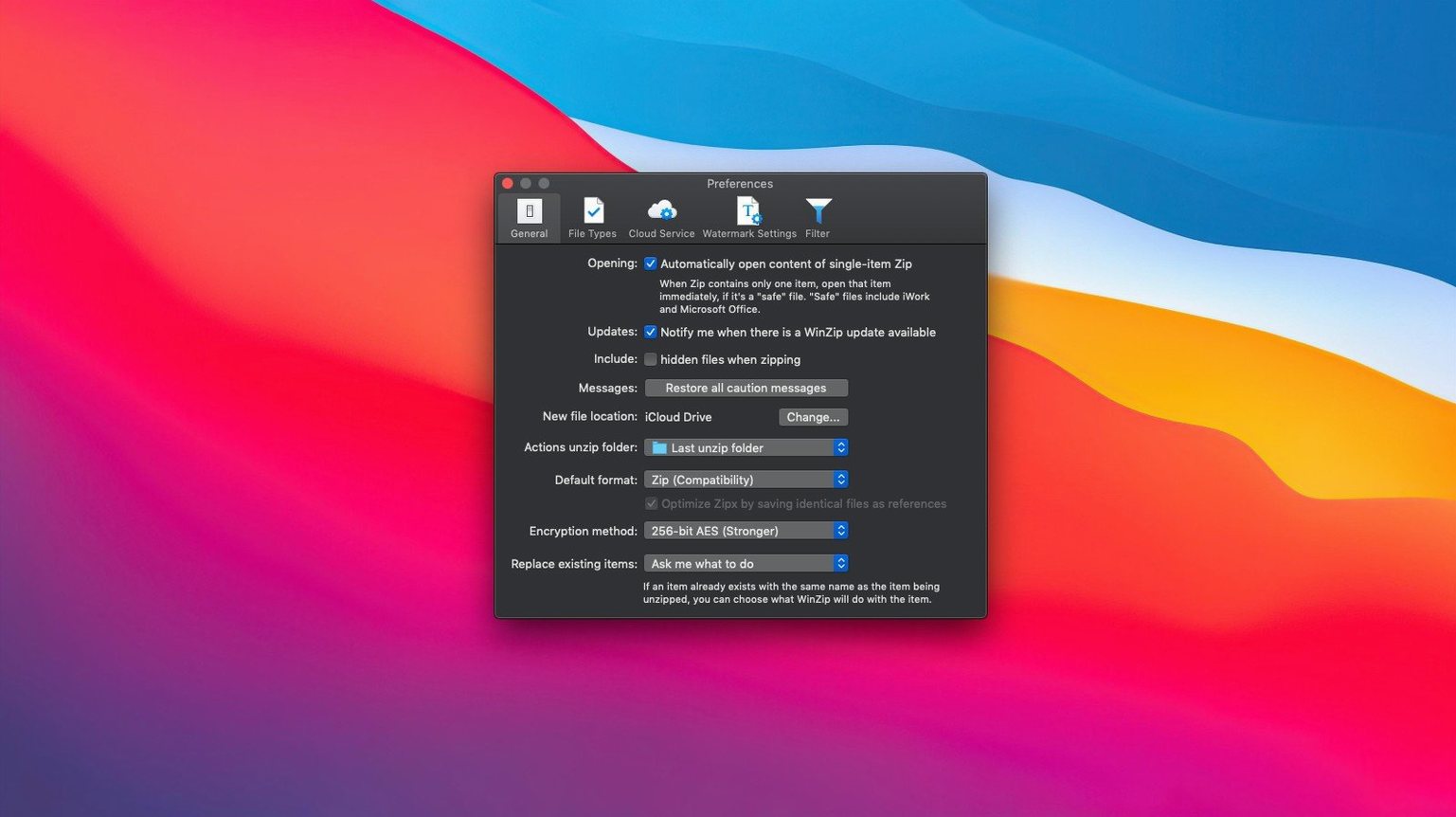
WinZip Mac Pro runs on any Mac with macOS 10.15 or later, and it’s a universal binary — so whether you’re holding onto an Intel machine or you’ve moved to Apple Silicon, the app fits right in. It’s the Mac edition of the classic WinZip tool, rebuilt with a clean, modern interface that feels at home on macOS.
What makes it tick
- Compression without the fuss. Drag a batch of files onto the window and they’re zipped or zipped into a Zipx archive in seconds. The Mac clipboard support also lets you copy files and paste them straight into a new archive.
- Email-ready attachments. WinZip Mac Pro optimizes archives specifically for email, shrinking large documents and photos so they slip under attachment limits without a second thought.
- Encryption built in. Password-protect any archive with strong encryption before you share it — sensible when you’re sending contracts or personal records.
- Cloud drives, direct. The app connects straight to iCloud Drive, Dropbox, and Google Drive. You can open from and save to your cloud folders without bouncing through Finder.
A productivity sidekick, not just a zipper
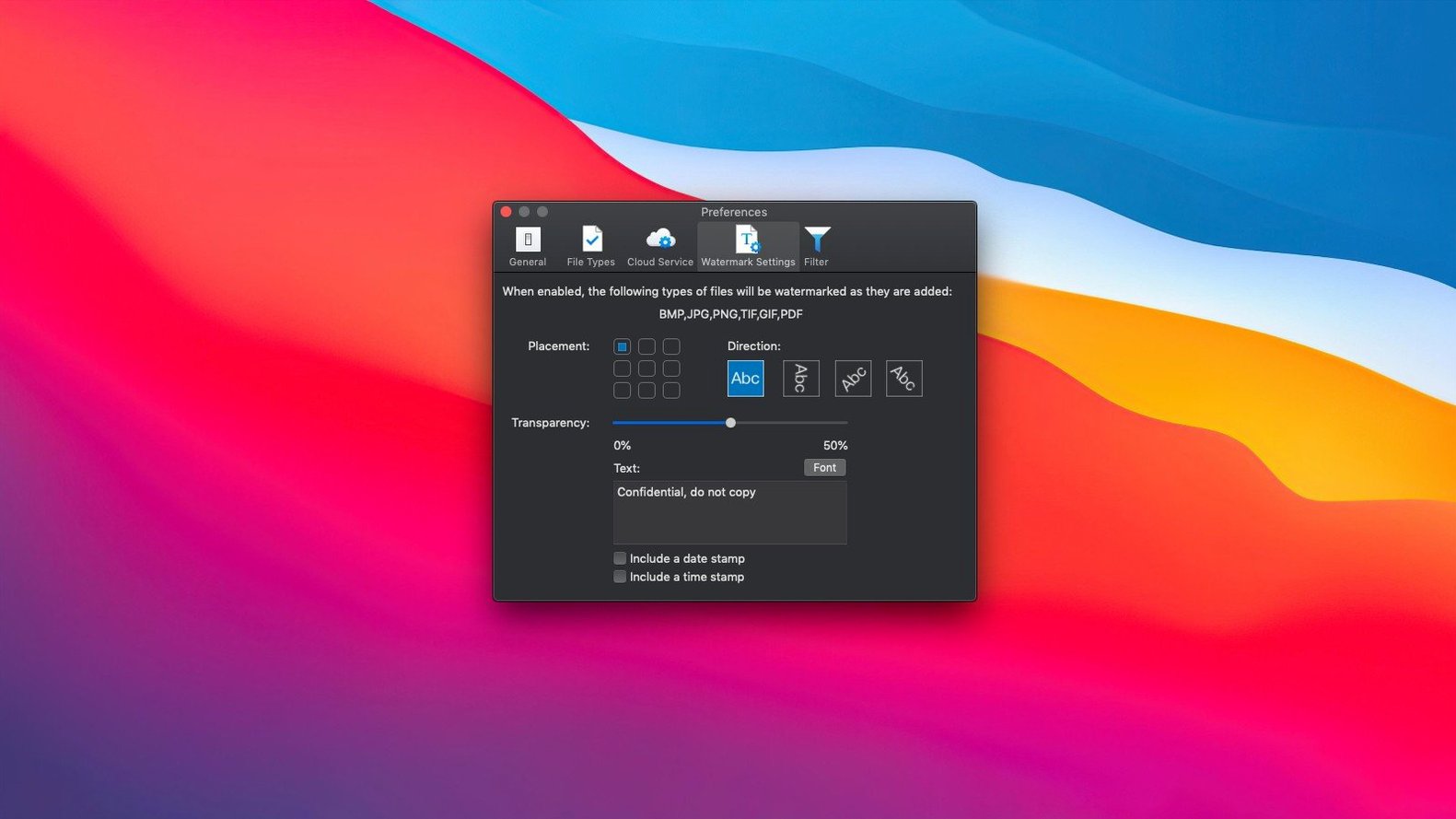
Beyond the compression core, WinZip Mac Pro bundles little file-management helpers that cut out repetitive steps. Convert a stack of images to a different format, resize photos before archiving, or watermark a batch of PDFs — it’s all inside the same window. The drag-and-drop archiving pairs nicely with those tools when you’re preparing files for a client or tidying a project folder. It handles the heavy lifting so your Finder stays uncluttered and your shared links stay tidy.
Free feather-light unpacker versus encrypted Zipx powerhouse
Three names come up the moment you search for winzip mac alternatives: The Unarchiver, Keka, and BetterZip. They all live in the same neighbourhood, but they furnish the house differently.
The Unarchiver is free, feather-light, and brilliant at one thing — unpacking almost any format you throw at it. What it doesn’t do is create archives with any real finesse, and encryption is absent. If you only ever receive files, it’s enough. The moment you need to send something protected and small, you’re back in Finder’s built-in compressor, which offers none of the cloud hooks or email smarts WinZip Mac Pro brings.
Keka sits closer. It compresses, it encrypts, it splits archives, and it handles a long list of formats. But the interface has always been its own kind of austerity — functional, tucked in the menu bar, not exactly chatty about what’s happening. WinZip Mac Pro wears a more polished coat and puts image resizing, PDF watermarking, and duplicate detection right where you can see them. Keka wants you to know what you’re doing; WinZip Mac Pro does a bit more hand-holding, which matters when you’re rushing to get files out before a deadline.
BetterZip is the power user’s pick. You can peek inside archives without extracting, edit files in-place, and script the whole thing. It’s deep, and it rewards tinkerers. WinZip Mac Pro doesn’t try to match that surgical precision — it trades it for speed across the whole workflow: compress, protect, resize, share. If BetterZip is a workshop bench, WinZip Mac Pro is a well-organised dispatch desk. Plenty of people who grabbed a winzip for mac download did so because they wanted one tool that covered the journey from messy folder to sent email, not a collection of specialist levers.
Zipping heavy Affinity files for a 10 a.m. client deadline
Picture a freelance graphic designer who’s just wrapped three logo concepts for a startup client. The client wants previews in their inbox by 10 a.m., and the raw Affinity Designer files are too heavy for Gmail. She opens WinZip Mac Pro, drags the project folder onto the dock icon, and ticks “Optimize for email.” In the same panel, she resizes the exported PNG previews to 1200 pixels wide so the client can scan them quickly on a phone. She adds a password — something the client will recognise but a random scraper won’t guess — and saves the archive straight to a Dropbox folder labelled “Client Deliveries.” The whole thing takes under a minute. She copies the Dropbox link, pastes it into an email, and moves on to the next brief. No Finder wrestling, no separate image converter, no remembering to encrypt after the fact. That’s the rhythm WinZip Mac Pro slips into — not a tool you admire all day, but one that clears the path between you and what you actually need to do.
Questions that usually come up before installing
Cross-platform Zipx with matching AES encryption
Yes — it’s the same archive format. A Zipx file made on a PC opens here without drama, and archives you create on the Mac unzip perfectly on a colleague’s Windows machine. The encryption uses standard Zip 2.0 or AES, so cross-platform password protection works as expected.
Fan noise during hundred-photo encrypted batch jobs
On an Intel Mac that meets the 10.15 minimum, the app stays responsive during everyday zipping and unzipping. Heavy batch operations — say, converting a hundred RAW photos and packing them into an encrypted Zipx — will spin the fans briefly, but background compression is gentle enough that you can keep working in other apps. On Apple Silicon, it barely registers.
Does it replace Finder’s built-in zip tool?
Not automatically, but once WinZip Mac Pro is installed, you can right-click any file or folder and choose “Send to WinZip” from the services menu. That hands the job off to WinZip’s engine, which gives you compression options Finder simply doesn’t offer — encryption strength, format choice, and email optimization all show up in the same step. Many people who search for winzip for mac free alternatives don’t realise how much control they’re leaving on the table with the default right-click compressor. WinZip Mac Pro fills that gap neatly once you set the service as your go-to.
Two-second cold launch on an M1 MacBook Air
After a couple of weeks pinned to the dock, a few patterns emerge. Launching the app from cold takes about two seconds on an M1 MacBook Air — quick enough that you don’t think about it. Creating a standard Zip from a folder of mixed documents feels instant; the progress bar flashes and it’s done. Zipx compression, which squeezes files tighter, takes noticeably longer on large media folders, but the trade-off in file size is real — a 350 MB folder of uncompressed TIFFs dropped to around 180 MB in testing, which makes a tangible difference when you’re uploading on a patchy café Wi-Fi.
Memory usage hovers modestly. Idling with a recent file list open, WinZip Mac Pro sits at roughly 90 MB of RAM. During a large compression job, it climbs to around 200 MB, occasionally peaking higher if you’re converting image formats at the same time. It’s no lightweight, but it’s not a resource hog either — Chrome tabs are hungrier. Stability has been uneventful, which is exactly what you want from a utility app. No crashes during batch operations, no beachballs when switching between cloud drives, and the iCloud Drive integration hasn’t tripped over itself once, even with patchy sync.
One small quirk: if you’ve got a dozen cloud-stored archives open while Dropbox is syncing heavily, the interface can pause for a beat before populating the file list. It’s rare, and closing a few tabs clears it up. On the whole, winzip torrent chatter often misses that this version is genuinely stable — the kind of app you install, configure once, and then forget about until the moment you need to send something safely and quickly. That kind of reliability is what turns a trial run into a keeper.
- macOS 10.15 or later
- Intel or Apple Silicon Mac
Questions people ask
Does WinZip Mac Pro work with iCloud Drive?
Yes, it connects directly to iCloud Drive, as well as Dropbox and Google Drive, so you can zip and unzip files right inside your cloud folders.
Can I encrypt archives in WinZip Mac Pro?
Absolutely. The app includes strong encryption tools that let you password-protect any Zip or Zipx file before sharing it.
What’s the main difference between WinZip Mac Pro and the standard Mac unzip tool?
WinZip Mac Pro adds cloud-drive connections, email-optimized compression, encryption, and built-in file productivity tools like image conversion and watermarking.
Also on readers' docks
Sign in or create an account to leave a comment.
No comments yet. Tell me how it got on with your other devices.
More in Mac Apps
See all Winclone Pro
10.5 Mac Apps
21 MB
Winclone Pro
10.5 Mac Apps
21 MB
 Wipr
2.38 Mac Apps
7 MB
Wipr
2.38 Mac Apps
7 MB
 WidgetWall
3.15.2 Mac Apps
396 MB
WidgetWall
3.15.2 Mac Apps
396 MB
 Updated Wirecast Pro
16.5.5 Mac Apps
820 MB
Updated Wirecast Pro
16.5.5 Mac Apps
820 MB
 Wondershare Filmora
14.8.17 Mac Apps
924 MB
Wondershare Filmora
14.8.17 Mac Apps
924 MB
 Wondershare Recoverit
14.0.20.6 Mac Apps
212 MB
Wondershare Recoverit
14.0.20.6 Mac Apps
212 MB
 Wondershare UniConverter
15.7.3.564 Mac Apps
324 MB
Wondershare UniConverter
15.7.3.564 Mac Apps
324 MB
 WALTR PRO
4.0.122 Mac Apps
29 MB
WALTR PRO
4.0.122 Mac Apps
29 MB