Download Drama for macOS
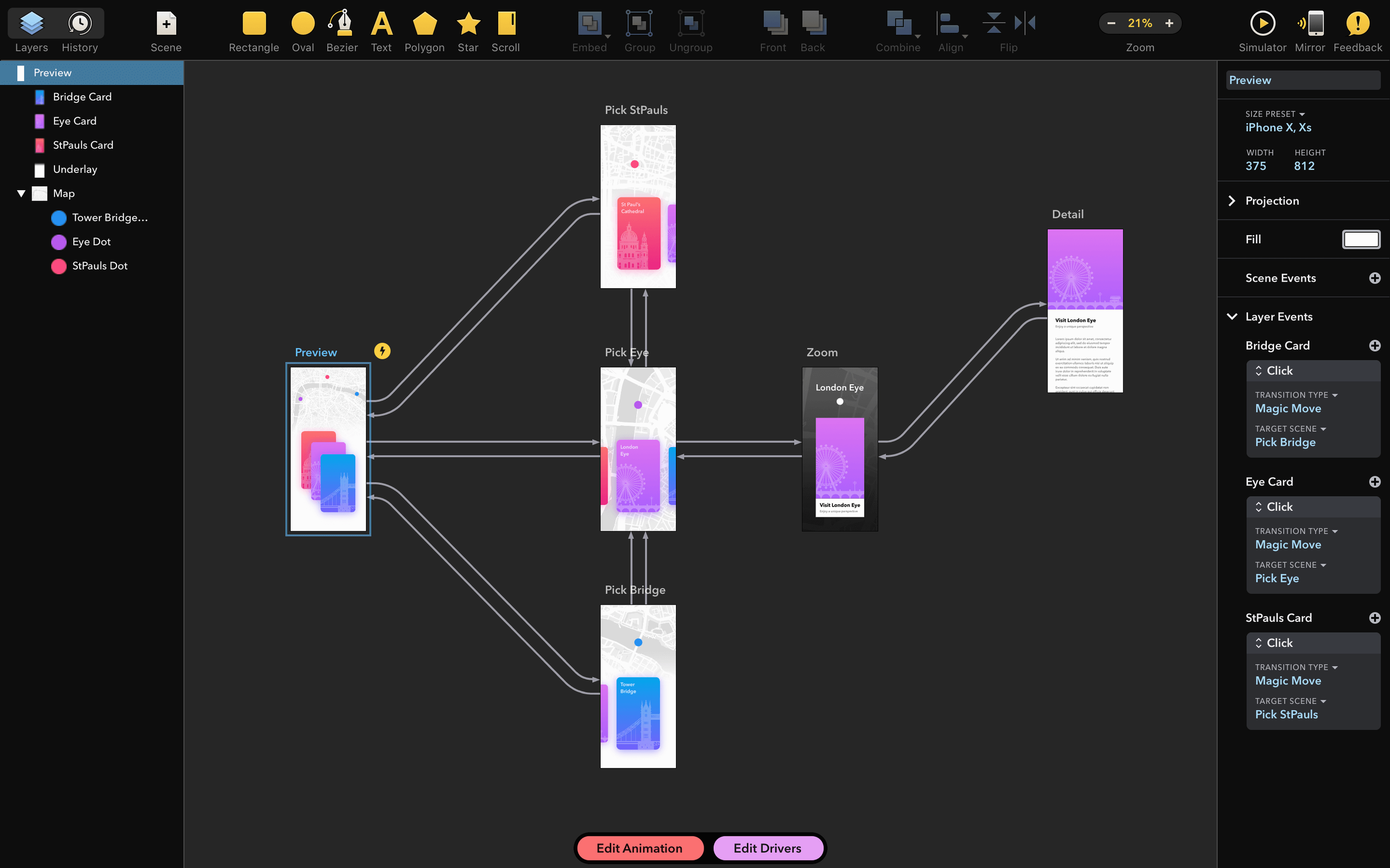
Quick UI mockups
Drop shapes, tweak corners, and float layers into roughly where they belong. The Fill and Stroke panels feel familiar if you keep Sketch or Figma open in the next window, so jumping in to block out a screen takes minutes rather than a tutorial.
Micro-interactions that move
The timeline isn't After Effects—it's deliberately lighter. Tween a button press, animate a loading spinner, or make a card swipe left with just a few keyframes and easing handles that are right out in the open.
Exporting assets for the dev handoff
Grab a single frame as PNG, or export the whole interaction as a GIF or video clip. Since PixelCut also makes PaintCode, the coordinate and color accuracy in the exported assets feels intentional, not tacked on.
Day-to-day feel: snappy and light on resources
After living with Drama 2.1.4 across a few workdays, what stands out most is how little it demands. It opens in under three seconds on an Intel MacBook Pro, even with a handful of other design tools already chewing through memory. The canvas stays responsive while dragging dozens of layers around, and I haven't caught the beach ball once during timeline scrubbing—something heavier animation packages can't always claim.
Memory use hovers around 200–300 MB for a typical prototype with a few artboards, which leaves plenty of headroom when you're also running Xcode, a browser with too many tabs, and Slack. The Intel-native build means no Rosetta translation overhead; it just runs, and runs quietly. Saving is instant, autosave works in the background without those annoying half-second freezes, and quitting and relaunching puts you exactly where you left off.
Stability-wise, the font-related crash fix in this release matters. Before 2.1.4, certain installed typefaces could knock the app over on launch—annoying if you keep a large library for client work. Now it starts clean every time, and I've thrown twenty custom fonts at a single document without a flicker. That kind of quiet reliability makes it easier to recommend as a daily driver rather than a toy you open twice a month.
No sign-in, no pop-ups, no friction
Open it and start working, no strings attached
No account, no sign-in, no license key pop-up on first launch. You open it and start working. For designers who bounce between machines or keep a clean offline setup, that's genuinely refreshing.
Will it feel familiar if I know Figma or Sketch?
The rectangle, oval, and pen tools behave the way you'd expect. Layers sit in a panel on the left, properties on the right. The timeline is the new bit, and even that borrows mental models from Keynote—drag a keyframe, pull an easing curve, play it back. You'll feel oriented in half an hour.
Can I hand off to developers, or is this just for my own screen?
PixelCut's PaintCode heritage shows here. Exported coordinates and color values are pixel-accurate. Developers get clean PNGs, GIFs, or video clips without weird anti-aliasing shifts. If your team uses PaintCode, the shared sensibility around precision will be immediately obvious—but even without it, the exports are dev-ready.
Does it handle larger prototypes or just single screens?
You can string multiple artboards together and jump between them in the player, so a five-screen sign-up flow works fine. It's not a sprawling clickable-wireframe tool meant for fifty-screen apps, but for focused interaction demos it stays quick and uncluttered.
Building a pull-to-refresh animation from scratch
Here's a real workflow I ran through yesterday: mocking up a pull-to-refresh spinner for a news app concept. I started with a blank artboard at iPhone size, dropped a rounded rectangle for the feed header, and added a circle that would become the spinner. No imported assets—just native shapes.
On the timeline, I set three keyframes across one second: the circle at rest, the circle pulled down twenty points with a slight rotation, and a third keyframe where it snaps back while spinning. The easing handles let me dial in a gentle overshoot on the return, which made the motion feel reactive rather than robotic. I previewed it in the player, tweaked the easing curve twice, and had it looking right in about eight minutes.
For the handoff, I exported the spinner layer as a looping GIF with a transparent background and pulled a static PNG of the final state for the developer's reference. The whole thing—from blank canvas to assets in a shared folder—took under fifteen minutes. That's the kind of speed that makes you reach for Drama instead of opening a heavyweight motion tool when you just need one interaction to feel alive, especially when you want drama macos free of the complexity that usually comes with timeline-based tools. Sometimes you just need a lightweight space to think in motion, without ceremony.
A crash on launch triggered by certain installed fonts has been fixed.
- macOS 11.5 or later
- Intel-based Mac
- English interface
Questions people ask
Does Drama work with the other design apps I already use?
It sits alongside them rather than replacing anything. You can import SVG files and export PNG, GIF, or video clips that drop cleanly into Sketch, Figma, or a developer's project folder.
Is there a companion app for iPad or iPhone?
Drama is a Mac app only at the moment. PixelCut does not offer an iOS companion, though the exported assets work fine in any prototyping or presentation tool on an iPad.
Also on readers' docks
Sign in or create an account to leave a comment.
No comments yet. Tell me how it got on with your other devices.