
Download Command-Tab Plus for macOS

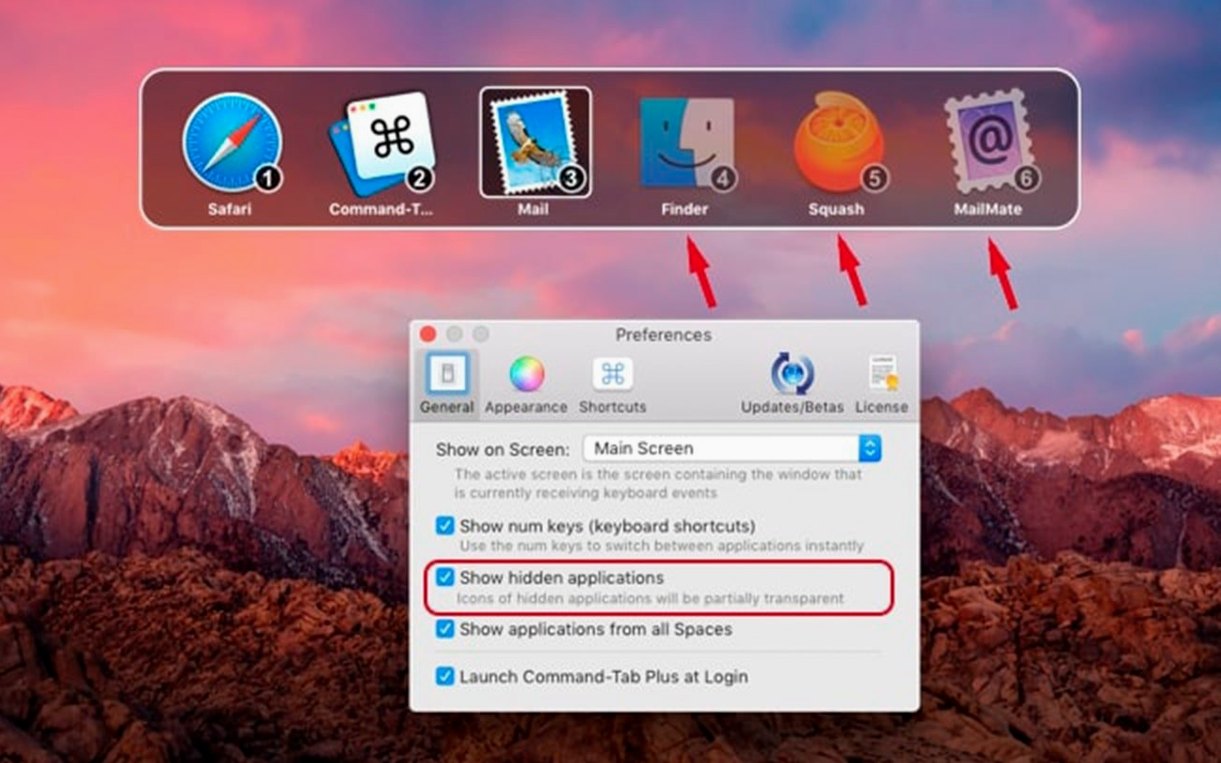
This release locks in the foundation. Under the hood, it's a stability and performance pass that keeps the switcher feeling instant, even with a dozen apps and countless windows open. For anyone who lives behind the keyboard, that split-second reliability is everything.
| What it does | How it helps |
|---|---|
| App & Window Switching | Hop between apps or pick a specific window without touching the trackpad. |
| Custom Hotkeys | Assign dedicated shortcuts to your go-to apps, bypassing the switcher entirely. |
| Isolated Workspaces | Keep work and personal app sets visually separate with distinct switching zones. |
Where Command-Tab Plus really earns its place is in the details an experienced user notices after the first hour. The workspace isolation isn't just a visual trick — it cordons off project apps so you don't accidentally tab into a chat window during a focus sprint. Hotkeys go beyond simple launch triggers; you can bind a shortcut to a specific window within an app, which is a small, radical shift for muscle memory. And because the appearance can be tweaked to match a dark desktop or a light one, the overlay never feels like a foreign panel that breaks your concentration. It runs natively on both Intel and Apple Silicon Macs, starting from macOS 11.5, so it fits right in on older workhorses and the latest machines alike.
Some small conveniences are hidden just beneath the interface, and they change how the switcher feels day to day. When the overlay is open, you can hit the number keys to jump straight to an app instead of tabbing across the row — your top-left app is 1, the next is 2, and so on. The same shortcut that opens the switcher can act as a fast toggle between your two most recent apps with a quick tap, no hold required. There’s also a quiet setting to hide unused apps from the overlay, which cleans up the grid so only the tools you’re actually touching sit in view. Drag a window thumbnail out of the switcher and drop it onto a different desktop space, and Command-Tab Plus handles the move without you ever leaving the keyboard flow. These aren’t headline features, but after a week they stop feeling optional.
The people who get the most out of this are power users with chaotic multitasking habits — developers bouncing between an IDE, terminal tabs, and documentation, or writers who keep research, notes, and a draft editor open simultaneously. If you’ve ever lost five seconds hunting for a browser window buried under a pile of Finder views, the window-switching mode alone clicks immediately. Designers who pin Photoshop, Figma, and a reference board into one isolated workspace while keeping Slack and music in another find the mental split invaluable. Even project managers juggling spreadsheets, email, and a calendar notice the friction drop because they can assign a hotkey combo to each tool and stop playing the “where did that window go” game entirely. It’s less about replacing the built-in command tab plus mac torrent switcher and more about accepting that Apple’s default was never built for this many open windows.
Right after launching Command-Tab Plus, a few settings are worth adjusting before muscle memory sets in. First, open preferences and set a dedicated hotkey for the window switcher — the default app switcher is familiar, but the window switcher is where the real speed lives, and it deserves its own shortcut. Next, disable the preview delay so the overlay appears without a pause, even if that means it pops up during accidental key presses for a day or two while you adjust. If you work with distinct contexts, take five minutes to define a couple of isolated workspaces and assign each one a color or label; the visual cue makes context-switching feel like walking into a different room. Lastly, turn on window cycling so tapping the same hotkey repeatedly steps through every open window of the frontmost app — it’s a small tweak that removes one more reach for the mouse when an app has five documents open side by side.
- macOS 11.5 or later
- Supports both Apple Silicon and Intel 64-bit Macs
Questions people ask
Does Command-Tab Plus only switch between apps?
No, it includes a window switcher that lets you cycle through individual windows across all your open applications, not just the frontmost one for each app.
Can I set a keyboard shortcut to open a specific app directly?
Yes, you can assign customizable hotkeys to launch or switch straight to your most-used apps without opening the main switcher interface.
What are isolated workspaces in Command-Tab Plus?
Workspaces let you define separate sets of apps that appear in their own switcher, keeping contexts like work and personal projects visually and functionally distinct.
Also on readers' docks
Sign in or create an account to leave a comment.
No comments yet. Tell me how it got on with your other devices.