








Download Neural DSP Parallax X for macOS
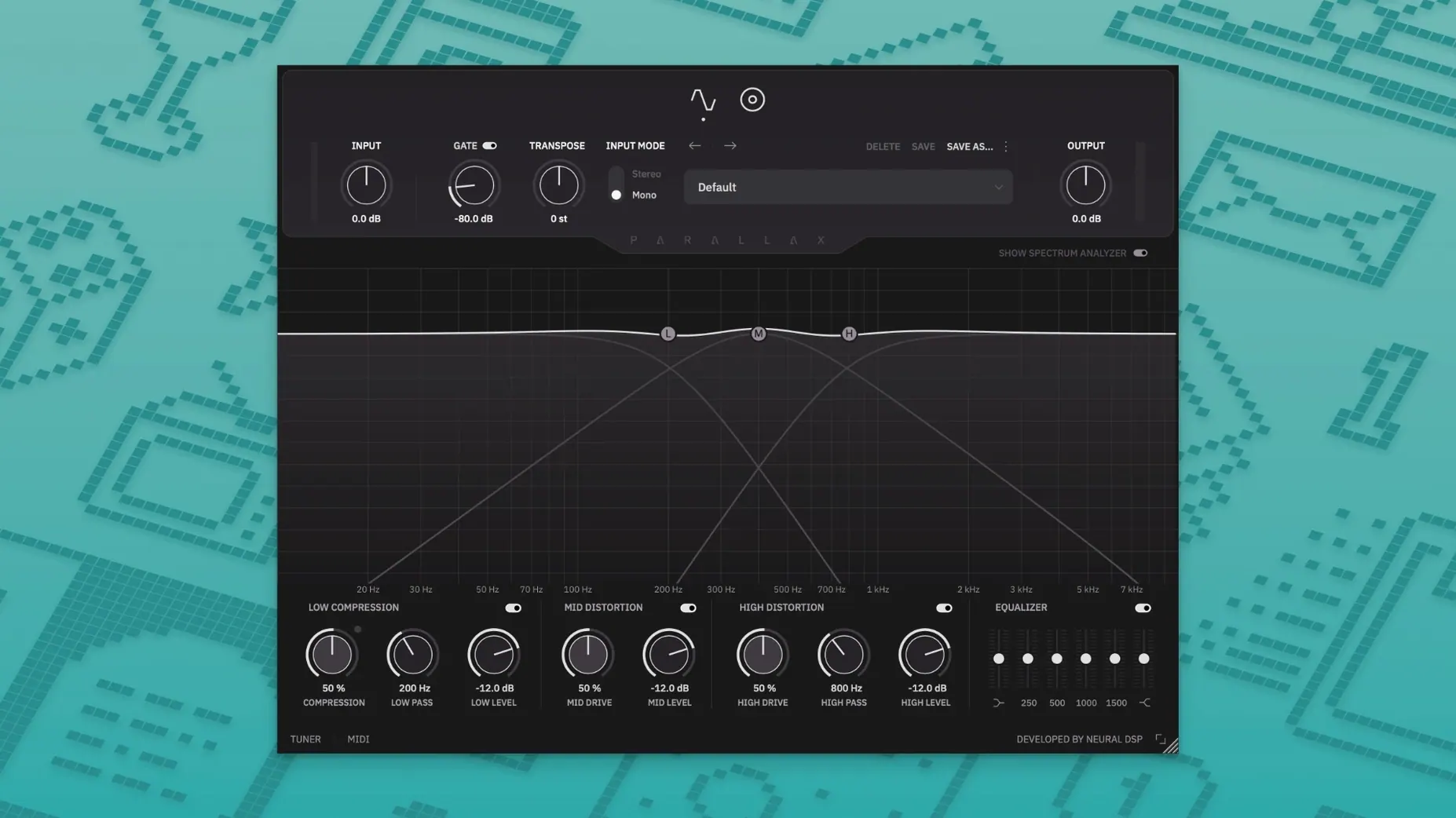
The mid-range distortion is where Parallax X first shows its hand. It's not about crushing the whole signal—it adds snap and articulation to the notes so your bass cuts through without losing its low-end weight. The whole plugin is built on parallel processing, treating the low end separately from the mids and highs. That means the cabinet emulation only touches the mid and high bands, leaving the deep lows clean and solid.
Grit that locks in your low end
- Bassists who want distortion that preserves the fundamental low end
- Dialling in everything from gritty fuzz on the treble band to focused mid-range bite
- Quick standalone practice sessions with the built-in tuner and metronome
- Apple Silicon Mac users who need native performance
Bass-only architecture and preset clutter
- It's a dedicated bass processor—guitarists should look elsewhere in the Neural DSP lineup
- The legacy Parallax version stays installed alongside it, which may clutter your plugin list
- Presets from the older version import on setup, but you'll likely want to build from the new factory set
Low-compressor threshold steals your thump
The parallel architecture trips up a fair number of first-timers. You dial in a gnarly mid-range tone, then wonder why the bottom end suddenly feels thin. Nine times out of ten it's the low-compressor threshold parked too high. Back it off so the compressor breathes with your playing rather than clamping down before the note speaks. The low band runs parallel to the distorted mids and highs, so over-compressing down there starves the whole signal of its foundation.
Another head-scratcher is the cabinet section. It only colors the mid and high bands—that's by design, but if you missed that detail during setup you'll spend ages tweaking mics and wondering why the sub-bass doesn't change. Pick your mic and position based on what the mids need. A dynamic mic halfway off-axis often tightens up a muddy DI without touching the clean low end at all.
If you grabbed a neural dsp mac download and the standalone mode refuses to see your interface, check that macOS granted microphone access to the app. The standalone needs explicit permission under System Settings > Privacy & Security > Microphone, otherwise it'll sit there silent no matter how many times you rescan devices. The tuner and metronome in standalone also rely on Core Audio being awake, so plug in your interface before launching the app.
Preset migration from the legacy Parallax can be a mixed bag. The installer brings them across automatically, but some older presets reference compressor settings that map differently in version 1.0.0. If a preset sounds off, nudge the low-compressor makeup gain first—it's the culprit more often than the distortion stages. And if your DAW shows both Parallax and Parallax X in the plugin list and you keep loading the wrong one, just let the legacy version gather dust. The new factory set covers more ground anyway.
DI straight to body, grit, and cab presence
Studio bassists tracking DI through an interface get the biggest win. You plug in dry, run Parallax X as the first insert, and suddenly the raw DI has body, grit, and a cab-like presence before you've touched an amp sim. The transpose slider also means you can drop a whole step to match a guitarist's downtuned riff without retuning mid-session. For quick takes where re-amping isn't practical, that's a genuine time-saver.
Mix engineers who inherit lifeless bass stems will lean on the six-band graphic EQ more than they expect. The distortion knobs are the headline feature, but being able to notch out boxy room resonances while simultaneously driving the mids forward is what makes the track sit. If someone sent over a neural dsp torrent version of the plugin as a quick test, they probably opened it for the fuzz and stayed for the EQ curve shaping. The visual spectrum analyzer helps spot problem frequencies before you start twisting knobs blindly.
Live performers running a laptop-based rig appreciate the standalone mode more than you'd think. No DAW overhead, just the plugin, tuner, and metronome in one window. Set the transposition to drop-E, dial a preset, and you're ready for a set without loading a full session. The metronome's time-signature and accent controls turn it into a legitimate practice partner, not just a click track bolted on as an afterthought.
Building a gritty fingerstyle tone from scratch
Imagine you've tracked a fingerstyle bass part that's clean but lacks presence next to distorted guitars. Start fresh—no preset. Load Parallax X on the DI channel and mute the mid and treble distortion sections so only the low compressor is active. Play the chorus and set the low compressor threshold so the needle bounces with your hardest notes. Add just enough makeup gain to match the bypassed level. The goal here is solid, not squashed.
Now unmute the mid band. Crank the mid drive until your plucking attack starts to bark, then back it off by a third. Open the cabinet section and cycle through the mics—skip the condenser for now, grab a dynamic model, and place it close. You're after articulation, not air. If the mids sound nasal, dip around 400 Hz on the graphic EQ and push 800 Hz a touch to bring the string definition forward.
For the treble band, think fuzz with restraint. Bring in just enough treble distortion to add a fizzy edge when you dig in, but keep it subtle enough that soft passages stay clean. The parallel routing means your clean low end sits untouched underneath, so even a fairly aggressive treble setting won't rob the bottom. Tap the tuner to check your tuning after all the drive adjustments—clipping can throw off pitch detection, and the built-in tuner is surprisingly accurate even with a distorted signal path. Save the preset, name it after the song, and audition it against the guitars. Nine times out of ten the bass now punches through without fighting for space, and you built the whole thing in under five minutes from a blank patch.
Version 1.0.0 builds on the original with a handful of practical upgrades:
- A Transpose control, Live Tuner, and a full metronome with time signature and accent settings
- New factory presets and a cleaner, revamped interface
- A redesigned Spectrum Analyzer for better visual feedback
- macOS 11 or later
- 64-bit VST2, VST3, AU, AAX, or standalone
- Native Apple Silicon and Intel support
- Language: English
Questions people ask
Does Parallax X work without a DAW?
Yes, it includes a standalone mode with a metronome and tuner, so you can practice or dial in tones without opening your recording software.
Also on readers' docks
Sign in or create an account to leave a comment.
No comments yet. Tell me how it got on with your other devices.
More in VST Plugins
See all Neural DSP Mantra
1.0.1 VST Plugins
153 MB
Neural DSP Mantra
1.0.1 VST Plugins
153 MB
 Neural DSP Soldano SLO-100 X
1.0.0 VST Plugins
340 MB
Neural DSP Soldano SLO-100 X
1.0.0 VST Plugins
340 MB
 Neural DSP Archetype Rabea X
1.0.1 VST Plugins
742 MB
Neural DSP Archetype Rabea X
1.0.1 VST Plugins
742 MB
 Neural DSP Archetype Petrucci
1.0.0 VST Plugins
745 MB
Neural DSP Archetype Petrucci
1.0.0 VST Plugins
745 MB
 Neural DSP Archetype Nolly X
1.0.2 VST Plugins
583 MB
Neural DSP Archetype Nolly X
1.0.2 VST Plugins
583 MB
 Native Instruments Noire KONTAKT
1.2.1 VST Plugins
14.7 GB
Native Instruments Noire KONTAKT
1.2.1 VST Plugins
14.7 GB
 Native Instruments Massive X
1.7.1 VST Plugins
1.6 GB
Native Instruments Massive X
1.7.1 VST Plugins
1.6 GB
 noteGRABBER
2.0.0 VST Plugins
35 MB
noteGRABBER
2.0.0 VST Plugins
35 MB