









Download Neural DSP Archetype Petrucci for macOS
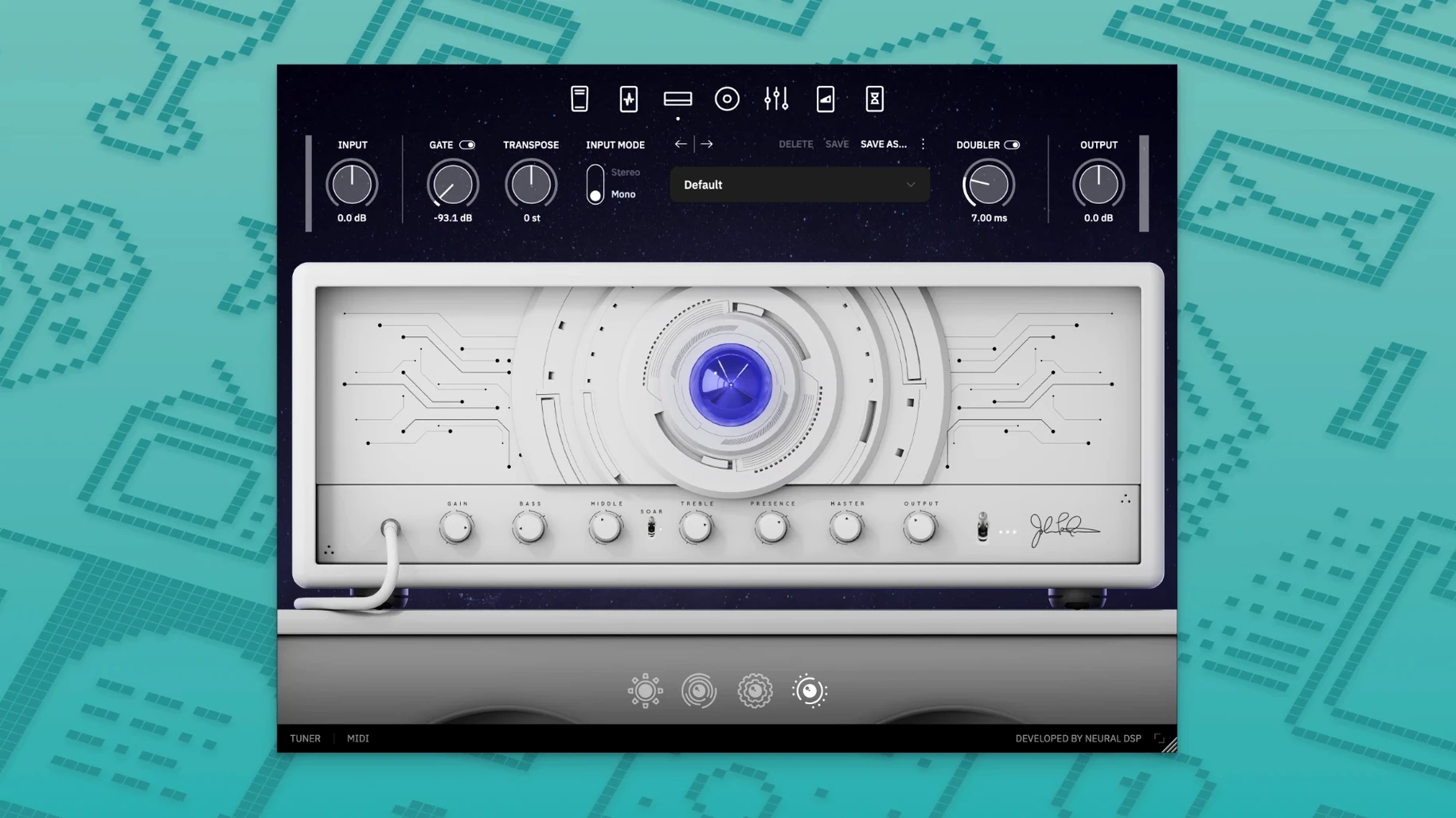
Archetype Petrucci runs on any Mac with macOS 10.15 or later, and it's a universal build — Intel and Apple Silicon machines are both covered natively, so M-series owners get the full 64-bit experience without any translation layer. That's the foundation you're building on, and it's a solid one.
Precision-minded players and Quad Cortex owners
- Players who want a restrained, precise amp character without option paralysis
- Quad Cortex owners — the plugin is stated as compatible with both the Quad Cortex and Quad Cortex mini
- Anyone who values skill and deliberate playing over stacking endless effects
English-only early release in the Archetype family
- The interface is English only
- Version 1.0.0 is the initial release, so it's an early point in the plugin's life
- It's part of the Archetype series, which means it follows that family's design philosophy rather than standing alone
Why your massive solo tone turns your mix to mud
Everyone opens a new Neural DSP plugin the same way — you load it up, dial in a tone that sounds massive on its own, and twenty minutes later you wonder why your mix is a wall of mud. Archetype Petrucci punishes that habit faster than most because it's voiced with a density that doesn't need help. The first mistake is piling on low end before you've heard the amp in context. This thing carries weight right out of the gate; if you're boosting bass at the input stage and pushing the depth control, you're already in trouble.
Another one I see constantly: treating the transposer like a novelty. People pitch down a whole octave, play the same riffs, and then blame the plugin for sounding artificial. The transposer tracks best when you play to its strengths — tighter picking, fewer ringing open strings, and honestly, writing parts for the shifted range rather than shoehorning existing material into it. It's a writing tool, not a magic button.
The compressor and overdrive sections trip people up too. Beginners tend to run both at once with aggressive settings before touching the amp EQ, which just chokes the front end. Back off. Get the amp where you want it first, then add the OD for character and the compressor for feel — not the other way around.
How Archetype Petrucci fits into a working setup
This plugin doesn't exist in a vacuum. In a typical session it's sitting alongside other Archetype instances or third-party amp sims, and because it's AU, VST3, and AAX, it slides into Logic, Cubase, Pro Tools, or whatever you're running without friction. The standalone app is genuinely useful too — I fire it up for quick practice sessions when I don't want to launch a full DAW project just to play for ten minutes.
Quad Cortex compatibility changes the equation if you're on that hardware. You can build a tone on the Mac with the full interface and then move it to the floor unit. That bridge between desktop sound design and live use is something Neural DSP has been pushing hard, and it works without extra hoops.
On the macOS side, it respects Audio Unit hosting properly. You can use it inside MainStage for live keyboard-triggered processing, or run it as a re-amp chain through Logic's I/O utility. Since it's Apple Silicon native, multiple instances don't bring an M-series machine to its knees — useful when you're running a full band template with Superior Drummer and a handful of synths alongside it.
Dropping Archetype Petrucci onto a drum-backed session
Here's how a tracking hour actually goes. I open Logic with a drum stem already roughed in, create a stereo audio track, and drop Archetype Petrucci onto the first insert. The default patch loads — I never keep it. I grab the amp selector and cycle through until the midrange character clicks against the drums. Usually that's the second or third model, depending on the tuning.
I mute everything except drums and guitar. Gain goes up in small increments while I play the chorus part. When it starts to compress naturally, I stop. I'm listening for the point where palm mutes have thump but single notes still breathe — that threshold is narrower on this plugin than on some of the higher-gain Archetypes, and that's intentional. It rewards listening.
EQ comes next. I cut a little at 250Hz if the bass guitar hasn't been tracked yet, just to leave room. Presence gets a nudge if the cymbals are masking. By now the tone sits in the track without fighting, and I haven't touched the compressor, the OD, or any post effects. That's the baseline.
If the part calls for a lead boost, I'll engage the overdrive with the mix knob around 40% and a gentle level bump — enough to push the amp without changing the voice. Delay goes on last, synced to tempo, typically a short stereo tap for width. I bounce the take, bypass the plugin, and move to the next section. The whole process from insert to commit is under four minutes. That pace isn't about rushing; it's about a plugin that doesn't make you second-guess yourself.
Running on an older Intel Mac with macOS Catalina
Will it run on an older Intel Mac? Yes. The build supports x86 64-bit and macOS 10.15 Catalina onward. Obviously you'll hit CPU limits faster on a 2015 machine than on an M3, but the plugin itself doesn't lock you out. You can run fewer instances or freeze tracks as needed.
Does this replace an entire rig, or is it just for recording? It's a full amp-and-effects chain in plugin form. You can use it for silent practice through headphones, for recording, and — if you have a Quad Cortex — for live performance. On a Mac alone, standalone mode handles practice and jamming without a DAW.
What if I've never used a Neural DSP plugin before? Archetype Petrucci follows the same layout logic as the rest of the series. If you can operate a physical amp and a couple of stompboxes, you already know where everything goes. The learning curve is in the ear, not the interface.
Is it only for prog and metal? John Petrucci's name sets expectations, and the high-gain voices absolutely deliver that tight, articulate thing his sound is known for. But the cleaner amp models and the reverb section cover a lot of ground. I've used it on ambient textures and indie leads without it sounding out of place. It's more versatile than the branding suggests.
How's the stability on current macOS? The 2024-11-21 build with native Apple Silicon support has been solid. No AU validation issues on Sequoia, no random dropouts. If you've wrestled with older Intel-only plugins on an M-series machine, the difference here is immediate.
Version 1.0.0 marks the debut of Archetype Petrucci.
- Initial release for Windows and macOS
- macOS 10.15 or newer
- 64-bit Intel or Apple Silicon Mac
- Native Apple Silicon support included
Questions people ask
Is Archetype Petrucci compatible with Quad Cortex?
Yes, the official page states it is compatible with both Quad Cortex and Quad Cortex mini.
Also on readers' docks
Sign in or create an account to leave a comment.
No comments yet. Tell me how it got on with your other devices.
More in VST Plugins
See all Neural DSP Archetype Nolly X
1.0.2 VST Plugins
583 MB
Neural DSP Archetype Nolly X
1.0.2 VST Plugins
583 MB
 Neural DSP Archetype Rabea X
1.0.1 VST Plugins
742 MB
Neural DSP Archetype Rabea X
1.0.1 VST Plugins
742 MB
 Neural DSP Mantra
1.0.1 VST Plugins
153 MB
Neural DSP Mantra
1.0.1 VST Plugins
153 MB
 Neural DSP Parallax X
1.0.0 VST Plugins
179 MB
Neural DSP Parallax X
1.0.0 VST Plugins
179 MB
 Native Instruments Noire KONTAKT
1.2.1 VST Plugins
14.7 GB
Native Instruments Noire KONTAKT
1.2.1 VST Plugins
14.7 GB
 Neural DSP Soldano SLO-100 X
1.0.0 VST Plugins
340 MB
Neural DSP Soldano SLO-100 X
1.0.0 VST Plugins
340 MB
 Native Instruments Massive X
1.7.1 VST Plugins
1.6 GB
Native Instruments Massive X
1.7.1 VST Plugins
1.6 GB
 noteGRABBER
2.0.0 VST Plugins
35 MB
noteGRABBER
2.0.0 VST Plugins
35 MB