









Download Native Instruments Massive X for macOS
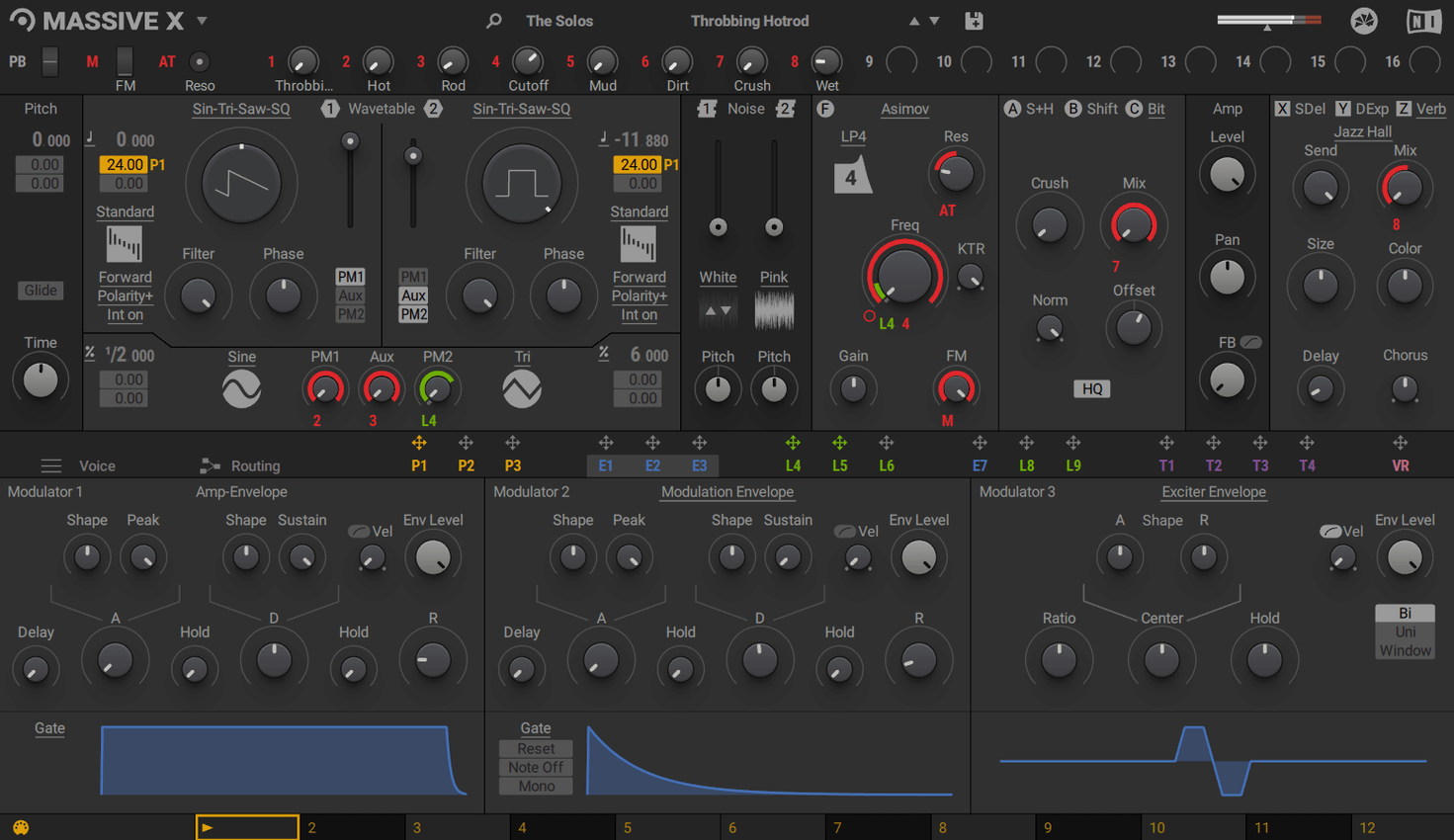
Preset surfing is fun until you hear a sound in your head that no library seems to cover. That's where building your own patch comes in, and Massive X gives you a deep set of tools to pull it off.
Let's walk through designing a rhythmic, evolving bass patch that feels alive.
Dual Phase Modulation Oscillators — We load two wavetables into the new oscillator section and use phase modulation between them. Small movements in the modulator's intensity knob create that gritty, vocal-like growl without losing low-end weight.
Performer Section — We draw a custom modulation shape with sharp peaks and valleys, then assign it to the filter cutoff. The Remote Octave control lets us trigger this pattern from a single key, so the rhythm shifts instantly when we move up or down the keyboard.
Flexible Routing — We send one oscillator's output to ring-modulate the other, then route that combined signal through a parallel distortion path. Because any output can feed any input, the signal flow feels more like a modular rack than a fixed-architecture synth.
After fifteen minutes of tweaking envelope curves and dialing in the Performer's tempo sync, the patch breathes on its own. It's the kind of sound that makes a track feel like it has a pulse.
Clearing Quirks That Stall Your Session
Massive X is a powerhouse, but it's got a few quirks that can trip you up when you're deep in a session. Let's clear them out early so they don't stall your momentum.
No standalone mode. This catches people off guard. You can't just open Massive X from the Applications folder and start playing. You need to load it inside a DAW or a plugin host. If you double-click the app icon and nothing useful happens, that's why. Fire up Logic Pro, Ableton Live, Bitwig, or whatever you use, and load it as an instrument track.
Presets not showing up. Sometimes the factory library doesn't appear in the browser after a fresh install. The fix is usually a rescan. In the Massive X interface, head to the preset browser, click the little refresh icon, and let it rebuild the database. If that doesn't do it, Native Access (NI's management tool) needs a quick relaunch and a library path check. The 780 factory presets should all land in a folder NI calls the Massive X Factory Content directory.
CPU spikes on Intel Macs. The AVX requirement is real on Intel hardware. If your Mac has an Intel chip and you hear crackling or see CPU meters max out, check that your processor supports AVX. Most do from the last decade, but older Xeon-based Mac Pros can struggle. Also, the new oscillator section with dual wavetables and phase modulation running in parallel will tax your machine. Bump your buffer size up in the DAW settings before you load a complex patch, and freeze tracks once a part feels locked in.
Performer not triggering. You've drawn a pattern, assigned it, and nothing's moving. Two things to check. First, make sure the Performer is enabled — there's a small power button near its section header. Second, the Remote Octave range might be set outside the keys you're pressing. If you've mapped the remote octave to C0–C1 but your MIDI controller sits at C3, you'll hear silence where the modulation should be. Shift the octave range or move your hands.
A Proper Workflow: From Blank Patch to Atmospheric Pad
Here's a start-to-finish walkthrough for building a lush, cinematic pad that evolves over time. This isn't about tweaking presets — it's about starting from an Init state and shaping every layer yourself.
Step one: pick the raw material. Load an Init patch. In the oscillator section, choose a wavetable with smooth harmonic movement. Something from the additive or vowel-sounding collection works nicely. Set the playback mode to Formant — it gives the sweep a vocal, almost choral quality as the wavetable position shifts.
Step two: stack and detune. Enable a second oscillator and load a slightly different wavetable. Detune it by about 7 cents. Now route the output of oscillator two into the phase modulation input of oscillator one, but keep the intensity low. You're not after an aggressive growl; a subtle shimmer is the goal.
Step three: envelope sculpting. Pull the amp envelope's attack up to around 800 ms and the release to 1.2 seconds. Do the same for the filter envelope, but set the sustain lower. Map the filter envelope to a low-pass filter with moderate resonance. Now the pad swells in and fades out, but the filter closure gives it a dark, distant tail.
Step four: bring the Performer to life. Draw a slow, undulating curve in the Performer — something like a sine wave stretched over four bars. Assign it to the wavetable position of oscillator one. Engage tempo sync so the pattern loops in time with your DAW. Now the harmonic content shifts gradually, never quite repeating the same way twice if you set the pattern length to an odd number of steps.
Step five: routing for atmosphere. Send the master output through a reverb insert inside Massive X's effects chain. Dial in a large hall with a long decay. Then route a parallel signal from before the reverb into a delay, and feed only the wet delay signal back into the reverb. The result is a pad that feels like it's breathing inside a cathedral, with delayed taps washing into the tail.
By the end, you've built a patch that has no single "note-on" moment — it shifts and drifts across the stereo field, perfect for ambient intros or film scoring cues.
How Massive X Stacks Up
Massive X vs. Serum
Xfer's Serum is the other giant in the wavetable space, and the comparison comes up constantly. Serum puts its wavetable editor front and center — you can import audio, morph it into a wavetable, and tweak every harmonic by hand. Massive X doesn't let you build wavetables from scratch; you choose from the 170 included options and shape them with the ten playback modes and phase modulation. That's less flexibility on the raw waveform side, but the routing system in Massive X is significantly deeper. Serum's modulation matrix is powerful, yet Massive X's "any output to any input" approach and the Performer section push it closer to modular territory. If you love crafting custom wavetables, Serum is the pick. If complex signal flow and rhythmic modulation are your playground, Massive X pulls ahead.
Massive X vs. Phase Plant
Kilohearts Phase Plant treats oscillators, effects, and modulation as snap-together blocks. It's genuinely modular in a visual, drag-and-drop way. Massive X is more structured — you have fixed oscillator, filter, and effects sections, but unlimited routing between them. Phase Plant's granular generator and wavetable editing give it an edge in experimental sound design. Massive X counters with the Performer and Remote Octave, which feel more intentional for musical modulation patterns you can trigger and transpose. Phase Plant can do rhythmic modulation too, but Massive X bakes it into the workflow with a dedicated section and keyboard control. For score composers who want evolving loops tied to key changes, Massive X fits more naturally.
Massive X vs. the Original Massive
They coexist, and for good reason. The original Massive has a sharper, more aggressive character that cuts through dense mixes — dubstep and drum and bass producers still reach for it. Massive X is warmer, wider, and more detailed in the low end. The routing in the original is fixed; in Massive X it's a patch bay. You can run both on the same system, and old Massive patches won't open in Massive X, so projects from years back stay intact. Think of Massive X as the deeper synthesis tool and the original as a character synth with a sound that's hard to replicate.
Mapping Performer Rate from Logic Smart Controls
Massive X plays nicely with the broader macOS music workflow. In Logic Pro, you can use the Smart Controls panel to map hardware knobs to Massive X parameters without opening the plugin window. Assign the Performer's pattern rate or the filter cutoff to physical encoders, and you've got hands-on control that feels like hardware.
With Ableton Live's Audio Effect Racks and Max for Live, you can route Massive X's output into chains that process the synth with external effects before it hits the master bus. The AU version also lets you load Massive X inside GarageBand, which is a surprisingly capable pairing for sketching ideas on a MacBook.
On the DAW-less side, Massive X works well inside hosts like MainStage for live performance. Map the Remote Octave to a foot controller and you can cycle through Performer patterns without taking your hands off the keys. It's a clever way to turn a single patch into a dynamic setlist tool.
Beyond the NI ecosystem, Massive X benefits from third-party wavetable libraries and preset packs that expand the 170 built-in options. Many producers build hybrid setups where Massive X handles bass and lead duties while other synths cover pads and textures. Its flexible routing makes it a good candidate for resampling — bounce a complex, modulated patch to audio, slice it up, and drag the slices into a sampler for further mangling.
- macOS 13 or newer
- Apple Silicon or Intel processor (Intel Macs require AVX support)
- 4 GB RAM (6 GB recommended)
- Graphics card supporting OpenGL 2.1 or higher
- Internet connection for download and activation
Questions people ask
Does Massive X replace the original Massive?
They coexist—Massive X is a separate instrument, so you can still open old projects that use the original Massive and access its familiar sounds.
Also on readers' docks
Sign in or create an account to leave a comment.
No comments yet. Tell me how it got on with your other devices.
More in VST Plugins
See all Native Instruments Noire KONTAKT
1.2.1 VST Plugins
14.7 GB
Native Instruments Noire KONTAKT
1.2.1 VST Plugins
14.7 GB
 Neural DSP Archetype Nolly X
1.0.2 VST Plugins
583 MB
Neural DSP Archetype Nolly X
1.0.2 VST Plugins
583 MB
 Neural DSP Archetype Petrucci
1.0.0 VST Plugins
745 MB
Neural DSP Archetype Petrucci
1.0.0 VST Plugins
745 MB
 Neural DSP Archetype Rabea X
1.0.1 VST Plugins
742 MB
Neural DSP Archetype Rabea X
1.0.1 VST Plugins
742 MB
 Neural DSP Mantra
1.0.1 VST Plugins
153 MB
Neural DSP Mantra
1.0.1 VST Plugins
153 MB
 Neural DSP Parallax X
1.0.0 VST Plugins
179 MB
Neural DSP Parallax X
1.0.0 VST Plugins
179 MB
 Neural DSP Soldano SLO-100 X
1.0.0 VST Plugins
340 MB
Neural DSP Soldano SLO-100 X
1.0.0 VST Plugins
340 MB
 noteGRABBER
2.0.0 VST Plugins
35 MB
noteGRABBER
2.0.0 VST Plugins
35 MB