








Download Melodyne for macOS
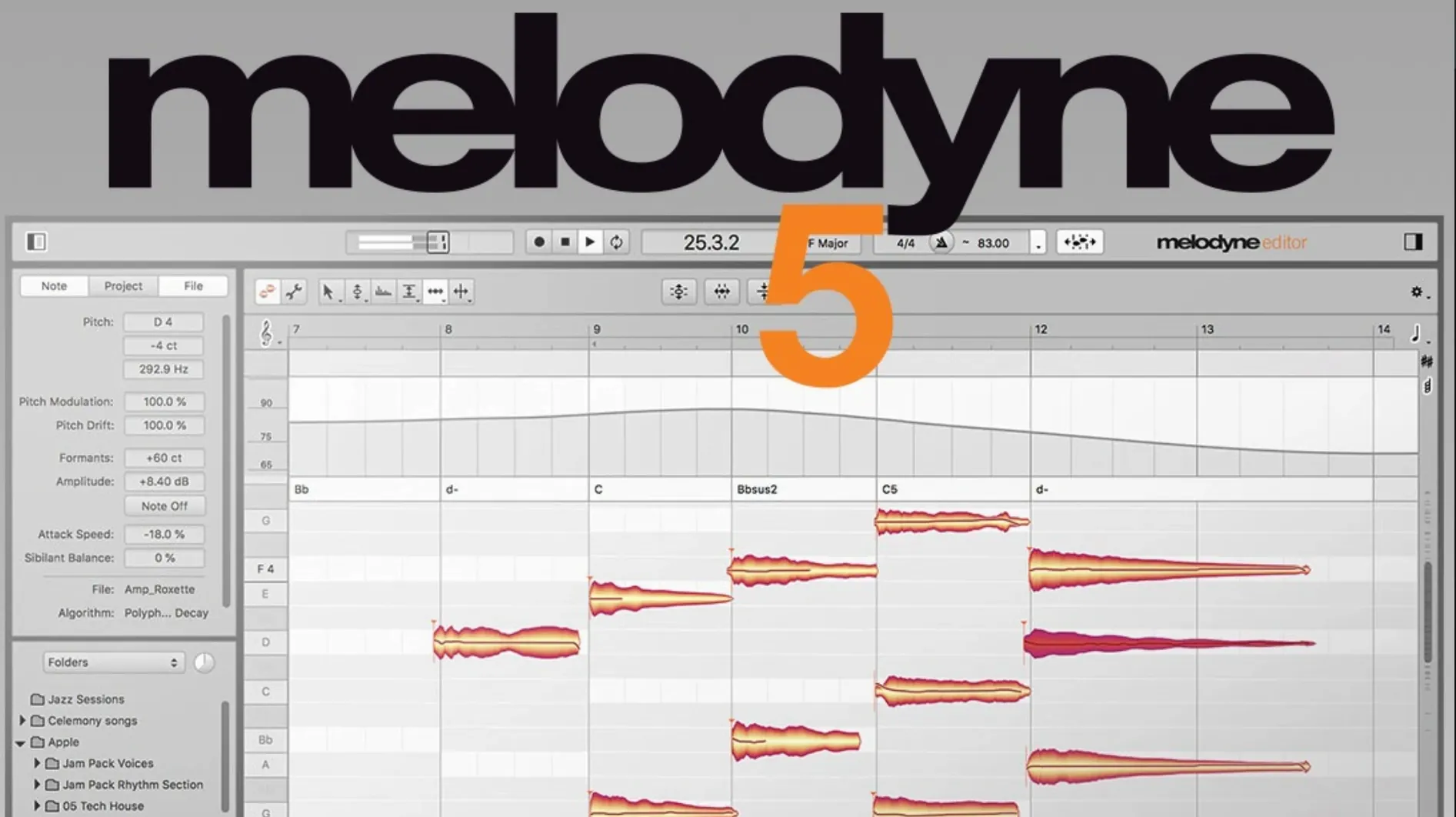
The Note Assignment mode lets you reach into a chord and touch individual notes — and in the 5.4.2 update, that same precision extends to how the interface feels. Trackpad scrolling got a real revision here, so moving through a vocal take or zooming into a dense polyphonic passage feels less like a suggestion and more like a direct response. Alongside that, Celemony patched a frustrating crash that could hit when opening Melodyne in ARA or as a plug-in, plus the customary round of macOS Sequoia adaptations.
Underneath those polish passes, the core that people keep coming back for hasn't budged. It still analyzes vocal material for pitch, breath, noise, and intonation with a musicality that's hard to find elsewhere. You can grab individual syllables and nudge their volume manually, or let it recognize the chords, keys, and tempos of a whole arrangement. The DNA-like detection that pulls apart sounds within a chord remains the headline act, especially in the Studio edition.
For anyone who hops between a plug-in window and a standalone workspace, ARA support keeps the round-trip invisible, and the 5.4.2 fixes make that handoff more reliable. It's not a feature-flashy release — it's a maintenance update that tightens the screws on an already deep toolset.
Real-Time Snap vs. Note-by-Note Sculpting
Auto-Tune Pro gets mentioned in the same breath as Melodyne for a reason — both handle pitch, but they come at it from completely different angles. Auto-Tune is a real-time processor first. You set a key, a retune speed, and it snaps notes into place while you listen. Great for that hard-tuned pop sound or for tracking a scratch vocal that needs to sit in the mix right now. Melodyne doesn't do real-time in the same way. You transfer audio into it, it analyzes, and then you edit with a note-by-note view that Auto-Tune simply doesn't offer. If you need to tweak the third note of a chord in a guitar arpeggio, Auto-Tune won't help. Melodyne will.
Waves Tune Real-Time is closer to the Auto-Tune camp, but Waves Tune (the non-real-time version) tries harder to play Melodyne's game. It gives you a piano roll, it draws pitch curves, and it handles vibrato edits. Where it falls short is the depth of the analysis and the polyphonic detection. Waves Tune can't pull apart a chord into individual notes the way Melodyne's DNA algorithm does. It also doesn't give you the same level of control over sibilants, formants, and note-based fades. For quick vocal fixes on a budget-conscious setup, Waves Tune does the job. For surgical work and polyphonic editing, Melodyne 5 still owns that space.
Logic Pro's Flex Pitch is the wildcard because it's already sitting there on every Mac running Logic. It's free, it's integrated, and for monophonic pitch fixes on vocals or a sax line, it's genuinely capable. The waveform-style editing feels snappy, and the ARA-like integration means no transfer step. But the moment you push into anything beyond basic pitch and timing, Flex Pitch shows its limits. Formant shifting sounds phasey compared to Melodyne's algorithm. Vibrato editing is coarse. And there's no polyphonic detection at all — you can't open a piano recording and see each note of a chord laid out. Melodyne 5 costs nothing to use once it's on your Mac, and for anyone who regularly edits anything more complex than a monophonic vocal, the difference is stark within the first five minutes.
Skip the Transfer With ARA Region Mode
Start with the ARA integration if your DAW supports it. Studio One, Logic Pro (with Rosetta for full ARA support), and Cubase all handle it differently, but the payoff is skipping the transfer step entirely. Open Melodyne as a region-based effect or an ARA insert, and your audio appears in the editor without recording it in real time. If you're on a DAW that doesn't do ARA — Ableton Live, for instance — you'll use the plug-in version and hit Transfer, then play through the section you want to edit. Either way, resist the urge to transfer an entire six-minute vocal comp in one go. Work in sections: verse, chorus, bridge. It keeps the analysis clean and stops the interface from getting bogged down.
Set your default algorithm before transferring anything. Melodyne guesses based on the source, but it's not always right. A plucked acoustic guitar part might default to Polyphonic when Percussive Pitched gives you better note separation. A breathy vocal sample might get analyzed with the Universal algorithm when the separate Sibilant detection in the Vocal path would give you cleaner results. Right-click the track header after transfer and switch algorithms if the note detection looks messy — it's faster than fixing bad detection note by note.
One habit worth building early: use the Macro controls before you touch individual notes. The Pitch Drift and Pitch Modulation sliders on the right-hand panel can clean up a wobbly vocal without pushing anything into obvious tuning territory. Pulling Drift down to about 30% tightens pitch without killing the human movement, and reducing Modulation slightly reins in overly busy vibrato. It's a thirty-second move that often saves ten minutes of manual blobs editing.
Per-Syllable Sibilance Control for Vocal Comping
Vocal producers and editors are the obvious crowd. If you comp takes all day and then spend hours aligning doubles, tightening harmonies, and de-essing, Melodyne becomes the centerpiece of your workflow. The ability to adjust sibilant volume per syllable, not just per region, means you can fix a harsh "s" in the middle of a word without touching the rest of the phrase. The formant tool lets you shift a double up or down without re-recording, thickening a stack in a way EQ alone can't replicate.
Composers and sample manipulators get something different out of it. Drop a field recording, a found vocal snippet, or a sampled chord stab into Melodyne, and you can pull it apart melodically in ways no sampler does. Change the chord quality from major to minor by dragging one internal note. Turn a major seventh into a dominant seventh with a single move. Export the MIDI of that analysis and send it to a synth, then layer the resynthesized version under the original. The DNA algorithm effectively turns any polyphonic audio into a playable instrument.
Mixing engineers who don't do vocal production still benefit. Receiving a multitrack where the bass is slightly flat in the choruses or the lead guitar bends just a hair sharp? Instead of asking for a re-track or reaching for a broad pitch shifter, you drop those sections into Melodyne and fix only the offending notes. The correction stays transparent because you're not processing the whole performance — just the moments that need it.
Settings Worth Changing Immediately
Open Preferences before your first real session and turn off "Show Introduction Screen" unless you enjoy clicking past it every launch. While you're there, check the Audio Cache folder location. Melodyne writes analysis files to disk, and if your system drive is tight on space, pointing this to an external SSD keeps projects from ballooning. The cache can run into gigabytes on large sessions.
In the Note Editor view, switch the pitch grid from Equal Temperament to the tuning that matches your production. If you work with sampled instruments from different libraries or with vocalists who lean into just intonation, the grid snapping can fight you. Setting it to "No Snap" temporarily while doing micro-pitch adjustments gives you full control, then you can re-enable snapping for larger moves. The grid options live in the bottom-right corner and most people never touch them.
For anyone editing vocals with visible breath and noise between phrases, enable the Sibilant detection in the algorithm dropdown. It splits each note into pitched content, noise, and breath components, giving you independent volume handles for each. That means you can pull down a loud inhale without affecting the note that follows it. It's not enabled by default on all vocal transfers, and turning it on after the fact means re-analyzing, so set it before that first pass.
A Full Workflow: Fixing a Doubled Vocal Take
Imagine this: you've got a lead vocal and a double tracked underneath, both recorded in the same session. The performances are solid, but the double drifts flat on the held notes in the bridge, and the lead has a couple of plosives in the second verse that didn't seem obvious while tracking. Here's how Melodyne 5 handles all of it inside half an hour.
Open the lead vocal in Melodyne via ARA. The analysis populates, and straight away, the blobs show pitch center wobbling on the long "you" in the bridge. Select that blob, grab the Pitch Drift Macro, and pull it to around 25%. The wobble tightens while the note stays natural. Now scan for the plosives — they show up as short, loud noise bursts at the start of words. Switch to the Sibilant tool, click the plosive blob, and pull its volume down by 6-8 dB. The "p" and "b" sounds soften without the word losing its attack. Two minutes in, the lead is already cleaner.
Move to the double. Transfer it and notice the held notes in the same bridge section sitting 15-20 cents flat. Select those blobs and double-click to snap them to the nearest semitone. That fixes the pitch, but now the double sounds locked and robotic against the lead. Grab the Pitch Modulation tool and add back about 40% of the original movement — just enough to reintroduce the singer's natural vibrato curve. The two tracks now lock together without phasey beating on the held notes.
Finally, select both tracks in the DAW and open the full arrangement. The bridge double still feels slightly thick in the low-mids, but instead of EQ, reach for the Formant tool on the double's held notes. Shift the formant up by about 0.8 semitones. It thins the double just enough to let the lead sit on top, and the combination sounds like a layered take instead of two vocals fighting for space. Export, bypass Melodyne, and A/B — the difference is the kind of polish that separates a rough mix from a finished one.
The 5.4.2 update focuses on stability and feel:
- Trackpad scrolling gets a meaningful revision for smoother navigation.
- A crash on opening — affecting ARA and standard plug-in usage — has been fixed.
- General optimizations and bug fixes, plus adaptations for macOS Sequoia.
- macOS 10.12 or later
- Supports Intel and Apple Silicon Macs
- English interface
Questions people ask
Can Melodyne edit individual notes inside a chord?
Yes, Melodyne's polyphonic detection can analyze sounds within chords and let you edit individual notes for pitch, timing, and volume.
What does the 5.4.2 update fix?
It improves trackpad scrolling, adds macOS Sequoia support, and fixes a crash that could occur when opening the plug-in in ARA or standard plug-in modes.
Does Melodyne work as a plug-in inside a DAW?
Yes, Melodyne can be used directly as a plug-in in your DAW and supports ARA mode for tighter integration with compatible hosts.
Also on readers' docks
Sign in or create an account to leave a comment.
No comments yet. Tell me how it got on with your other devices.
More in VST Plugins
See all Metric Halo Production Bundle
2025.05 VST Plugins
318 MB
Metric Halo Production Bundle
2025.05 VST Plugins
318 MB
 MiniMeters
1.0.30.358 VST Plugins
103 MB
MiniMeters
1.0.30.358 VST Plugins
103 MB
 Minuit Solstice
1.2.0 VST Plugins
117 MB
Minuit Solstice
1.2.0 VST Plugins
117 MB
 Lunacy Audio CUBE
1.6.0 VST Plugins
381 MB
Lunacy Audio CUBE
1.6.0 VST Plugins
381 MB
 Native Instruments Massive X
1.7.1 VST Plugins
1.6 GB
Native Instruments Massive X
1.7.1 VST Plugins
1.6 GB
 LFOTool
1.768 VST Plugins
7 MB
LFOTool
1.768 VST Plugins
7 MB
 Native Instruments Noire KONTAKT
1.2.1 VST Plugins
14.7 GB
Native Instruments Noire KONTAKT
1.2.1 VST Plugins
14.7 GB
 LANDR Vocal Bundle
2025.12 VST Plugins
447 MB
LANDR Vocal Bundle
2025.12 VST Plugins
447 MB