









Download Flicker Free for macOS
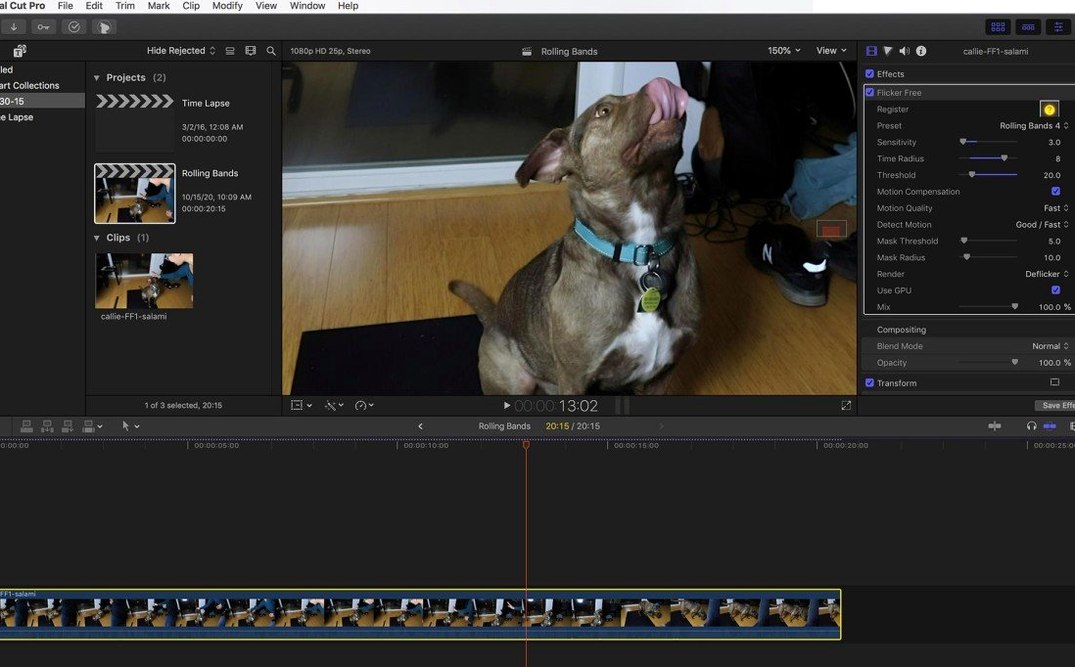
Editors working with high-frame-rate cameras like a Phantom Flex or pushing a GoPro into slow motion will know the enemy: rolling bands of flicker from mismatched lighting and shutter speeds. Digital Anarchy Flicker Free targets exactly that. It’s a third-party plugin, not a built-in fix, and it earns its place in a session when a simple deflicker filter just smears the detail away.
Where Flicker Free Sits in a Session
- Drop it on a problem clip. Time-lapse sequences and slow-motion shots are the usual suspects. LED office lights and old fluorescent tubes create the most noticeable crawl.
- Pick a preset. The presets make the first pass fast — choose based on the camera or the type of flicker, then let it analyze. It’s tuned for footage from Sony FS700U, Phantom Flex, and GoPro HERO3 Black, among others.
- Refine on a bus or an adjustment layer. For heavy jobs, I’ll park it on an adjustment layer above a whole scene so it processes once, or send it to a dedicated render bus when the timeline gets dense.
What sets it apart is how it handles rolling bands without killing real motion. It’s built for 64-bit ARM and Intel Macs and works as a straightforward plugin, so there’s no round-tripping to a different app. The interface is English only, but the controls are simple enough that a preset and a strength slider usually get the job done. Editors who grade their own footage or clean up documentary interviews under mixed lighting will find it fits right into a finishing pass.
Match the flicker pattern first
Out of the box, the Detect Flicker dropdown deserves immediate attention. Switching it from Auto to Time Lapse or High Speed tells the plugin what pattern to hunt for, and that single choice often cuts render-test cycles in half.
Next, pull the Strength slider back to around 60 percent if the default leaves motion looking plastic. The algorithm is aggressive by design. Dropping strength early keeps fine texture in hair, fabric, and moving water — the things that separate a clean plate from an over-processed one.
- Time Radius — bump it up when a flicker cycle spans more than two or three frames. LED panels with slow PWM dimming need more temporal context.
- Detail Preservation — crank this if your clip has high-frequency detail (brickwork, foliage) that the deflicker softens. It tells the engine to leave edges alone while still smoothing luminance shifts.
- Masking — skip it unless the flicker is localized. Drawing a quick garbage mask around a pulsing monitor in an otherwise stable shot saves processing time and stops the plugin from hunting for flicker where none exists.
Solo shooters fixing mixed light
Editors who shoot their own b-roll and don’t always control the lighting rig are the core audience. A documentary cutter grabbing interviews in a fluorescent-lit office, or a wedding editor pulling slow-motion highlights under DJ uplighting, will reach for this on every project. It’s not a once-a-year tool for them — it’s a finishing step.
Motion graphics artists working with stock time-lapse clips also benefit. Cloudscapes and city-night sequences from asset libraries often carry subtle banding from mismatched shutter angles. Cleaning that before it hits the composite prevents the colorist from inheriting a headache.
High-frame-rate shooters on Phantom or FS700U rigs get the most out of the preset system. The plugin was built with those cameras in mind, and the default profiles are genuinely tuned — not just relabeled generic settings. If your footage came off a GoPro HERO3 Black pushed past 60 fps, the matching preset alone often nails the fix without further tweaking.
A Colorist’s Late-Night Save
Picture a colorist on a short film with a single problematic scene: a four-minute dialogue shot under mixed practical lamps and a flickering monitor in the background. The production couldn’t afford a reshoot. The editor sends over the locked cut, and the colorist spots a slow luminance pulse crawling across the wall behind the actor.
They drop Flicker Free onto a node before the grade, set Detect Flicker to High Speed, and pull the strength to 55 with detail preservation at 70. A quick 15-second render of the worst section confirms the rolling band is gone without turning the actor’s cheek into wax. The node stays live through the full conform. By delivery, the flicker never comes up in notes — exactly the outcome a finishing artist wants from a fix that took three minutes to dial in.
- macOS (native ARM and Intel 64-bit support)
- Compatible host application for video plugins
Questions people ask
What kind of flicker does Digital Anarchy Flicker Free remove?
It removes rolling flicker caused by LEDs and fluorescent lamps, as well as flicker from unsynchronized cameras in time-lapse, slow-motion, and high-frame-rate video.
Does Flicker Free work with slow-motion footage?
Yes, it is designed to handle flicker in high-frame-rate and slow-motion shots from cameras like the Phantom Flex, Sony FS700U, and GoPro HERO3 Black.
Is Flicker Free a standalone app or a plugin?
It is a third-party plugin that you apply directly inside your video editor, not a standalone application.
Also on readers' docks
Sign in or create an account to leave a comment.
No comments yet. Tell me how it got on with your other devices.
More in Final Cut Pro Plugins
See all FxFactory Pro
9.0.5-8654 Final Cut Pro Plugins
68 MB
FxFactory Pro
9.0.5-8654 Final Cut Pro Plugins
68 MB
 Dehancer Pro
7.3.4 Final Cut Pro Plugins
382 MB
Dehancer Pro
7.3.4 Final Cut Pro Plugins
382 MB
 Color Finale
2.2.8 Final Cut Pro Plugins
35 MB
Color Finale
2.2.8 Final Cut Pro Plugins
35 MB
 MotionVFX mInfographics
Final Cut Pro Plugins
8 MB
MotionVFX mInfographics
Final Cut Pro Plugins
8 MB
 MotionVFX mKBHD
Final Cut Pro Plugins
12 MB
MotionVFX mKBHD
Final Cut Pro Plugins
12 MB
 MotionVFX - mLowers Universal for FCP
Final Cut Pro Plugins
71 MB
MotionVFX - mLowers Universal for FCP
Final Cut Pro Plugins
71 MB
 MotionVFX mModules
Final Cut Pro Plugins
5 MB
MotionVFX mModules
Final Cut Pro Plugins
5 MB
 Motionvfx - mTitle Cinematic
Final Cut Pro Plugins
5 MB
Motionvfx - mTitle Cinematic
Final Cut Pro Plugins
5 MB