









Download Color Finale for macOS
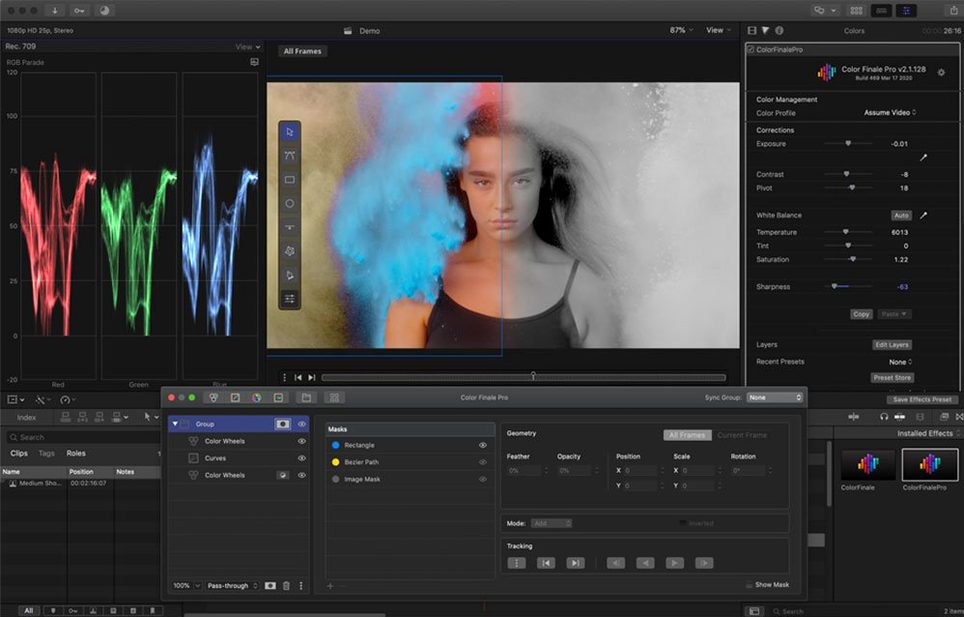
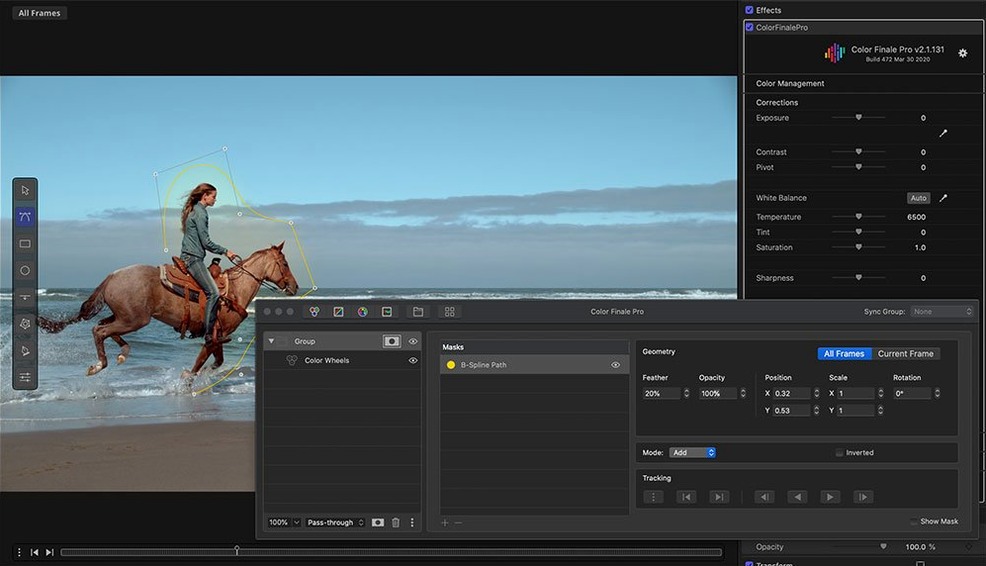
You’re halfway through a grade and the built-in wheels aren’t giving you the separation you need between the talent’s skin and a murky background. That’s the moment you reach for Color Finale — not because it’s easier, but because it hands you the same kind of control you’d expect in a dedicated finishing suite, without leaving your FCP timeline.
What makes the plugin click for someone who grades regularly are the curves. Hue-vs-hue, hue-vs-sat, luma-vs-sat — the sort of targeted adjustments that let you pull a single color into shape without touching anything else. Layered adjustments mean you can stack those tweaks, reorder them, and toggle each one on and off to compare. Paired with the color wheels, it stops feeling like a plugin and starts feeling like a compact grading panel bolted onto Final Cut Pro.
The LUT Utility is built right in, so applying a technical transform or a look LUT doesn’t require a separate step. And the 30 ASCEND presets that ship with version 2.2.8 aren’t just starter looks — they’re built around common camera profiles and give you a solid jumping-off point when you want to move fast. If you want to browse beyond that, the in-app Color Preset Store keeps the whole thing self-contained.
It runs on Intel and Apple silicon Macs back to macOS 10.12, and installs as a Motion effect, so it slots into FCP’s effects browser like any other tool. The interface is available in English and Simplified Chinese, which is a thoughtful touch for bilingual post houses. For anyone who’s outgrown the stock corrector and wants curves, layering, and wheels living together in a single effect, Color Finale 2.2.8 is worth the trip.
Matching skin tones from ceremony to dance floor
Jenny shoots and edits 25 weddings a year, all in Final Cut Pro. Her biggest headache isn't the timeline — it's matching skin tones across a ceremony lit by window light, a reception swimming in purple uplighting, and a dance floor that's basically a rave. Before Color Finale, she'd stack three instances of the built-in corrector, fight with masks, and still feel like the couple looked different in every scene.
Now she keeps a base grade saved as a preset: a gentle s-curve for contrast, a slight pull toward teal in the shadows via the color wheels, and an HSL curve that isolates skin and nudges saturation down by about eight percent. She drops that onto the ceremony clip, tweaks exposure to match the next angle, and copies the effect across the timeline. For the reception, she swaps the base preset for one built around the ASCEND tungsten profile and adjusts the luma-vs-sat curve so the purple lights don't bleed into faces. By the time she exports, the whole film feels like one continuous moment instead of three different rooms. That's not a small thing when a bride is watching her vows back.
Color Finale sits alongside FCP’s built-in tools
Does this replace the built-in color tools in FCP? Not really — it lives alongside them. You can still use the stock corrector, the color board, or any other effect in the same project. Color Finale just gives you a deeper set of controls when a clip needs more than a quick balance. Plenty of editors use the native tools for rough cuts and switch to Color Finale for the final pass.
Will my older Mac handle it? Version 2.2.8 runs on anything back to macOS 10.12 and it's a 64-bit Intel build, so even a 2014 MacBook Pro can muscle through — just don't expect real-time playback with five layers of curves on a 4K timeline. Render and move on.
Do I need to know how to color grade to get anything out of it? The presets and the LUT Utility mean you can get a decent look without touching a wheel. But honestly, the plugin shines most when you do know what a hue-vs-hue curve does. If you're curious and willing to experiment, it'll teach you plenty along the way.
Plugin missing from the effects browser
The effect doesn't show up in FCP's effects browser. This usually means the plugin didn't land in the right Motion Templates folder. Color Finale installs as a Motion effect, so check ~/Movies/Motion Templates/Effects/ and make sure the files are there. If they ended up in the system-level Library instead, drag them over to the user folder and restart Final Cut Pro.
Playback stutters badly with the effect applied. Color Finale is doing a lot per frame — curves, wheels, LUTs, all stacked. Lower your viewer quality to "Better Performance" while scrubbing, then switch back to "Better Quality" for the final render. Also, flatten any layers you're not actively tweaking. You can always un-flatten them later from a duplicated project.
The LUT Utility reads a LUT but the image looks off. Check whether the LUT expects a log input and you're feeding it Rec.709, or vice versa. Color Finale applies the LUT at whatever point in the layer stack you place it, so move it above or below your other corrections and see if the result cleans up. If you're hunting for specific LUTs, some editors grab a Color Finale crack Mac download to test compatibility before committing to a workflow — third-party LUTs vary wildly in quality and often need tweaking, so it's smart to check how they interpret your footage early on.
The Terminal step during install makes you uneasy. The Gatekeeper bypass is standard for a lot of pro video tools that don't come through the App Store. You press Enter once in the Terminal window and it's done. It's not something you'll need to repeat after the initial setup.
- macOS 10.12 or later
- Intel or Apple silicon Mac
- Final Cut Pro X with Motion installed
Questions people ask
Does Color Finale 2 work on Apple silicon Macs?
Yes, Color Finale 2.2.8 runs on both Intel and Apple silicon Macs and installs as a Motion effect for Final Cut Pro.
Also on readers' docks
Sign in or create an account to leave a comment.
No comments yet. Tell me how it got on with your other devices.
More in Final Cut Pro Plugins
See all Dehancer Pro
7.3.4 Final Cut Pro Plugins
382 MB
Dehancer Pro
7.3.4 Final Cut Pro Plugins
382 MB
 Flicker Free
2.1.6 Final Cut Pro Plugins
24 MB
Flicker Free
2.1.6 Final Cut Pro Plugins
24 MB
 FxFactory Pro
9.0.5-8654 Final Cut Pro Plugins
68 MB
FxFactory Pro
9.0.5-8654 Final Cut Pro Plugins
68 MB
 MotionVFX mInfographics
Final Cut Pro Plugins
8 MB
MotionVFX mInfographics
Final Cut Pro Plugins
8 MB
 MotionVFX mKBHD
Final Cut Pro Plugins
12 MB
MotionVFX mKBHD
Final Cut Pro Plugins
12 MB
 MotionVFX - mLowers Universal for FCP
Final Cut Pro Plugins
71 MB
MotionVFX - mLowers Universal for FCP
Final Cut Pro Plugins
71 MB
 MotionVFX mModules
Final Cut Pro Plugins
5 MB
MotionVFX mModules
Final Cut Pro Plugins
5 MB
 Motionvfx - mTitle Cinematic
Final Cut Pro Plugins
5 MB
Motionvfx - mTitle Cinematic
Final Cut Pro Plugins
5 MB