Download Cockos REAPER for macOS
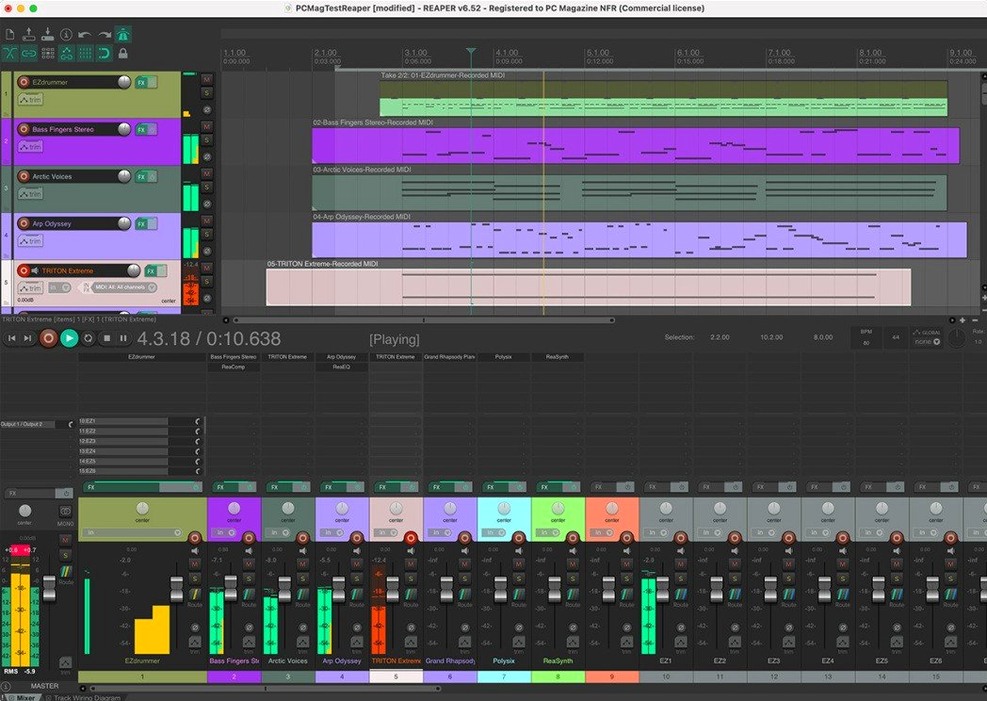
512 channels of audio I/O, remappable any way you like. That's the headroom Cockos gives you in REAPER, and it's a pretty good hint that this digital audio workstation doesn't care if you're tracking a voice memo or a full orchestra. It's the same application, same download, whether you're editing a podcast, mixing a band's live set, or printing stems from a 200-track film session.
- Folder tracks let you group drums, backing vocals, or entire sections — route child tracks into a folder, drop processing on the parent, and even record the folder's output non-destructively to freeze heavy plug-in chains.
- Up to 512 channels of hardware input and output, plus 128 MIDI hardware and loopback devices, all freely remappable.
- Compatible with a huge range of plug-in formats and digital audio hardware — it slots into studios that mix vintage outboard gear with modern VST3 chains.
- Runs on everything from macOS 10.15 through the latest ARM64 builds, so Intel and Apple Silicon Macs are both first-class citizens.
- One version serves every user, from bedroom producers to post-production houses. No feature tiers, no edition upgrades, just the same toolset evaluated in full for 60 days.
It's lean, it loads fast, and it doesn't dictate a workflow. If you like tweaking every routing matrix or just want a tape-machine-style recorder that stays out of the way, REAPER fits either mood without complaint.
The Empty Workshop Fixes
REAPER's flexibility means the first few hours can feel less like opening a DAW and more like staring at an empty workshop with a thousand unlabeled drawers. A few things trip people up reliably, so let's clear them early.
Where's the sound? You've armed a track, hit record, waved at the interface — nothing. Nine times out of ten, REAPER hasn't latched onto your audio device yet. Open Preferences → Audio → Device and check that your interface is selected as the Audio device. If you're on a Mac without an interface, the built-in mic won't show up unless you create an aggregate device in Audio MIDI Setup first, or you can flip REAPER's audio system to something simpler like WASAPI on a Boot Camp rig.
Plug-ins missing after a fresh install. REAPER scans standard folders — /Library/Audio/Plug-Ins/VST and the user-level equivalents — but if you keep your plug-ins somewhere custom, head to Preferences → Plug-ins → VST and add the path manually. Hit "Re-scan" and watch the splash screen do its thing. On Apple Silicon Macs running native, an Intel-only plug-in won't appear unless REAPER itself is running under Rosetta. You can flip that in Finder's Get Info panel on the app bundle, or use the separate x86_64 download if you're building a session around older tools.
MIDI keyboard silent despite lights blinking. Arm the track (the red button), make sure input monitoring is on (the little speaker icon), and then right-click the track's record-arm button to confirm your MIDI device is enabled as an input. REAPER treats every hardware input as a separate source — it won't guess which keyboard you meant.
Ditch the Grey Defaults
Out of the box, REAPER ships with a look and feel Cockos calls the "Default 7.0" theme. Functional, yes. A little grey, also yes. A few quick tweaks make it feel more like yours.
- Change the theme. Preferences → Theme Editor. You don't need to build one from scratch — the REAPER community has hundreds of polished themes. Drop a .ReaperThemeZip file into REAPER's ColorThemes folder (Options → Show REAPER resource path) and it'll appear in the Theme menu instantly.
- Mouse modifiers for your muscle memory. If years of Pro Tools or Logic are wired into your fingers, the Preferences → Mouse Modifiers panel is where you remap drag behaviors, scroll-wheel actions, and click-routing gestures. Change "Media item bottom half" to behave like a marquee select instead of a time selection, and editing suddenly feels twice as fast.
- Auto-save and backups. REAPER's undo system is deep, but a stray crash still stings. Preferences → Project → "Save to project file (not recommended)" is misnamed for many users — enabling timestamped backups to an additional directory means you'll never lose more than a few minutes of work. Set the interval to every 3–5 minutes and pick a folder outside the project directory.
- Tame the metronome. Right-click the metronome icon. The default click sound is a short beep that can get buried in a dense mix. Swap the first-beat and subsequent-beat samples for something with more attack — a rimshot or a cowbell sample — and you'll actually hear it over distorted guitars.
How REAPER Compares With Similar Mac DAWs
No DAW is best; they're just different sets of trade-offs. Here's how REAPER stacks up against a few common alternatives for Mac-based production.
REAPER vs Logic Pro
Logic Pro arrives with a sprawling library of instruments, loops, and polished virtual drummers. It's an all-in-one production suite that feels like walking into a fully furnished studio. REAPER brings almost no bundled content — no orchestral libraries, no step sequencer, no Drummer tracks. That's not an oversight. It's a lightweight chassis you're meant to build on with your own plug-in collection. Where Logic leans into Apple's ecosystem, REAPER runs identically on macOS and Windows, so sessions travel between collaborators with zero conversion. Folder tracks and routing in Logic can feel rigid; REAPER's track system treats audio, MIDI, and busses as the same building block, which means nested routing and parallel processing chains stay cleaner as projects grow.
REAPER vs Ableton Live
Ableton Live is built around the Session View: non-linear clip launching, performance-oriented warping, and a tight integration with hardware controllers. It's a sketchpad and stage instrument first. REAPER has no equivalent to Session View — it's a linear, timeline-based recorder and editor. If you're performing live or building tracks by triggering and layering loops, Ableton's workflow is hard to beat. But if you're editing multi-take drum sessions, conforming location audio, or mixing a feature-length project with hundreds of tracks, REAPER's editing efficiency and low CPU footprint pull ahead. REAPER also handles video tracks natively, which Ableton doesn't touch.
REAPER vs Pro Tools
Pro Tools is the lingua franca of post-production and large commercial studios, partly because of its entrenched hardware integration and partly because session exchange is reliable across facilities. REAPER mimics much of Pro Tools' keyboard-shortcut logic and offers ARA2 support for tools like Melodyne — something Pro Tools adopted much later. REAPER's track count, routing depth, and scriptability go further without hitting artificial ceilings. The trade-off is industry expectation: if you need to hand off sessions to a mixing stage that demands Pro Tools session files, REAPER can export AAF but won't open .ptx natively. For a personal studio or a flexible production room, that's a small concession for cutting out iLok dependencies and subscription friction.
- macOS 10.15 or later
- Intel or Apple Silicon Mac
Questions people ask
Can REAPER handle large orchestral recording sessions?
Yes. It supports up to 512 channels of audio I/O and 128 MIDI devices, so tracking a full orchestra with spot mics and MIDI triggers is well within its range.
Does the same REAPER version work for both music production and spoken-word editing?
Absolutely. Cockos ships one version for all users, so the toolset that mixes a band's album is the same one you'd use for editing a podcast or mastering an audiobook.
Also on readers' docks
Sign in or create an account to leave a comment.
No comments yet. Tell me how it got on with your other devices.