Download Depth Scanner for macOS
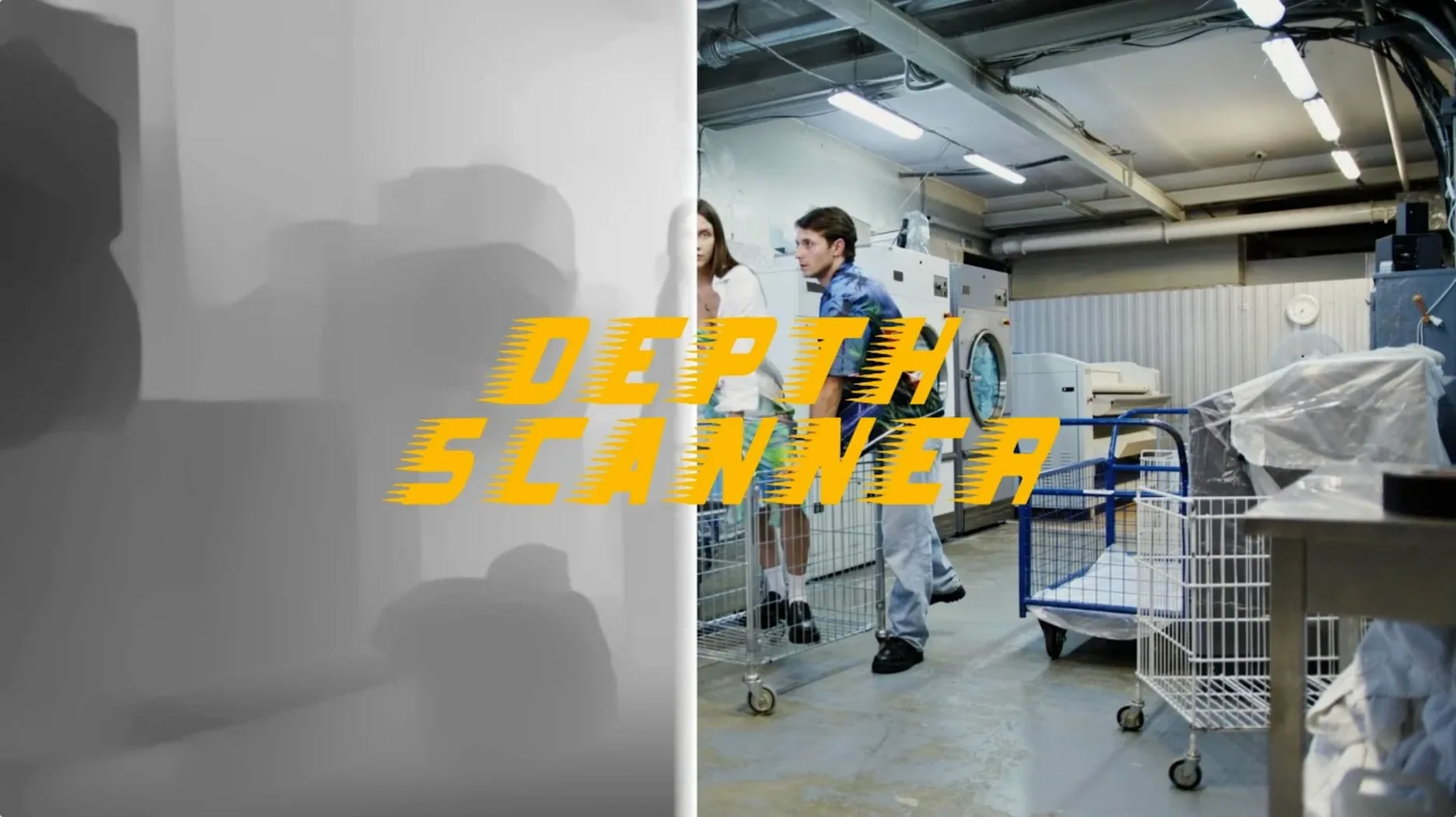
Depth Scanner is a plugin from Blace Plugins that uses artificial intelligence to automatically generate depth maps from video clips and still photos right inside Adobe After Effects.
- Automatic depth generation. The AI works out what’s near and what’s far without manual rotoscoping or hand-painted mattes — just drop a clip on the timeline and let the plugin do the heavy lifting.
- 3D parallax motion. Once you have a depth map, you can drive a displacement that slides foreground and background layers at different rates, giving flat footage a dimensional punch.
- Depth-based transitions. Use the map as a matte to reveal or hide layers from back to front — an effect that feels organic and would be painstaking to keyframe by hand.
- Photo and video support. It handles both stills and moving footage, so you can use the same tool whether you’re animating a photograph or treating a filmed shot.
The plugin speaks one language — English — and slots into the effect stack like any native After Effects filter. Motion designers who want quick parallax shots, stylised reveals or depth-aware composites will find it earns its keep fast.
Quick depth maps for social product reels
Motion designers working on short-form social content are the natural home for this plugin. When a client wants a 15-second product reel with that dimensional push-in look, painting a depth map by hand feels like overkill — Depth Scanner gives you a working map in seconds and lets you spend the afternoon finessing the animation instead of the matte. Editors cutting trailers or music videos fall into the same bucket; they often need a handful of parallax shots that feel alive, and the plugin slots into that workflow without demanding a dedicated compositing pass.
Compositors on indie and mid-budget VFX jobs will also warm to it. The depth maps aren't perfect — occasional soft edges around fine detail like hair or mesh — but for atmosphere work, background-replacement shots or driving a quick depth-of-field blur on a locked-off shot, they’re absolutely usable straight out of the box. Photographers dipping into motion get a genuine boost too: throw a still into After Effects, generate a depth map, and suddenly you have a parallax image that moves like a subtle, tasteful Ken Burns effect with real separation.
Turning a flat drone shot into a parallax forest
Imagine you’ve just imported a drone shot flying low over a forest trail. The footage is sharp, the light is good, but the whole thing feels flat — you want the tree trunks in the foreground to slide faster than the distant canopy.
Step one: you drop the clip onto a composition and apply Depth Scanner from the Effects panel. No pre-processing, no color grading ahead of time — just let it read the frame. The plugin takes a few seconds to chew through the analysis, then serves up a grayscale matte where nearby branches are near-white and the trail vanishing into the woods is deep gray.
Step two: you duplicate the layer, apply a displacement map effect, and point it at the depth output. A little tuning of the horizontal displacement, a gentle ease on the keyframes, and suddenly the foreground trees are sliding with satisfying weight while the background barely shifts. The shot reads as dimensional now — not gimmicky, just good.
Step three: you notice a few spots where a thin branch got lumped into the background depth. Instead of re-running the whole pass, you drop a rough mask on the depth map layer, feather it generously, and nudge the levels to pull that branch back where it belongs. Two minutes of tweaking and the shot is client-ready. The whole process — from flat footage to parallax piece — took under fifteen minutes, and most of that was creative play, not cleanup.
Depth Scanner 2 versus the wider plugin field
If you’ve poked around the After Effects plugin landscape for depth tools, a few names pop up regularly. Depth Scanner 2 is the obvious sibling — same developer, sharper AI model, faster processing, and a few more output options. For users on newer machines who hit the depth map workflow daily, the second version is the natural pick. Version 1.15.6 still holds its own on older setups or for artists who don’t need the extra polish and prefer a lighter footprint.
Then there’s VoluMax, a template-driven parallax toolkit that leans more on pre-built camera rigs and less on raw depth generation. VoluMax gives you slick results fast if your footage fits its assumptions, but it’s less flexible when you need a real depth map to drive custom effects — you’re working inside its playground rather than building your own. Depth Scanner, by contrast, hands you the matte and gets out of the way.
For the truly DIY-minded, there’s the manual approach with Lumetri scopes, stacked blurs and hand-drawn mattes. It costs nothing but time, and on a complex shot with foreground occlusion, it can eat an afternoon. Depth Scanner isn’t magic — you’ll still want to check edges and occasionally patch trouble spots — but it turns a grueling rotoscope session into a quick verification pass. For artists who’d rather spend their hours on motion and mood than on painting grayscale gradients frame by frame, the trade-off makes immediate sense.
- Adobe After Effects installed
- macOS (exact versions not specified by the developer)
Questions people ask
Can Depth Scanner create depth maps from both photos and video?
Yes, it works with still images and video clips alike, generating a depth map automatically for either.
What can I do with a depth map inside After Effects?
Depth maps are commonly used for 3D parallax motion effects and as mattes for depth-based transitions that reveal layers from back to front.
Does Depth Scanner require manual painting to create the depth map?
No, it uses artificial intelligence to generate the depth map automatically, so you typically don’t need to paint or rotoscope by hand.
Also on readers' docks
Sign in or create an account to leave a comment.
No comments yet. Tell me how it got on with your other devices.