








Download Supertone Air for macOS
A production dialogue editor opens a session. The location audio is warm and roomy, but the ADR lines recorded in a booth sound like they came from a different planet. They load a reference clip and the dry studio take into Supertone Air, and the plug-in's neural network captures the acoustic fingerprint of the original set — reverb tail, early reflections, tonal balance — and impresses it onto the replacement lines in seconds.
Runs on Apple Silicon Macs back to macOS 10.13
- Available as AAX, VST3, and AU — covers Pro Tools, Logic Pro, Nuendo, Studio One, Reaper, and most other DAWs.
- Built for Apple Silicon and Intel Macs running macOS 10.13 or later.
- Sample rate support: 44.1 kHz, 48 kHz, and 96 kHz.
- Optimized for offline processing in Pro Tools AudioSuite, but works in real-time inserts too.
- Imports and exports Air profiles for sharing settings across sessions and machines.
How the matching actually works
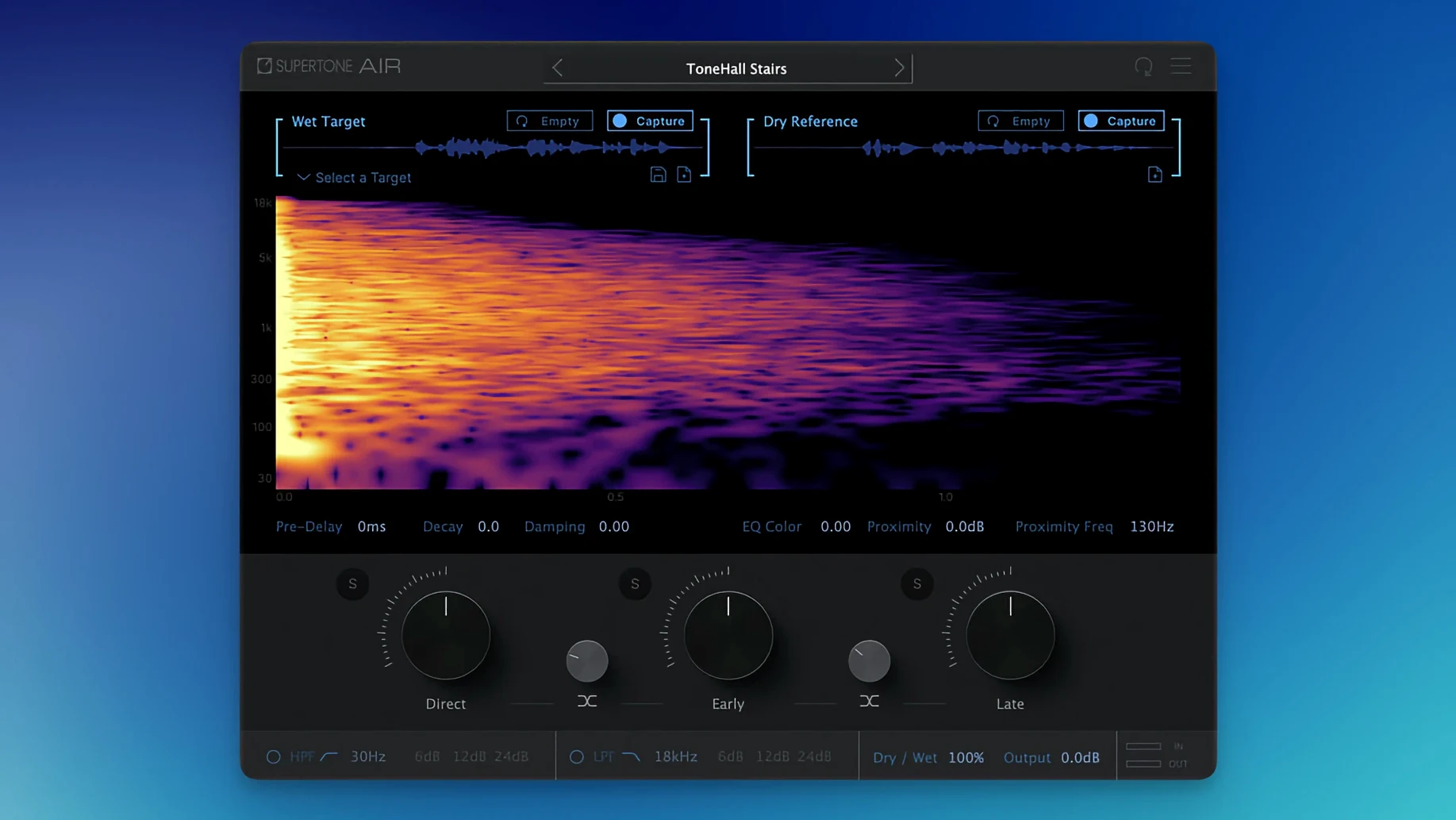
Supertone Air uses what Supertone calls Acoustic Scene Transfer. You feed it a snippet of source dialogue — a couple of seconds is often enough — and it analyzes the reverb and EQ signature. The plug-in then rebuilds that acoustic environment on a dry target clip using separate controls for direct signal, early reflections, and the late tail. It's built specifically for dialogue post, so the focus isn't on creative reverbs or endless tweaking. It's about making ADR sit in the mix without drawing attention to itself. The 1.0.1 update tidied up the plug-in file naming and fixed a conflict for anyone who had Sound Particles Air installed previously.
Double-click any knob to reset it
Supertone Air keeps its interface straightforward, but a few shortcuts hide below the surface. Double-clicking any knob resets it to the default value — handy when you've nudged the Decay or Damping too far during a late-night session. The capture process itself is nondestructive; the plug-in analyzes the reference without altering it, so you can keep the same source clip loaded and reapply the match to multiple dry takes without recapturing.
Profile management is another timesaver. Once you've captured a room's signature, export it as an Air profile from the dropdown menu. These tiny files travel well between projects, making it easy to match ADR shot months apart against the same location audio. And if you're working in AudioSuite — where this plug-in really shines — you'll notice it remembers your last capture even after you close and reopen the session, at least within the same Pro Tools launch.
Feed it 2–3 seconds of dialogue with a clean tail
The most common stumble involves capture length. Feeding Supertone Air a reference clip that's too short, especially one lacking a natural room tail, produces a thin match. Aim for at least two to three seconds of dialogue with a clean bit of room tone trailing after the words. If the source is cut tight against the waveform, the neural network has less to work with — the result often sounds boxy or over-damped.
Another friction point: the plug-in expects reasonably dry target audio. If you've already applied a room reverb to your ADR before hitting Air, the layering gets messy fast. Bypass or remove any prior ambience processing. Some mixers also report that extremely close-miked source material — lavaliers buried under clothing — can confuse the EQ matching. In those cases, try capturing from a boom channel instead, even if the boom track won't make the final mix.
Installation quirks from the 1.0.1 [GUISEPPE] release are mostly behind us. The naming conflict with Sound Particles Air has been resolved, but if you're upgrading from an earlier build, a clean removal of the old plug-in file before installing prevents duplicate entries in your DAW's plug-in list.
A dialogue match, start to finish
Picture this: a scene shot in a tiled hallway. The production track has a bright slap-back that the director loves, but two lines need replacing because of off-camera noise. Here's a workflow that gets the ADR sitting right in under two minutes.
First, duplicate the production take onto a fresh track and trim it down to a clean reference clip — about three seconds containing a full phrase and the reverb tail. Load Supertone Air on your dry ADR track, click Capture, and play the reference. Watch the waveform display; once it's done analyzing, the plug-in locks in the acoustic fingerprint.
Now play the dry ADR line. Switch between the Direct, Early, and Late tabs to solo each component and hear what the neural network pulled from the hallway. Usually the defaults sit well, but if the tail feels too present, pull Decay back a touch. If the early reflections add unwanted brightness, a gentle nudge on Damping softens them without dulling the dialogue.
Once it sounds right in solo, unmute the full mix and toggle the plug-in's bypass to A/B against the original production track. The goal isn't perfect invisibility — just enough cohesion that the editor doesn't flag the line. When you're happy, render the clip in AudioSuite and move on. The whole process feels less like sound design and more like a fast corrective pass, which is exactly what busy dialogue editors need.
A small but helpful housekeeping update:
- The plug-in file name was changed from Air to Supertone Air for clarity.
- Fixed an installation hiccup that affected users who also had Sound Particles Air installed.
- macOS 10.13 or later
- Apple Silicon or Intel processor
- Host that supports AAX, VST3, or AU
- Session sample rates: 44.1 kHz, 48 kHz, or 96 kHz
Questions people ask
What sample rates does Supertone Air support?
It supports 44.1 kHz, 48 kHz, and 96 kHz — the three most common rates in post-production.
Which plug-in formats are included?
AAX, VST3, and AU, so it runs in Pro Tools, Logic, and pretty much any major DAW on Mac.
Is it real-time or offline only?
While it's optimized for AudioSuite offline processing in Pro Tools, it works as a real-time insert in any supported host.
Also on readers' docks
Sign in or create an account to leave a comment.
No comments yet. Tell me how it got on with your other devices.
More in VST Plugins
See all Superior Drummer
3.4.4 VST Plugins
625 MB
Superior Drummer
3.4.4 VST Plugins
625 MB
 Synapse Audio The Legend HZ v2.0.2.R1
2.1 VST Plugins
472 MB
Synapse Audio The Legend HZ v2.0.2.R1
2.1 VST Plugins
472 MB
 T-RackS
6.3.2 VST Plugins
2.3 GB
T-RackS
6.3.2 VST Plugins
2.3 GB
 Steinberg SpectraLayers Pro
13.0.20-All-in-One VST Plugins
3.9 GB
Steinberg SpectraLayers Pro
13.0.20-All-in-One VST Plugins
3.9 GB
 Steinberg GrooveAgent
6.0.30 VST Plugins
575 MB
Steinberg GrooveAgent
6.0.30 VST Plugins
575 MB
 Spire
1.5.19 VST Plugins
158 MB
Spire
1.5.19 VST Plugins
158 MB
 Sonic Charge Synplant 2
2.0.2 VST Plugins
61 MB
Sonic Charge Synplant 2
2.0.2 VST Plugins
61 MB
 Sonic Academy KICK
1.1.8 VST Plugins
358 MB
Sonic Academy KICK
1.1.8 VST Plugins
358 MB