








Download Arturia Pigments for macOS
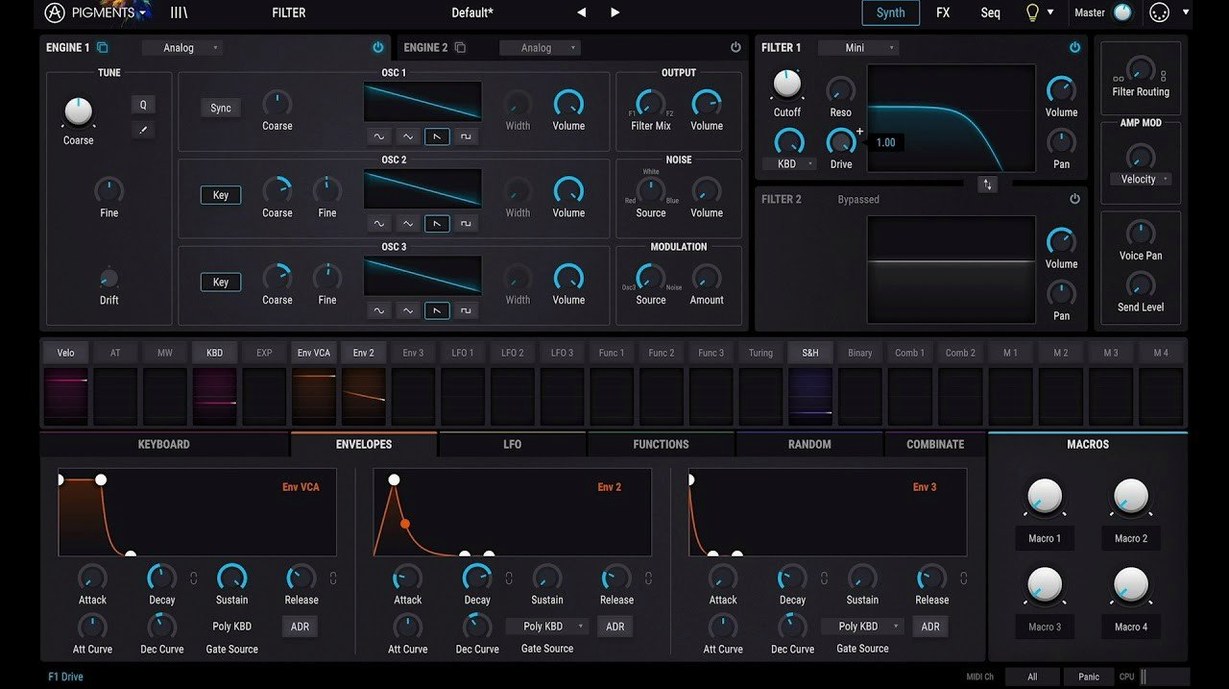
Arturia Pigments is the company's flagship software synthesizer, a deep sound design environment that blends six distinct synthesis engines with extensive modulation tools.
Build a patch from scratch
Start with a wavetable, virtual analog oscillator, or a sample, then layer in harmonic or utility engines. The signal flows straight into a redesigned Play Page that puts macro controls and quick-tweak parameters right where you expect them.
Shape and warp the tone
The 7.0.1 update introduces three new filters—Rage, Ripple, and Reverb—that sit alongside the Corroder effect. They push timbres from gritty analog warmth to metallic, broken-speaker textures without leaving the plugin.
Modulate anything, fast
Drag a modulator onto almost any control and Pigments visualizes the connection instantly. With in-app tutorials baked in, even wild modulation chains feel approachable, not overwhelming.
Performance that stays out of the way
I've thrown a fair bit at Pigments on both an M1 MacBook Air and an older Intel iMac, and the story is refreshingly consistent. A single instance with a dense patch—three engines humming, half a dozen modulators mapped, the Corroder chewing on the tail end—barely moves the CPU meter past 15–20%. Stack ten of those in a Logic project and you'll see the fan spin up on Intel machines, but Apple Silicon handles it with headroom to spare.
Memory use sits around 300–400 MB for the plugin alone, which is modest for a synth that loads wavetables, samples, and convolution reverb impulses into the same patch. The 7.0.1 build hasn't introduced any noticeable regression in load times or GUI responsiveness either. The redesigned Play Page snaps open instantly, and browsing the 150 new factory presets doesn't trigger the sluggish preview lag some heavy sample-based instruments suffer from.
What version 7 really changed day to day
Arturia didn't just bolt on features—they reshaped how you encounter the synth when you first open it. The Play Page overhaul means I now spend less time staring at the full engine matrix and more time actually playing. Macros, filter cutoff, and the new Rage and Ripple filters are front and center, so quick sound tweaking happens without diving into tabs.
The Corroder effect deserves its own mention. It's a lo-fi degradation module that sits in the FX chain, and it's become my go-to for taking a clean wavetable pad and roughing it up into something that sounds like a warped cassette found in a damp basement. Combined with the new Reverb filter—which applies reverb-like spectral shaping before the actual reverb effect—the sound design possibilities took a noticeable leap forward without adding complexity.
The 150 added presets aren't filler. They lean into the new filters and the Corroder heavily, so they double as tutorials for what the update actually unlocks. The 50 wavetables, 30 samples, and 20 noise sources expand the raw material pool enough that I've retired a few third-party wavetable packs I used to reach for.
Stacked against the alternatives
Every synth in this weight class makes trade-offs. Here's how Pigments holds up next to three common contenders.
Serum. The wavetable workflow in Serum is still the benchmark for immediacy—drag a waveform, see it animate, tweak. Pigments counters by letting you do that and layer a virtual analog or sample engine underneath without leaving the plugin. Serum's modulation feels a tick snappier for pure wavetable work, but Pigments wins the moment you want to crossfade between synthesis types. Stability-wise, both are rock solid on Apple Silicon, though Pigments uses slightly more RAM when samples are loaded.
Phase Plant. Kilohearts' modular approach gives you unlimited oscillator and effect snapping, which appeals if you think in signal-flow diagrams. Pigments is more opinionated: six engines, a fixed but deep modulation system, and a curated effects rack. Phase Plant rewards granular control freaks; Pigments rewards people who want to move fast and still land somewhere unexpected. CPU load on equivalent patch complexity is close, with Phase Plant edging ahead on Intel machines and Pigments feeling a hair more optimized on M-series chips.
Vital. The free tier of Vital is absurdly capable for wavetable work, and its spectral oscillator warp modes are genuinely innovative. Pigments pulls ahead with its filter roster—Rage, Ripple, and the vintage emulations aren't things Vital touches—and the drag-and-drop modulation visualization is clearer. If someone was hunting for an arturia pigments torrent because they wanted wavetable synthesis without commitment, I'd nudge them toward Vital's free version first. But for multi-engine hybrid patches with deep effects integration, Pigments earns its place.
Rough edges and how to smooth them
No synth is frictionless, and Pigments has a few spots where I've had to pause and troubleshoot.
Preset browsing can feel sticky. The preset browser is powerful but scrolls choppily on Intel Macs when thumbnails are enabled. Switching to list view in the browser's top-right menu cuts the lag entirely. On any machine, rebuilding the preset database (hold Option while launching the standalone app) clears indexing hiccups that sometimes cause blank preview icons.
DAW-specific quirks. In Ableton Live, Pigments occasionally misses the first MIDI note after a transport stop-start cycle. Toggling the plugin's "Send MIDI Clock" setting off in the upper toolbar fixes it reliably. In Logic Pro, the AU version sometimes reports latency incorrectly when the Corroder or convolution reverb is active—flipping the plugin off and back on in the channel strip resyncs the delay compensation.
CPU spikes with the Corroder. The new Corroder effect sounds fantastic but can spike CPU by 10–15% when its "Crush" and "Jitter" parameters are both cranked on an Intel machine. Dialing back the internal quality setting within the effect's dropdown (from "High" to "Standard") cuts the hit nearly in half with barely any audible difference in a full mix.
Activation and offline use. Arturia's licensing wants a periodic internet check-in, and losing a connection mid-session can mute the plugin. Opening the Arturia Software Center and refreshing the license before going offline prevents it. If you're looking into an arturia pigments crack or pigments vst crack to sidestep this, know that cracked versions often break the preset browser entirely because the database relies on proper license verification—the convenience trade-off isn't small.
Wavetable import limits. Pigments reads standard .wav wavetables but refuses anything above 2048 samples per frame. If a custom table won't load, resample it in a free tool like WaveEdit to the supported size and it slots right in. The same goes for user samples: 24-bit files sometimes cause clicks at loop boundaries. Converting to 32-bit float before importing has smoothed that out every time for me.
Version 7.0.1 brings a handful of meaningful additions:
- A redesigned Play Page for faster browsing and performance control
- Three new filter types: Rage, Ripple, and Reverb
- The Corroder effect for lo-fi and distorted textures
- 150 factory presets, plus 50 wavetables, 30 samples, and 20 noise sources to explore
- macOS 11 or later
- Supports Intel and Apple Silicon Macs
- Interface language: English
Also on readers' docks
Sign in or create an account to leave a comment.
No comments yet. Tell me how it got on with your other devices.
More in VST Plugins
See all Arturia MiniFreak V
5.1.1 VST Plugins
468 MB
Arturia MiniFreak V
5.1.1 VST Plugins
468 MB
 Arturia Rev LX-24
1.2.1-6567 VST Plugins
403 MB
Arturia Rev LX-24
1.2.1-6567 VST Plugins
403 MB
 Arturia Mellotron V
1.9.3 VST Plugins
2.1 GB
Arturia Mellotron V
1.9.3 VST Plugins
2.1 GB
 Arturia FX Collection
2026.02 VST Plugins
16.1 GB
Arturia FX Collection
2026.02 VST Plugins
16.1 GB
 Arturia Emulator II V
1.6.2 VST Plugins
700 MB
Arturia Emulator II V
1.6.2 VST Plugins
700 MB
 Arturia Efx AMBIENT
1.0.0 VST Plugins
285 MB
Arturia Efx AMBIENT
1.0.0 VST Plugins
285 MB
 Arturia DX7 V
11.13.4 VST Plugins
475 MB
Arturia DX7 V
11.13.4 VST Plugins
475 MB
 Arturia Augmented Voices
2.0.2 VST Plugins
4.8 GB
Arturia Augmented Voices
2.0.2 VST Plugins
4.8 GB